
GA4 Channel Grouping Explained: All 19 Default Channels
By Frankie Chan, Co-Founder · Updated 30 July 2026 · 16 min read
Jump to section
- What is a channel grouping in GA4?
- What rules does GA4 use to assign a channel?
- The 19 Default Channels in GA4
- What channel is not included in the default channels report?
- Session or first user: which channel group dimension should you use?
- Default vs custom channel groupings
- GA4 channel grouping best practices
- FAQ
One of the main goals of Google Analytics is to identify the most effective channels, advertising campaigns, and content for attracting new customers or traffic. To decide how best to allocate resources or marketing budgets for a better return on investment, it’s important to understand the quality of traffic from each channel.
Quick answer: GA4 sorts every session into one of 19 default channels, from Direct and Organic Search through to the AI Assistants channel added in 2026. Google writes those rules and you cannot edit them. Anything matching none of them lands in Unassigned, so a large Unassigned row is nearly always a UTM tagging problem on your side rather than a setting inside GA4.
As I mentioned in my other article, “Google Analytics 4 (GA4): The Essential Guide”, you can assess traffic quality in the Acquisition Tab of Google Analytics 4.
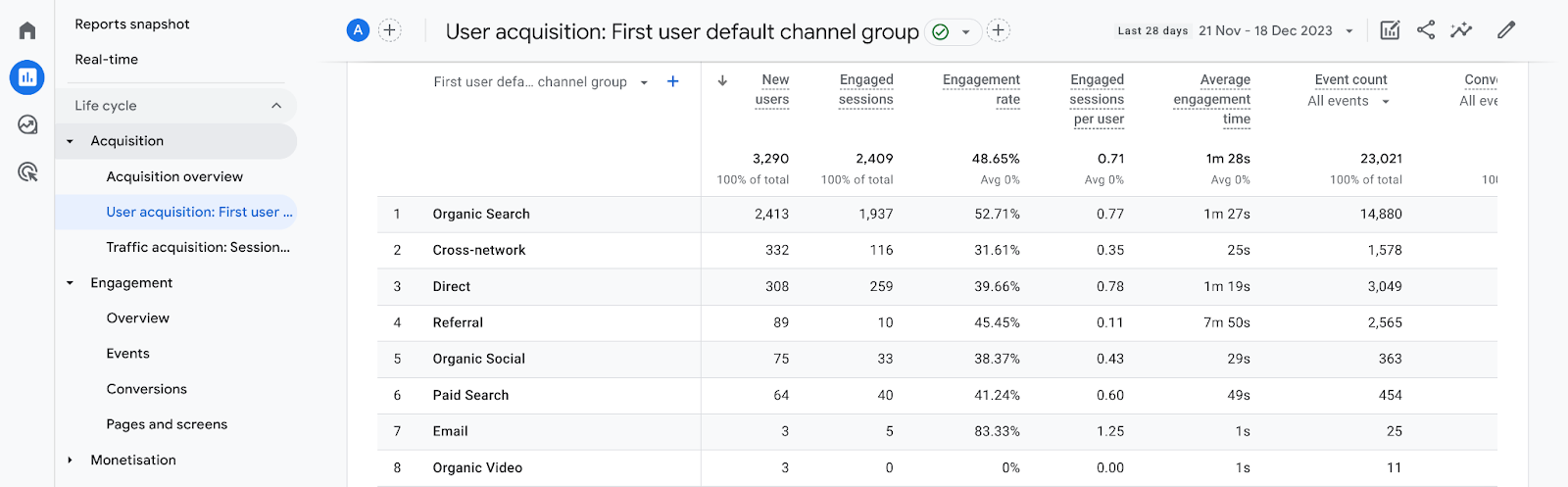
Understanding traffic can be quite complicated, but the quickest and simplest way is to understand the Default Channel Grouping dimension. Today, I’ll guide you through the default channel groupings in Google Analytics. Before diving in, make sure you understand how UTM parameters work, because several of the channels below depend on them being set correctly.
What is a channel grouping in GA4?
GA4 default channel grouping is the rule-based system Google Analytics 4 uses to sort every visit into one of 19 predefined channels — such as Direct, Organic Search, Paid Search, Organic Social and Email — based on each session's source and medium. It lets you compare the quality and performance of each traffic source in the Acquisition reports without any custom setup.
A channel grouping is simply how GA4 buckets your traffic. GA4 reads the source and medium of every session — set automatically by Google Ads Auto Tagging, or by the UTM parameters on your links — and matches it against Google's default rules to assign a channel. Get the tagging right and each visit lands in the correct channel; get it wrong and it falls into Unassigned. The table below summarises all 19 default channels with a typical example.
| Channel | Definition | Example source / medium |
|---|---|---|
| Direct | Someone types your URL, uses a bookmark, or clicks a link shared in a messaging app | Direct / (none) |
| Organic Search | Clicks on unpaid, natural search results on a results page | google / organic |
| Paid Search | Clicks on paid search ads marked "Ad" (mainly Google or Bing Search Ads) | google / cpc, via Auto Tagging |
| Organic Social | Clicks on unpaid links posted on social platforms | facebook / social |
| Paid Social | Clicks on paid ads run on social platforms | facebook / paid (UTM-tagged) |
| Display | Clicks on Google Display Network banner ads (other networks need manual UTMs) | Auto Tagging (GDN) |
| Paid Video | Clicks on YouTube ads (other platforms need manual UTMs) | Auto Tagging (YouTube ads) |
| Paid Shopping | Clicks on Google Shopping ads (non-Google needs manual UTMs) | Auto Tagging (Shopping) |
| Cross-network | Clicks from Google Demand Gen and Performance Max campaigns | Auto Tagging (PMax / Demand Gen) |
| Organic Video | Non-ad links on video platforms such as YouTube, TikTok or Vimeo | e.g. youtube.com (non-ad link) |
| Organic Shopping | Unpaid links on shopping platforms such as Amazon or eBay | e.g. amazon.com (non-ad link) |
| Clicks from your email marketing campaigns | medium = email | |
| Affiliate | Traffic from affiliate partners (tag each with unique UTMs) | medium = affiliate |
| Referral | Traffic from links on other websites | other-site.com / referral |
| AI Assistants | Referrals from AI assistants such as ChatGPT, Gemini, DeepSeek, Copilot or Grok (excludes Google AI Overviews and AI Mode) | medium = ai-assistant, or a known AI-assistant source |
| Audio | Ads on audio platforms such as podcasts | medium = audio |
| SMS | Text-message links | source or medium = sms |
| Mobile Push Notifications | Links in mobile push notifications | medium ends with push, or contains mobile / notification |
| Paid Other | Paid ad traffic that doesn't fit the search, social, video or shopping paid categories | (paid, uncategorised) |
What rules does GA4 use to assign a channel?
Source, medium, campaign name, and for Google Ads traffic the ad network type. Google writes the default rules and you cannot edit them, so the only lever you hold is the tagging you send in.
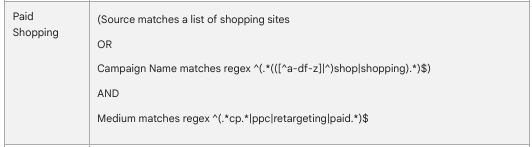
One pattern does most of the work. Google reuses a single "paid" test, ^(.*cp.*|ppc|retargeting|paid.*)$, across Paid Search, Paid Social, Paid Video, Paid Shopping and Paid Other. In plain terms: the medium contains cp (so cpc, cpm and cpv all qualify), or it is exactly ppc or retargeting, or it starts with paid. Whether that traffic becomes Paid Search, Paid Social or Paid Other then comes down to the source. These are the conditions behind the channels people ask about most:
| Channel | The condition GA4 checks |
|---|---|
| Direct | Source exactly matches (direct) and medium is (not set) or (none) |
| Organic Search | Source matches Google's list of search sites, or medium exactly matches organic |
| Paid Search | Source matches Google's list of search sites and medium matches the paid pattern above |
| Organic Social | Source matches Google's list of social sites, or medium is one of social, social-network, social-media, sm, social network, social media |
| Paid Social | Source matches Google's list of social sites and medium matches the paid pattern above |
| Organic Video | Source matches Google's list of video sites, or medium matches ^(.*video.*)$ |
Source or medium is one of email, e-mail, e_mail, e mail | |
| Referral | Medium is one of referral, app, link |
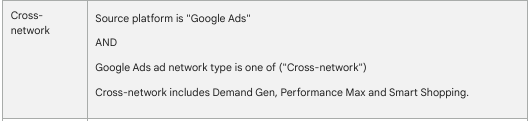
| Cross-network | Campaign name contains cross-network, or Google Ads reports a Performance Max or Demand Gen network type |
| Paid Other | Medium matches the paid pattern above and no more specific paid channel applies |
Google Ads traffic takes a shortcut past all of this. With Auto Tagging on, GA4 reads the ad network type straight from Google Ads, which is how Search, Display, Shopping and YouTube clicks land in the right channel without a single UTM parameter. Everything that is not Google Ads depends entirely on what you put on the link. (Source: Google Analytics Help on the default channel group)
The 19 Default Channels in GA4
GA4's default channel group now has 19 channels. This guide walks through each one, including the 2026-added AI Assistants channel that captures referrals from AI assistants like ChatGPT and Gemini.
1. Direct Traffic
Direct traffic refers to the visits that occur when people enter your website’s URL directly into their browser.
This includes visits from people who have bookmarked your webpage or added it to their favorites and later visit the page through these bookmarks or favorites. Additionally, if someone shares a link with you through instant messaging apps like WhatsApp or Facebook Messenger, and you click on that link to visit the website, it is also considered direct traffic.
Typically, direct traffic is an indicator of brand recognition or repeat customer visits. An increase in your direct traffic usually signifies a boost in your brand’s visibility or that you are gaining more returning customers.

2. Organic Search Traffic
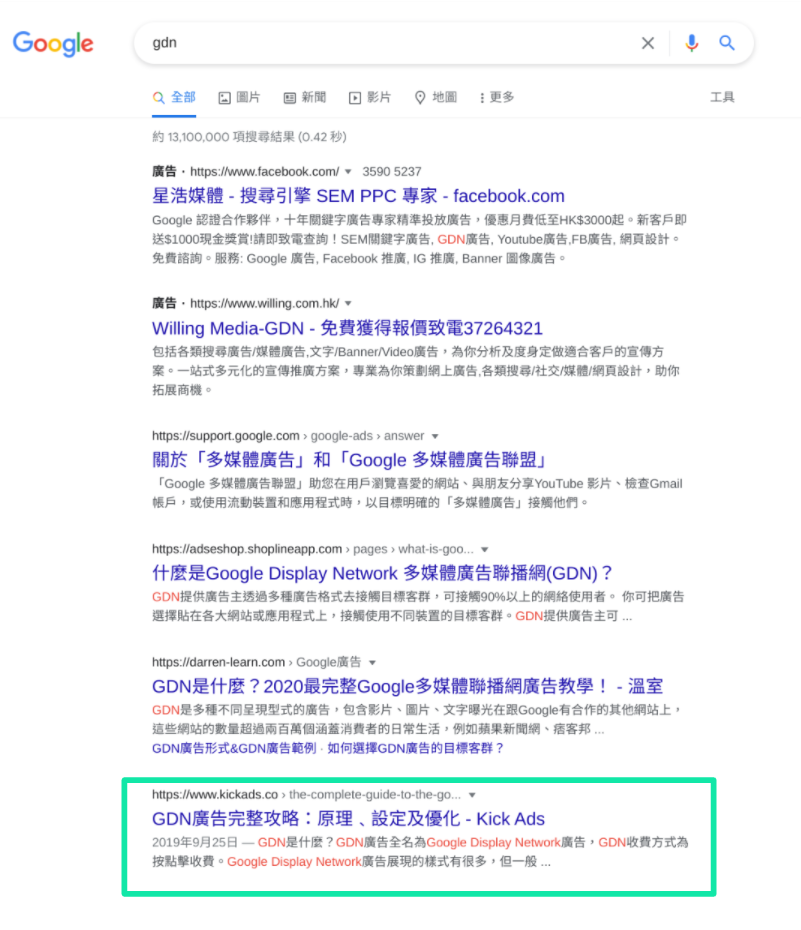
Organic search traffic refers to the visits that occur when people click on natural (non-paid) search results on a search engine results page (SERP) and subsequently visit your website. This type of traffic originates from unpaid search results, which is distinct from the traffic generated through paid search ads.
For example, Terrence searches for the keyword “gdn” on Google, sees the search results, and then clicks on one of the natural search results, leading him to your website page.
3. Paid Search Traffic
Paid search traffic is generated from clicks on search ads, primarily from Google Search Ads or Bing Search Ads.
When people search on Google or other search engines and click on the paid search results marked as “Ads” on the search engine results page (SERP), those clicks contribute to paid search traffic.
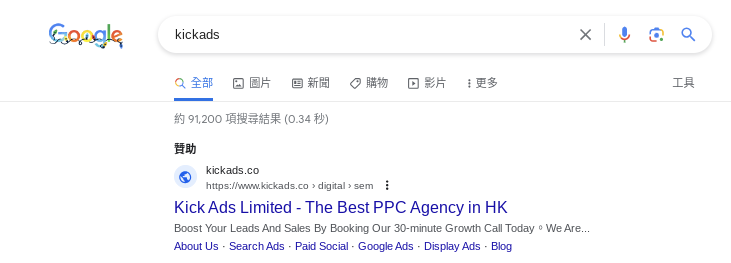
However, there’s a situation to be aware of: if your Google Ads aren’t set up with Auto Tagging, your paid search traffic may be incorrectly categorised as organic traffic. Auto Tagging is a default setting in Google Ads, and typically, unless there’s an operational error, this issue should not arise.
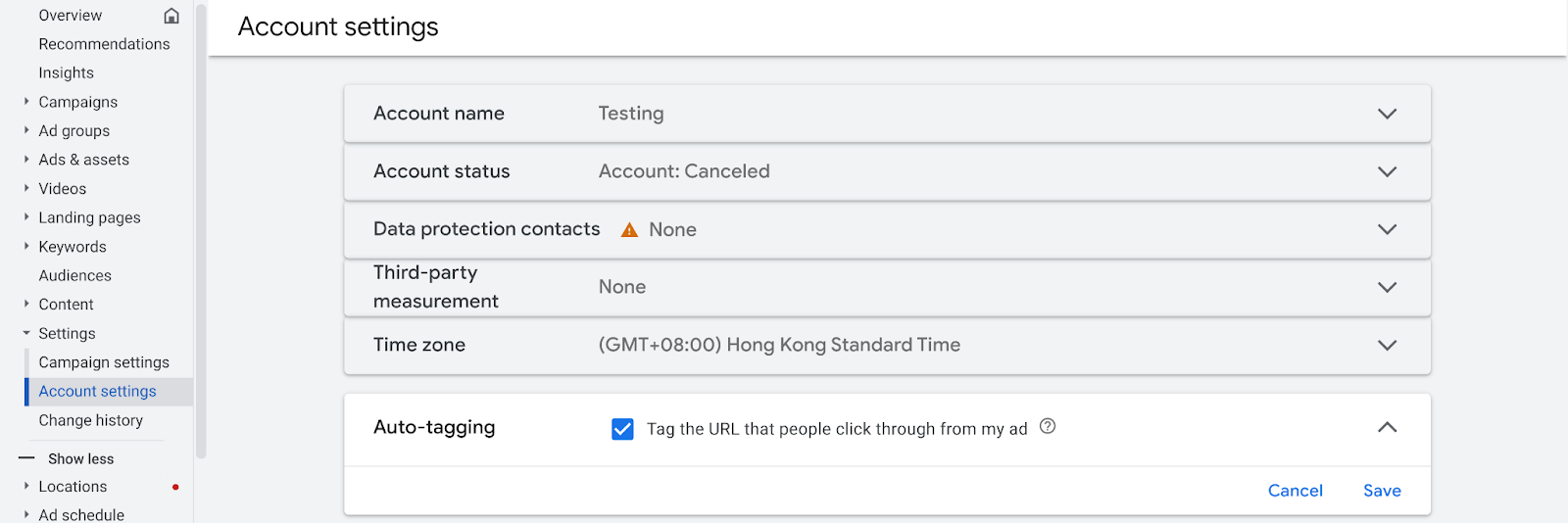
For example, Terrence searches for “kickads” and clicks on the “Ad” for kickads.co displayed in the search engine results page.
4. Organic Social Traffic
Social traffic comes from social networks: the clicks that happen when people share links on platforms like Facebook, X (Twitter), Instagram and LinkedIn. In GA4, social traffic is split into two official channels: Organic Social and Paid Social. If you paste a link directly onto a social platform and someone clicks it, that click is categorised as Organic Social.
5. Paid Social Traffic
Paid Social is traffic from paid ads run on social platforms. To identify paid social accurately, tag your links with UTM parameters.
6. Display Traffic
If you run Google Display Network (GDN) ads, Auto Tagging (on by default) labels those clicks as Display traffic automatically. Running display ads on another network? Add UTM parameters to each link by hand so GA4 can attribute those visitors correctly.

7. Paid Video Traffic
YouTube ads work the same way: with Auto Tagging enabled (the default), GA4 files the resulting clicks under Paid Video. For video ads bought on other platforms, tag the destination links with UTMs yourself to see how much traffic each campaign really drives.

8. Paid Shopping Traffic
For Google Shopping ads, Auto Tagging (the default) sorts the clicks into Paid Shopping with no extra setup. Shopping ads on any non-Google platform need manual UTM tags, otherwise those visits are hard to track and attribute.
9. Cross-network Traffic
If you use Google’s Demand Gen and Performance Max ads, just select the Auto Tagging feature (which is the default setting), then the traffic generated from these ads will automatically be categorised as Cross Network Traffic.
10. Organic Video Traffic
Organic Video covers visitors who reach your site or app through non-ad links on video platforms such as YouTube, TikTok or Vimeo.
You rarely need to tag these links yourself, since Google can usually detect the source automatically.

11. Organic Shopping Traffic
Organic Shopping is traffic arriving from unpaid links on shopping platforms like Amazon or eBay.
As with organic video, manual UTM tagging is seldom necessary because Google generally recognises where the click came from.

12. Email Traffic
Email traffic refers to the visits generated from your email marketing campaigns.
It’s important to note that not all link clicks in emails are automatically counted as email traffic. To ensure that these clicks are correctly categorized under email traffic, you need to integrate your Email Direct Marketing (EDM) software with Google Analytics, or enable auto-tagging in your EDM tool, or manually add UTM parameters to your links, making sure the medium parameter is set to “email” (be aware of case sensitivity).
If you do not do this, Google Analytics 4 may count these link clicks (visiting your website) as direct traffic. This can affect the accuracy of your data and influence your decision-making, potentially leading you to believe that your email campaigns are ineffective and making incorrect conclusions based on that assumption.

13. Affiliate Traffic
If you’re not familiar with affiliate marketing, I recommend reading Affiliate Marketing 101: What it is and How to Get Started
In simple terms, affiliate marketing involves affiliate partners charging you based on the traffic they direct to your site. Many affiliate platforms track the performance of each affiliate website and allocate commissions based on the traffic they generate for you.
Generally, these affiliate platforms are more accurate in tracking the actual transaction amounts or values than Google Analytics. However, you can still track other metrics from these affiliates in Google Analytics, such as engagement and duration of engagement. To do this, you should create unique UTM parameters for each affiliate partner.
For a better understanding of how to create UTM parameters for affiliate traffic, I strongly recommend watching this video.

14. Referral Traffic
Referral traffic is the kind of traffic that comes from other websites.
This usually happens when other individuals or organisations write content about you, your products, or services on their own websites. When visitors from these websites click on links and visit your website, it generates referral traffic.
In Google Analytics, these external websites linking to your site are called referral domains, and the corresponding traffic is categorised as referral traffic. This type of traffic is an important indicator of how well-known and influential your website is outside of your own domain.
15. AI Assistants
Added by GA4 in 2026, this channel captures referrals from AI assistants: traffic where someone clicks through to your site from ChatGPT, Gemini, DeepSeek, Copilot or Grok (the rule matches medium ai-assistant or a known AI-assistant source). Note it excludes Google's own AI Overviews and AI Mode. As more people search via AI assistants, this is the key channel for seeing how much real traffic AI search actually sends you.
16. Audio
Traffic from ads on audio platforms such as podcasts (medium exactly matches audio).
17. SMS
Traffic from text-message links (source or medium exactly matches sms).
18. Mobile Push Notifications
Traffic from links in mobile push notifications (medium ends with push, or contains mobile/notification).
19. Paid Other
Paid advertising traffic that doesn't fit the search, social, video or shopping paid categories.
Unassigned
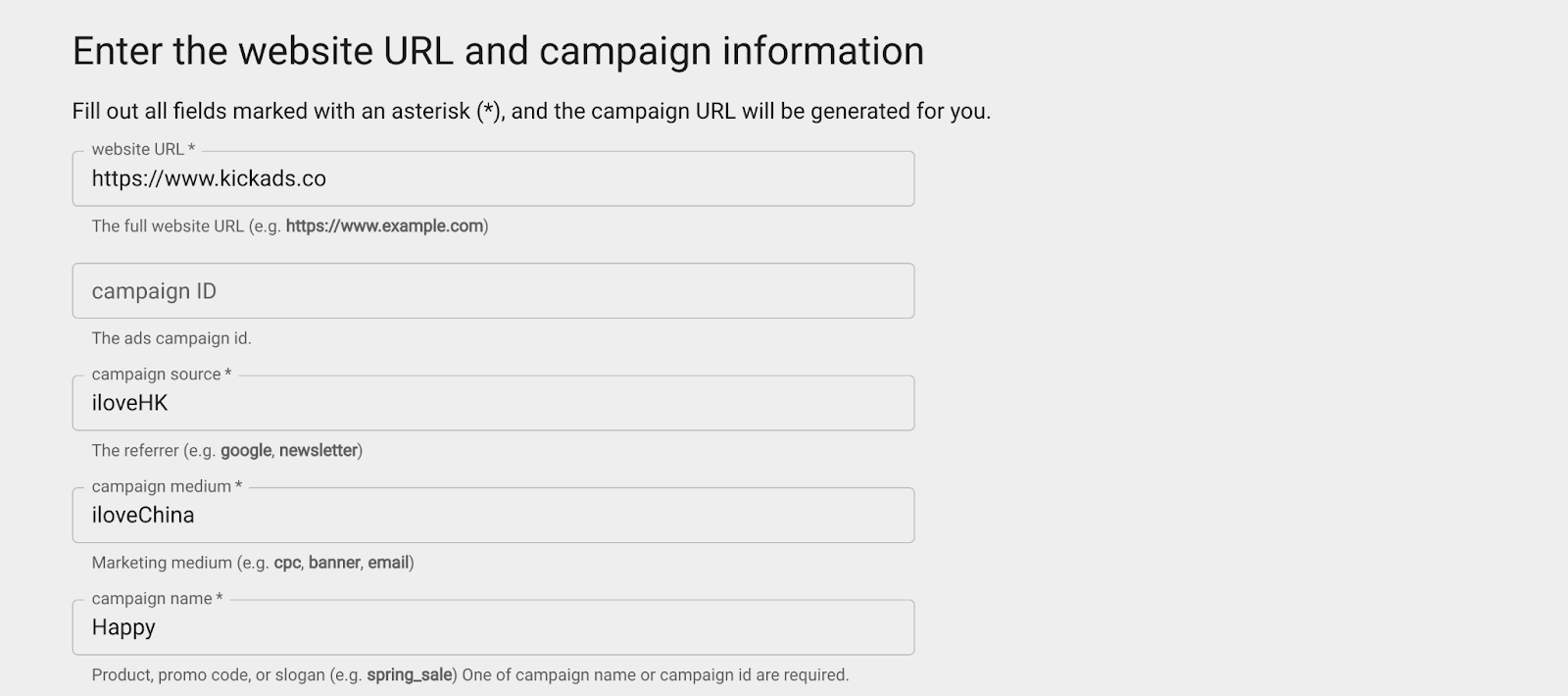
Unassigned is not one of the 19 official channels — it's GA4's bucket for traffic that matches none of the default channel rules. Custom UTM parameters that don't follow Google's guidelines end up here, which is why following Google's UTM guidelines matters for clean categorisation.
What channel is not included in the default channels report?
Unassigned. It shows up in the report, but it is not one of the 19 default channels: it is the bucket GA4 falls back to when a session matches no rule at all. Beyond that, three things people go looking for are genuinely absent from the list:
- There is no paid email channel. Email is one channel, so a sponsored newsletter placement and your own campaign land in the same row unless you deliberately tag the sponsored one to go elsewhere.
- There is no QR code channel. A QR code is only a URL, so it inherits whatever UTM parameters you printed into it, and inherits Direct if you printed none.
- There is no messaging channel. A link opened from WhatsApp, Signal or a Messenger thread arrives with no referrer, so GA4 records it as Direct.
If a distinction you care about is missing, a custom channel group is the answer, and that is the next section.
Session or first user: which channel group dimension should you use?
Scope. First user records how a person first found you and never changes afterwards; session records which channel started one particular visit, whether that visitor is new or returning.
| Dimension | Scope | What it answers | Where you'll see it |
|---|---|---|---|
| First user default channel group | User | How this person first found you, ever | User acquisition report |
| Session default channel group | Session | Which channel started this visit | Traffic acquisition report |
| Default channel group | Event | Which channel led to a key event | Attribution reports |
Google's own worked example makes the gap concrete. Someone arrives from Google, then comes back ten more times by typing your URL. The User acquisition report counts all 11 sessions in the Google row, because Google is how that user was acquired. The Traffic acquisition report counts 1 session in Google and the other 10 in (direct). Same visitor, same eleven visits, two very different-looking reports.
Which one you want depends on the question you are asking. Whether a campaign brings in new people is a first user question. Where this month's traffic actually came from is a session question. Pulling both and calling either one "channel performance" is where most GA4 reporting quietly goes wrong.
Primary channel group is a third thing again, and it is the editable one. GA4 keeps the default channel group locked to Google's rules, but it lets you promote one of your custom channel groups to Primary, after which the standard reports run on your rules instead. That is why the dimension list offers both Session default channel group and Session primary channel group: same scope, different rulebook.
Default vs custom channel groupings
The 19 channels above are GA4's default channel grouping — the rules Google applies automatically and that you cannot change. A custom channel grouping lets you layer your own rules on top: for example, splitting Paid Search into branded and non-branded, or merging several sources into a single line for cleaner reporting. The default grouping is fixed and applies to every account the same way; a custom grouping is yours to define. For most businesses the default view is enough to start, and a custom grouping earns its place only when the default hides a distinction you actually need to act on.
Through this article, we have gained a comprehensive understanding of various traffic sources in Google Analytics and how to track them. From direct traffic to social and affiliate traffic, analysing this data correctly helps optimise marketing strategies and improve return on investment. Mastering this knowledge is crucial for gaining deep insights into customer behaviour and enhancing website performance.
GA4 channel grouping best practices
Fix the tagging before you touch the rules. Almost every "GA4 is wrong" complaint traces back to a link, not to Google's logic.
- Keep every UTM lowercase. GA4 is case sensitive, so
Emailandemailare two different mediums and only one of them reaches the Email channel. - Leave Auto Tagging on in Google Ads. It is the default, and it is what puts Search, Display, Shopping, YouTube and Performance Max traffic in the right channels with no UTM work at all.
- Stick to Google's medium vocabulary:
cpc,organic,email,referral,affiliate,social. Inventnewsletterorfb-paidand the traffic ends up in Unassigned or Paid Other. - Read the Unassigned row every month. A rising number means a campaign shipped somewhere with broken tags. Fix the links, but do not expect the old sessions to move: the source and medium GA4 already recorded against them do not change.
- Do not confuse channel grouping with Content Grouping. Content Grouping is a separate GA4 feature that buckets your pages, not your traffic sources. The two share a word and nothing else.
Ready to grow with Google Ads?
Kick Ads is a certified Google Partner agency in Hong Kong. We're a Google Partner agency managing paid media for Hong Kong and Malaysia businesses since 2017.
Google Ads Management for HK SMBs → · Book a Free Strategy Call →
FAQ
What is channel grouping in GA4? Channel grouping is how Google Analytics 4 categorises your traffic sources into predefined channels such as Direct, Organic Search, Paid Search, Display and Email, so you can compare the quality and performance of each channel in the Acquisition reports.
Why is my paid search traffic showing up as organic search? If Auto Tagging is not enabled in Google Ads, paid search clicks can be wrongly classified as organic traffic. Auto Tagging is Google's default setting, so this normally only happens through manual error.
What is Cross-network traffic in GA4? Traffic generated by Google's Demand Gen and Performance Max campaigns. With Auto Tagging enabled (the default), GA4 categorises these clicks automatically as Cross Network.
Why do my email clicks show up as direct traffic? Email clicks only count as Email traffic when your EDM software is integrated with Google Analytics, or your links carry UTM parameters with the medium set to "email" (case sensitive). Otherwise GA records those visits as direct traffic.
What is the difference between session default channel group and first user default channel group? Scope. First user default channel group records how a person first found you and never changes; session default channel group records which channel started one particular visit. The User acquisition report uses the first, the Traffic acquisition report uses the second.
What is the primary channel group in GA4? It is the editable version of the default channel group. Google's default rules are locked, but you can promote a custom channel group to Primary, and the standard reports then run on your rules instead of Google's.
What channel is not included in the default channels report? Unassigned is not one of the 19 default channels; it is where GA4 puts sessions that match no rule. GA4 also has no separate channel for paid email, for QR codes, or for links opened inside messaging apps, which arrive without a referrer and count as Direct.
Why is my traffic showing as Paid Other? Because the medium matched Google's paid pattern (anything containing cp, or ppc, retargeting, or starting with paid) but the source did not match a search, social, video or shopping site. Paid Other is the catch-all for paid traffic GA4 cannot place more precisely.
What is Unassigned traffic in GA4? Traffic whose custom parameters, such as UTM tags, do not follow Google's guidelines, so GA4 cannot fit it into any of the predefined channel groups.

About the author
Frankie Chan · Co-Founder, Kick Ads
Frankie is an ex-Googler and paid media strategist. He has managed Google Ads and Meta Ads for ecommerce and lead generation businesses across Hong Kong and Malaysia since 2017, working closely on strategy, reporting and client growth planning.