
Google Shopping Ads: The Complete 2026 Guide
By Frankie Chan, Co-Founder · Updated 15 July 2026 · 6 min read
Jump to section
For ecommerce, Google Shopping ads are often one of the highest-return channels there is — they put your product image, price and store name in front of shoppers at the exact moment they're searching for something to buy. Intent is high, and the path to purchase is short. This 2026 update walks you through what Shopping ads are, how to set them up, why your product feed makes or breaks results, and — in an era where Performance Max dominates — when Standard Shopping still earns its place.
What are Google Shopping ads?
Quick answer: Google Shopping ads are product-level ads that show a product's image, price, store name and rating directly in the search results. They aren't driven by keywords you bid on — they're driven by the product catalogue (feed) you upload to Google Merchant Center, which Google matches automatically to relevant searches.
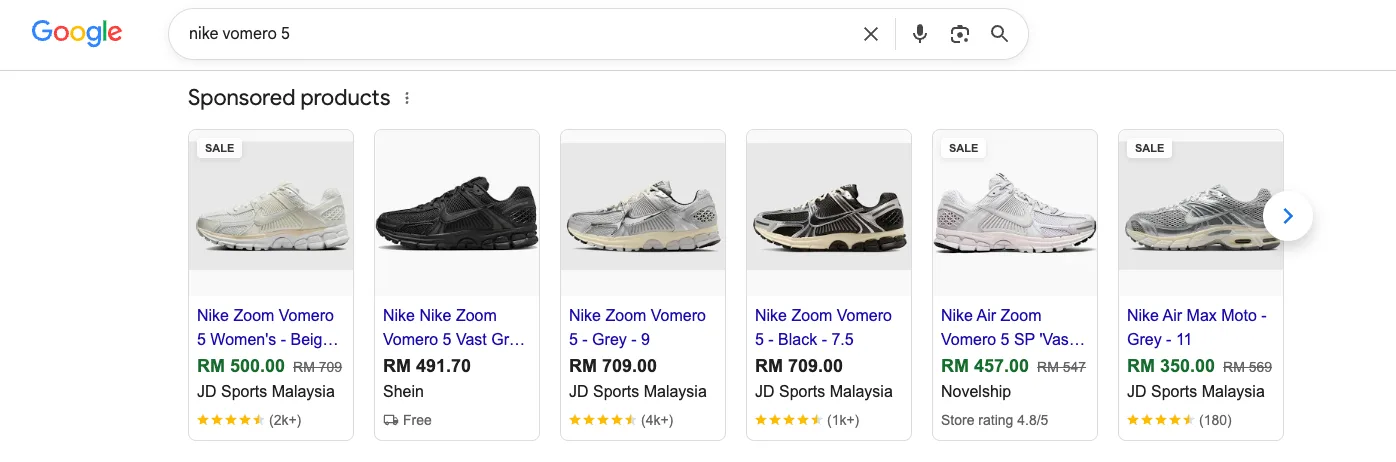
The biggest difference from text search ads is that Shopping ads are product-data-driven, not keyword-driven. You don't pick keywords for every item; as long as your feed is accurate and complete, Google matches the right product to the right search.
Where do Shopping ads show?
Quick answer: Shopping ads appear in the Shopping slots at the top or right of Google Search results, on the Shopping tab, in Google Images, and across Shopping partner sites — plus there are free product listings alongside the paid ones.
These high-visibility placements put your products in front of shoppers at the moment buying intent peaks — which is exactly why Shopping ads convert so efficiently.
Why should ecommerce use Shopping ads?
Quick answer: Because they combine three advantages at once — high buying intent, visual display and automatic matching. Shoppers see your image and price while searching for a product, so the clicks you get tend to be ready buyers, and conversion rates are usually higher than for plain text ads.
Shopping ads have a structural benefit too: because they're driven by your product feed, they can cover thousands of products at scale without you writing a separate ad for each one — which matters most for retailers with large catalogues.
The product feed is the foundation of everything
Quick answer: The quality of your product feed directly determines how well your Shopping ads perform. The more accurate and complete your titles, images, categories, attributes, prices and availability, the better Google can match your products to the right searches.
Shopping ads have no "keywords" to tune — what you're really optimising is the feed itself. The essentials:
- Product titles: Put the most important information (brand, category, model, key attributes) up front, close to how shoppers actually search.
- Product images: Clear, compliant with Google's specifications, and focused on the product itself.
- Categories and attributes: Fill in the correct Google product category, GTIN, brand, colour, size and so on for sharper matching.
- Price and availability: Keep them consistent with your website and up to date, so items aren't disapproved for a mismatch.
How do you set up Google Shopping ads?
Quick answer: Setting up Shopping ads takes three steps — build and upload your product feed in Google Merchant Center, link Merchant Center to Google Ads, then create a Shopping or Performance Max campaign.
- Set up Google Merchant Center: Create an account (in 2026 this is the Merchant Center Next interface), verify and claim your website, then upload your product feed via file, Google Sheets or the API.
- Link Google Ads: In Merchant Center, link the account to your Google Ads so your product data is available to your campaigns.
- Create the campaign: Choose Standard Shopping or Performance Max, set your budget and bidding strategy, and make sure conversion tracking is in place.
Standard Shopping vs Performance Max: which should you use?
Quick answer: Both run on your product feed. Standard Shopping gives you more control and transparency; Performance Max automatically combines Shopping with Search, YouTube, Display and more for wider reach but less transparency. Tellingly, most of what Performance Max delivers for ecommerce actually comes from "product data on Search" — which is essentially Shopping inventory.
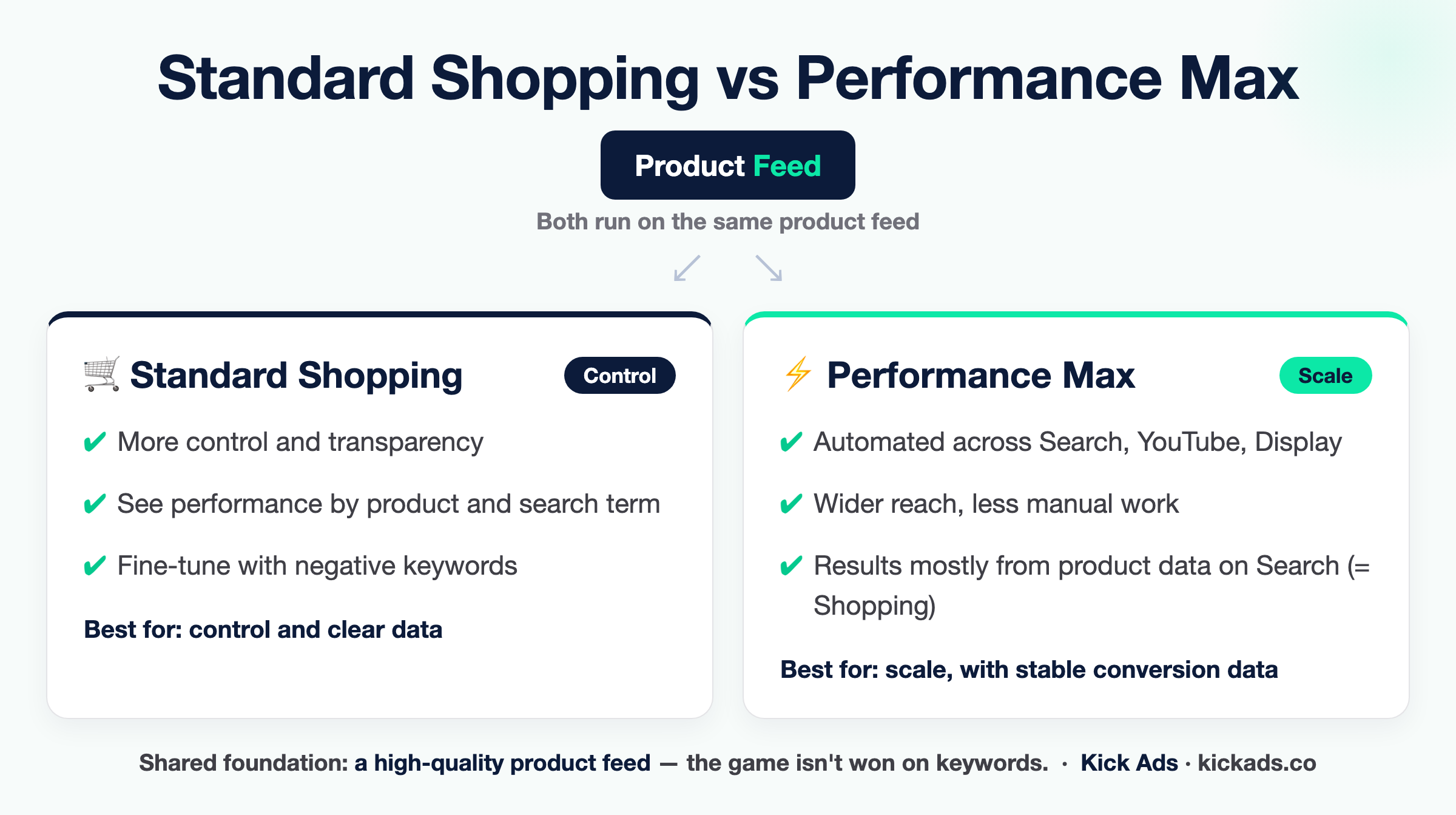
The practical trade-off: if you value control and want to see the performance of each product and search term clearly, Standard Shopping is still useful; if you're after scale and automation and already have stable conversion data, Performance Max is often less work (it automatically pushes your products across Search, YouTube, Gmail and more — the video placements covered in our complete YouTube ads guide being an important one). Either way, results rest on the same foundation — a high-quality product feed. For a deeper look at PMax's strengths and pitfalls, see our complete Performance Max guide.
How do you optimise your Shopping ads?
Quick answer: Optimising Shopping ads is about your product feed, campaign structure and negative keywords — not the traditional keyword bidding you'd do on search.
- Keep improving the feed: Refine titles and images, complete missing attributes, and fix disapproved products — this is the highest-return optimisation there is.
- Use negative keywords: Standard Shopping can't pick keywords, but you can add negative keywords to block irrelevant or low-intent searches.
- Tier by product performance: Split bestsellers or high-margin products into their own campaign, with more budget and more aggressive bids. Before you set the tiers, look at what our Hong Kong ecommerce account data shows about product spend concentration.
- Pair with Smart Bidding: Use strategies like Target ROAS or Maximise Conversion Value so the system adjusts bids by each product's likelihood to sell.
- Watch the search terms report: See which searches your products actually match, and use it to refine your feed and negative keywords.
Conclusion
Google Shopping ads are one of the closest-to-the-sale channels ecommerce has. Whether you run Standard Shopping or Performance Max, the deciding factor isn't "tuning keywords" — it's how good your product feed is and how cleanly your campaigns are structured. Get the feed right, sort out the structure, and set up tracking accurately, and Shopping ads can turn every dollar of budget into real sales.
If you'd like a specialist to look at your setup, Kick Ads runs Google Ads for ecommerce and SMBs across Hong Kong and Malaysia — start with a free Paid Media Health Check.
FAQ
What are Google Shopping ads? Google Shopping ads are product-level ads that show a product's image, price and store name directly in the search results. They're driven by the product feed you upload to Google Merchant Center and matched automatically by Google to relevant searches, rather than by keywords you bid on.
How do I start running Google Shopping ads? First build and upload your product feed in Google Merchant Center, link Merchant Center to Google Ads, then create a Standard Shopping or Performance Max campaign — and make sure conversion tracking is set up.
What's the difference between Standard Shopping and Performance Max? Both use your product feed. Standard Shopping gives you more control and transparency; Performance Max automatically combines Shopping with Search, YouTube, Display and more for wider reach but less transparency. In fact, most of PMax's ecommerce results come from product data showing in search results — essentially Shopping.
How do I optimise Google Shopping ads? Focus on the product feed (titles, images, attributes), add negative keywords, tier campaigns by product performance, pair with Smart Bidding, and watch the search terms report — rather than traditional keyword bidding.
Do Shopping ads need a product feed? Yes. The product feed is the foundation of Shopping ads, and how accurate and complete its titles, images, categories, prices and availability are directly determines whether Google can match your products to the right searches.

About the author
Frankie Chan · Co-Founder, Kick Ads
Frankie is an ex-Googler and paid media strategist. He has managed Google Ads and Meta Ads for ecommerce and lead generation businesses across Hong Kong and Malaysia since 2017, working closely on strategy, reporting and client growth planning.