Google Demand Gen Campaigns: The Complete 2026 Guide
By Frankie Chan, Co-Founder · Updated 7 October 2026 · 19 min read
Jump to section
- What is a Demand Gen campaign?
- Where Demand Gen ads appear
- Does Demand Gen run on Google Search?
- Demand Gen vs Performance Max vs GDN
- What is moving into Demand Gen, and when
- Demand Gen updates in September 2026
- When Demand Gen fits (and when it doesn't)
- Audience strategy
- Creative requirements
- Demand Gen ad specs: images, video and text
- Bidding options
- Measuring Demand Gen honestly
- Real results: creating demand with events
- Common mistakes we see
- Ready to create demand, not just capture it?
- FAQ
Search ads capture demand that already exists: someone types "overseas study fair" and your ad answers. But what about the much larger group who would be interested, and just haven't searched yet? That's the job of Google Demand Gen campaigns: visual, feed-native ads across YouTube, Discover and Gmail that put your offer in front of people while they browse, not only when they search. This guide covers what Demand Gen is in 2026, how it differs from Performance Max and the Google Display Network, and how we run it for Hong Kong and Malaysia businesses.
What is a Demand Gen campaign?
Quick answer: Demand Gen is Google's visual, audience-driven campaign type that serves image and video ads across Google's own feeds: YouTube (including Shorts and YouTube Search), the Discover feed, Gmail, the Google Display Network (added in 2025) and Google Maps (added in 2026). It never serves on Google Search results. It replaced Discovery campaigns in 2023-24, absorbed Video Action Campaigns in 2025, and from June 2026 it absorbs standalone Display campaigns too. Google is consolidating its non-search visual inventory into this one campaign type.
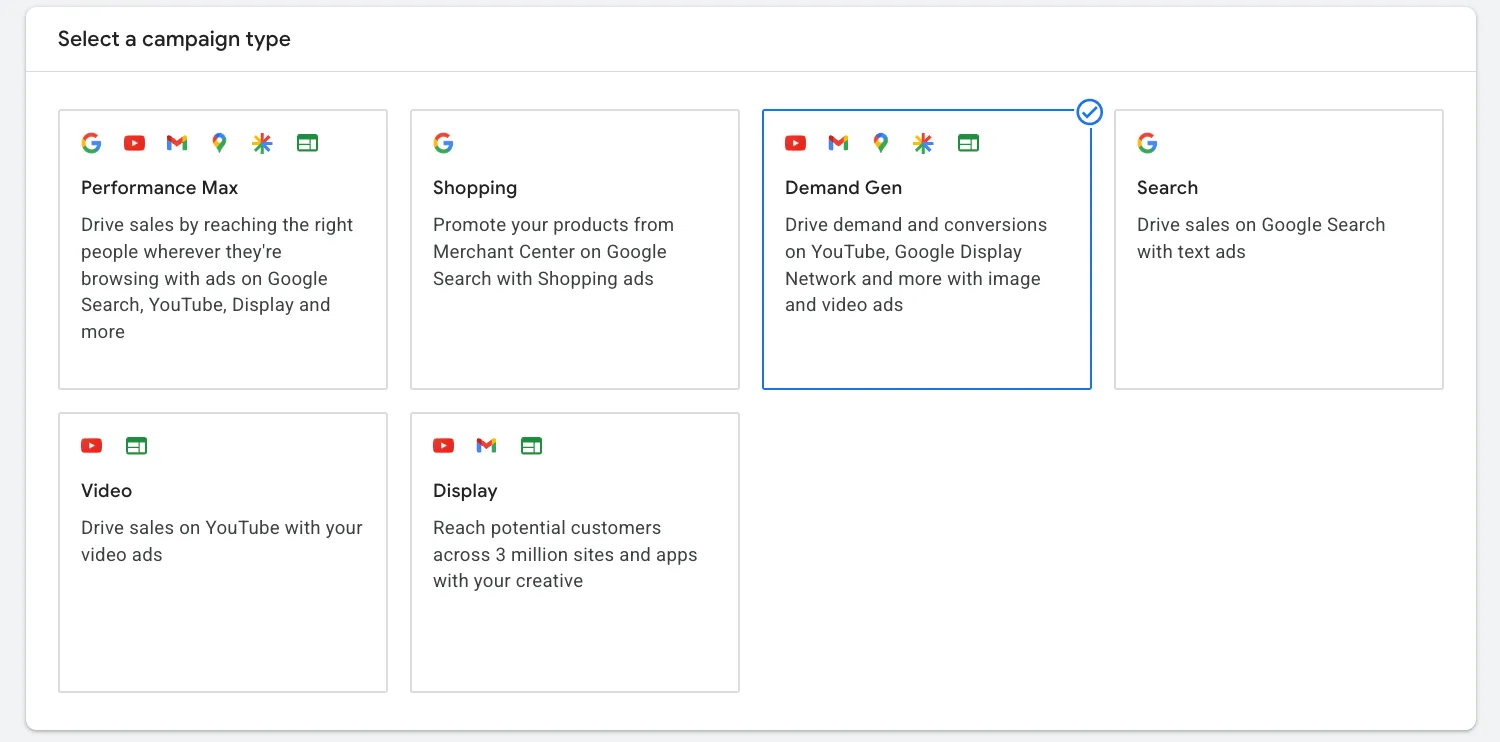
If Meta ads live in the Facebook and Instagram feeds, Demand Gen is Google's answer: ads that appear inside feeds people scroll for interest, not intent. Google cites around 3 billion monthly users across these surfaces. Two lineage points worth knowing, because older articles still use the old names:
- Discovery campaigns → Demand Gen (rollout completed early 2024). Same surfaces, more formats and controls.
- Video Action Campaigns → Demand Gen (2025). If you previously ran VAC for conversion-focused YouTube ads, Demand Gen is now the home for that traffic. If your goal is views rather than conversions, that traffic belongs in a Video Views campaign instead.
Where Demand Gen ads appear
- YouTube: in-feed (home and watch-next), in-stream, and Shorts, which matters in Hong Kong where short-form viewing keeps growing.
- Discover feed: the content feed on the Google app and Android home screen.
- Gmail: the Promotions and Social tabs. Since standalone Gmail (GSP) campaigns were retired in 2021, this is the main way to buy the inbox. More in our Gmail ads guide.
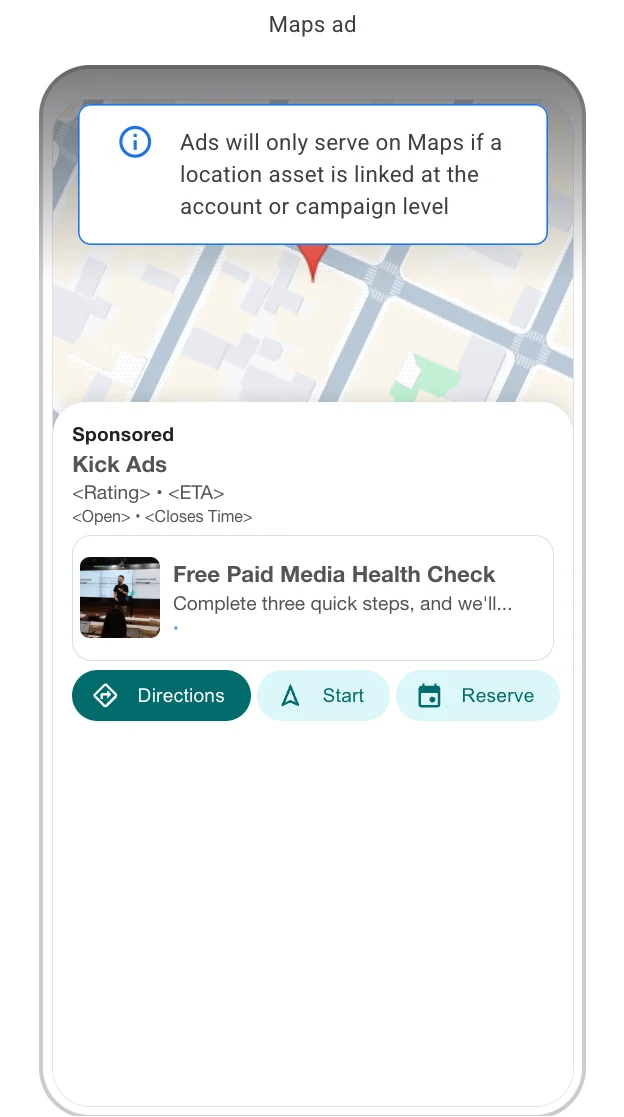
- Google Maps: Promoted pins on the map while people browse, search and get directions. Google's channel controls page says Maps only serves when a location asset is enabled on the account. Google's Display migration page still labels Maps as beta.
- Google Display Network: partner websites and apps, opted in per ad group.
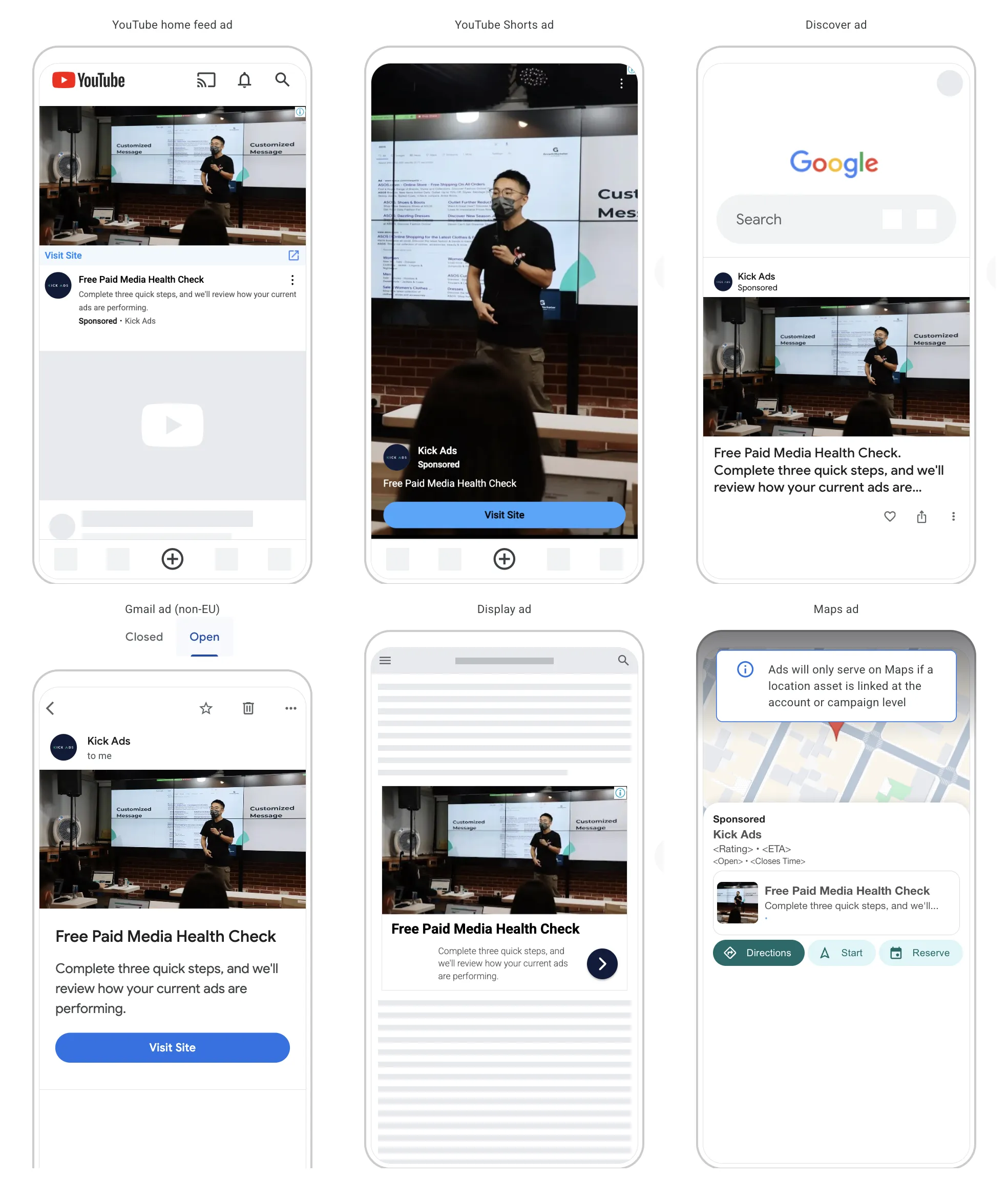
Google added channel controls in 2025, so you can now limit delivery to specific surfaces (for example YouTube only) instead of always buying the full bundle. They are set per ad group. The current options are YouTube (in-stream, in-feed and Shorts), Discover, Gmail, Maps and the Google Display Network.
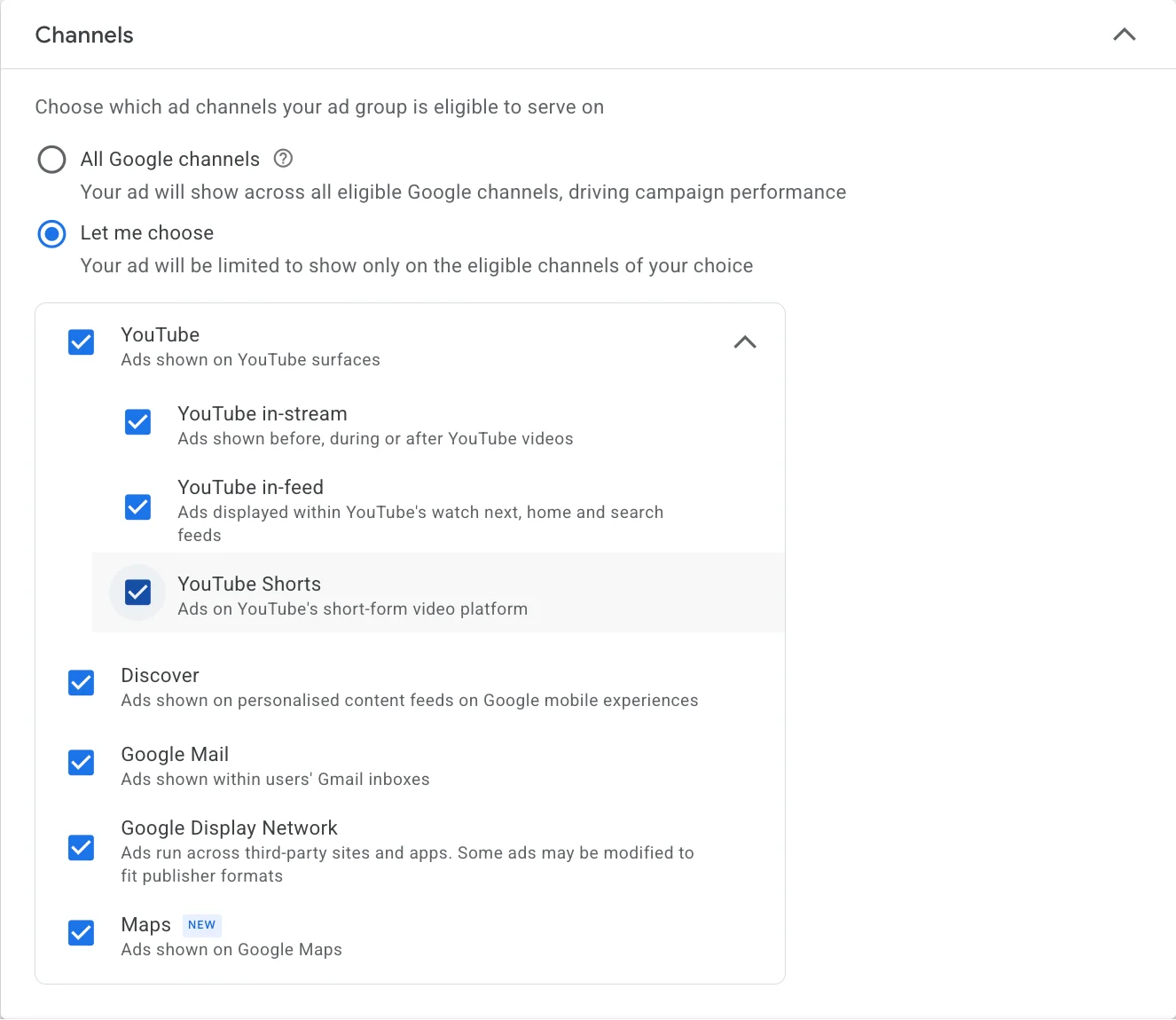
In our own Hong Kong Google Ads account, the Channels list already showed Maps, marked New, when we checked on 7 October 2026. That shows the option is there. It does not tell you how much Maps inventory a Hong Kong campaign will get. The Maps ad preview in the same account also says ads will only serve on Maps if a location asset is linked at the account or campaign level.
That bundle is wider than most guides admit. Here is the full surface list, and which of them your video assets are actually eligible to run on, from Google's Demand Gen video asset requirements (checked 7 October 2026):
| Surface | What it is | Video eligible |
|---|---|---|
| YouTube Shorts | The vertical short-form feed | Yes |
| YouTube Home | The YouTube app and homepage feed | Yes |
| YouTube Watch Next | The suggested-videos rail beside a video | Yes |
| YouTube Search | Results inside YouTube's own search | Yes |
| YouTube in-stream | Before or during another video | Yes, but the file must be 10 seconds or longer |
| Google Video Partners | Third-party video sites and apps | Yes |
| Google Display Network | Partner websites and apps | Yes |
| Discover | The feed in the Google app and Android home screen | Yes, except video ads with a product feed attached |
| Gmail | The Promotions and Social tabs | No, images only |
| Google Maps | Promoted pins on the map | Not listed. Maps ads run as Promoted pins and need a location asset |
Three things fall out of that table. Gmail will not show your video, so an image-only ad group loses nothing there. Google's table now marks Discover as video-eligible. Earlier versions of this guide said it was not. And a 6-second bumper cut is locked out of YouTube in-stream entirely.
Does Demand Gen run on Google Search?
No. Demand Gen never serves on Google Search results pages. The confusion comes from YouTube Search, which is a Demand Gen placement and looks similar in a report, but it is YouTube's search box, not Google's. If you want your ads on Google Search results you need a Search campaign or Performance Max.
This matters for how you read the numbers. Demand Gen traffic is interest-triggered even when it comes from a search box, so judging it against Search CPA on a last-click basis will always flatter Search.
Demand Gen vs Performance Max vs GDN
These three get mixed up constantly. The short version:
| Demand Gen | Performance Max | Display Network (GDN) | |
|---|---|---|---|
| Where it serves | YouTube, Shorts, Discover, Gmail, Google Maps, plus the Display Network if you opt in | Everything: Search, Shopping, Display, YouTube, Discover, Gmail, Maps | 35M+ third-party websites and apps |
| You control | Audiences, creative, channels | Mostly inputs (assets, signals); placements decided by Google | Targeting, placements, creative |
| Best at | Creating demand with visual formats | Squeezing conversions across all inventory (strongest for ecommerce with a product feed) | Cheap reach and remarketing at scale |
| Feels like | Social-style feed advertising | A goal-driven black box | Classic banner buying |
Rule of thumb: if you want control over who sees a visual story, Demand Gen. If you want maximum conversion volume for ecommerce and accept less visibility, PMax. If you want the cheapest possible reach or simple remarketing banners, GDN.
What is moving into Demand Gen, and when
Quick answer: Two campaign types. Video Action Campaigns finished migrating by April 2026. Standalone Display campaigns start migrating in June 2026, and the migration tool carries 42 days of performance history across, which cuts the new campaign's learning period to roughly 1 to 2 days.
Display campaigns move from June 2026
Google is retiring the standalone Display campaign type. The Display Network inventory itself carries on; you will just be buying it from inside a Demand Gen campaign.
| When | What happens |
|---|---|
| March 2025 | Google Video Partners inside Demand Gen is renamed Google Display Network, and the opt-in setting moves from campaign level to ad group level |
| April 2025 | Image inventory expands to the Display Network for opted-in ad groups |
| June 2026 | Phased rollout of the migration tool. Eligible advertisers can move Display campaigns into Demand Gen themselves |
| Later (no date given yet) | New Display campaigns can only be created inside Demand Gen |
| Later (no date given yet) | Remaining eligible campaigns are migrated automatically, with no advertiser action |
What the tool actually does, from Google's Display to Demand Gen documentation: it carries over performance history dating back 42 days, which brings the learning period down to about 1 to 2 days. Migrated campaigns are named "[Original campaign name] #2". The original Display campaign is set to Removed but stays in the account for reporting for up to five years. Migrated campaigns are opted into the Google Display Network by default and you cannot unselect it during migration.
Before you migrate, go and look at what you will lose. Google's Demand Gen FAQ states that topic and placement exclusions "will not be generally available at the campaign or ad group levels", that inventory type, content type and label settings live on the account-level Content Suitability page instead, and that manual frequency capping is not supported at all because the system controls impression frequency itself. A Display campaign gives you all three. Google's Display migration page now lists placement and topic exclusions as supported for the Display Network inside Demand Gen. The two pages disagree (both checked 7 October 2026). Check what your own account offers before you rely on either. So write down your exclusion lists, managed placements and app exclusions before you touch the migration tool, because in an account where those lists are doing real work, that work has to move to the account level or stop happening.
Video Action Campaigns finished migrating in April 2026
Any VAC setup you were working from now applies to Demand Gen instead. Google's VAC upgrade documentation sets out the sequence:
| When | What happened |
|---|---|
| April 2025 | The option to create new Video Action Campaigns was removed |
| July 2025 | Automatic upgrade of existing VACs to Demand Gen began |
| December 2025 | Campaign end dates could no longer be extended past 31 January 2026 |
| April 2026 | The final campaigns were upgraded automatically |
Upgraded campaigns keep the status they had, so a paused VAC arrives as a paused Demand Gen campaign and an active one keeps running. Conversion goals, compatible audiences, budgets and bid strategies come across. Several things do not: lead forms, seasonal event targeting, new customer acquisition, shared budgets, frequency caps and affiliate location assets are incompatible and get stripped during the upgrade. Shared budgets are the one that catches people out, because a campaign silently moving onto its own budget changes pacing across a whole account.
The affiliate location point applies to the VAC upgrade only. In September 2026 Google announced affiliate location extensions for Demand Gen on Google Maps (see the next section).
Demand Gen updates in September 2026
Quick answer: Google's September 2026 Demand Gen Drop, published on 24 September, added three things: a Business Agent beside YouTube video ads, one-tap image ads on YouTube Shorts and Gmail, and affiliate location extensions on Google Maps. The Business Agent is a US beta for retailers. Google has not said which markets get the other two, or when they reach Hong Kong.
- Business Agent for YouTube Ads. On a video ad with a product feed, viewers can ask a conversational AI about the products or the brand without leaving the video. Google's shopping update of 16 September 2026 describes it as a beta that retailers in the US are invited to join, and sign-up is through a Google form linked from the Drop post.
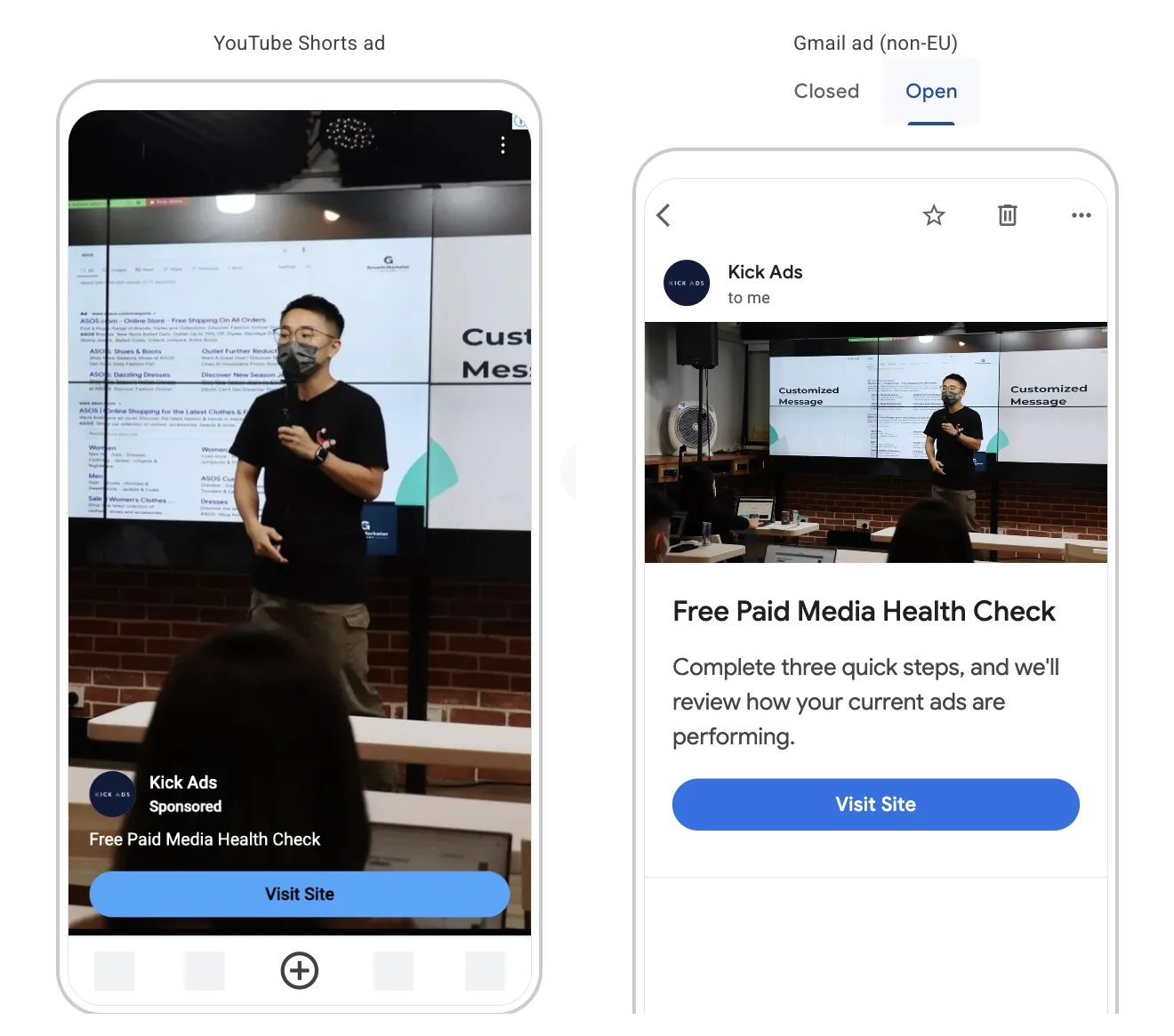
- One-tap image ads on Shorts and Gmail. A single tap on an image ad now opens the landing page. On Shorts this needs a 9:16 full-bleed image, the size listed in the specs below. Gmail ads have mostly worked as a teaser that expands into the full ad on the first click. Google's Gmail clicks page now also describes a one-click format. Google says advertisers who add Gmail to Demand Gen see their image creatives get on average 40% more conversions at the same ROI (Google internal data, global, Gmail ads, February 2026). That is Google's global average. We have not measured it in our own accounts.
- Affiliate location extensions on Google Maps. Retail networks and dealerships can show the stores that sell their products as Promoted pins while people browse, search and navigate in Maps. This is for brands whose products sit in stores they do not own. Google's channel controls page still says Maps needs a non-affiliated location extension.
When Demand Gen fits (and when it doesn't)
Demand Gen earns its budget when:
- Your product is visual: fashion, beauty, F&B, property, fitness. A feed ad can show what a search ad can only describe.
- Customers take time to decide: education, medical services, high-ticket B2C. You need to be present during research, not just at the final search.
- You have real first-party lists: Demand Gen is the main home of Google's lookalike segments (the successor to Similar Audiences, retired in 2023; they also exist in Video brand campaigns). Seed them with customer lists or site visitors and expand to new people who resemble them.
- Search is capped: when you already own your high-intent keywords and CPCs are climbing, the next customer has to come from somewhere search volume can't provide. Search captures demand; Demand Gen creates it.
Be careful when:
- You have no conversion signal. Smart Bidding needs conversions to learn from. Set up conversion tracking properly first.
- You expect Search-level lead quality on day one. Feed traffic is earlier-funnel. Judge it accordingly (see measurement below), and keep Search as the backbone of a lead generation account.
- Your creative is one recycled banner. Demand Gen is a creative-led format; weak assets produce weak results no matter the settings.
Audience strategy
Audiences are Demand Gen's real control surface:
- Remarketing first. Site visitors, video viewers, customer lists. Warm audiences prove the funnel works before you spend on cold reach.
- Lookalike segments for prospecting. Seed with your best list and choose narrow, balanced or broad reach. This is the closest thing Google has to Meta's lookalikes. Since March 2026 Google has been moving Demand Gen lookalikes to a suggestion mode in phases: the seed list and reach level become signals. The system may then reach people outside the similarity threshold. Google's lookalike segments page also says the old 100-user minimum for the seed list no longer applies. Advertisers who want the old behaviour can opt out through a Google form. Opt-out controls in the interface are due later in 2026.
- Custom segments and in-market audiences to describe intent when your lists are small.
- Optimized targeting can expand beyond your audience once conversions flow. Test it, but watch where the extra volume comes from.
Creative requirements
Plan for the three canvases from day one: square (1:1), landscape (1.91:1 image / 16:9 video) and vertical (4:5 image / 9:16 video for Shorts). Uploading only a 16:9 TV cut means invisible or awkward Shorts placements. Formats available: single images, carousels and video, and retailers can attach a Merchant Center product feed. In our accounts, creative quality and freshness decide Demand Gen outcomes more than any bid setting. Treat it like a social channel: several angles live, refresh before fatigue, vertical first.
Demand Gen ad specs: images, video and text
Quick answer: Images are .jpg or .png at 5 MB each, in three required ratios (1.91:1, 1:1 and 4:5 or 9:16 for Shorts). The logo is the odd one out at 150 KB. Headlines run to 40 characters in Google's Help pages. The Google Ads API still caps them at a display width of 30, so keep at least one at 30 or fewer. Descriptions run to 90.
This is the part most guides get wrong, usually by repeating Discovery-era numbers that Google has since changed. Everything below is from Google's Demand Gen asset specifications, image asset requirements and video asset requirements, plus the Google Ads API Demand Gen ad reference, checked 7 October 2026.
Images
| Asset | Ratio | Recommended | Minimum | Max file size | How many |
|---|---|---|---|---|---|
| Horizontal | 1.91:1 | 1200 × 628 | 600 × 314 | 5 MB | 1 to 20, 3 recommended, required |
| Square | 1:1 | 1200 × 1200 | 300 × 300 | 5 MB | 1 to 20, 3 recommended, required |
| Vertical | 4:5 | 960 × 1200 | 480 × 600 | 5 MB | 1 to 20, 3 recommended, optional |
| Vertical | 9:16 | 1080 × 1920 | 600 × 1067 | 5 MB | Recommended for Shorts |
| Logo | 1:1 | 1200 × 1200 | 144 × 144 (128 × 128 on some Google pages) | 150 KB | 1 to 5, 1 recommended, required |
File types are .jpg or .png. Watch the logo cap, which is 150 KB rather than the 5 MB every other image gets. An export straight out of a brand kit will usually breach it.
Video
| Spec | Value |
|---|---|
| Minimum length | 5 seconds |
| YouTube in-stream eligibility | Videos under 10 seconds cannot serve there |
| Recommended length | Over 15 seconds, to stay eligible across the most formats |
| Format | MPG (MPEG-2 or MPEG-4) |
| Max file size | 256 GB |
| HD resolutions | 1:1 at 1080 × 1080, 16:9 at 1920 × 1080, 4:5 at 1080 × 1350, 9:16 at 1080 × 1920 |
Text
| Field | Limit | How many |
|---|---|---|
| Headline | 40 characters (the Google Ads API states 30, so keep at least one at 30 or fewer) | 1 to 5, at least 3 recommended |
| Long headline (video ads) | 90 characters | At least 3 recommended |
| Description | 90 characters (40 on carousel ads) | 1 to 5, at least 3 recommended |
| Business name | 25 characters | 1, required |
| Final URL | 2,048 characters | 1, required |
| Call to action | Set automatically | 1, required |
The long headline only applies to video ads, where Google uses it in the in-feed format on YouTube and Discover. Image and carousel ads use the 40-character headline.
Bidding options
- Maximize clicks: for traffic while conversion volume is still thin.
- Maximize conversions / target CPA: the standard once your tracking is solid.
- Maximize conversion value / target ROAS: for ecommerce passing purchase values.
Start with remarketing on Maximize conversions, let it gather data, then scale into lookalikes with a tCPA you'd genuinely pay.
Measuring Demand Gen honestly
Judging Demand Gen on last-click alone will kill it prematurely. People see a feed ad, don't click, and search your brand two days later, and that value lands on the brand campaign unless you look wider:
- Watch engaged-view conversions for video, alongside click-through conversions.
- Compare brand search volume and direct traffic before and after flighting.
- In GA4, check channel grouping and path reports rather than a single attribution line.
The honest framing: Demand Gen is paid discovery. It should be cheaper per qualified enquiry than generic Search once assisted value is counted. That's the bar we hold it to.
Across the accounts we manage, Demand Gen results are sharply split. Accounts with visual products tend to drive the bulk of their conversions at a two-digit CPA, while service and lead-gen accounts that run it like Search often burn through the budget for only a handful of results. The divide matches everything above: Demand Gen rewards visual products and demand creation, and punishes accounts that just want to harvest intent. Before you launch, ask yourself: is your product eye-catching enough to stop the scroll, and is your audience (not yet searching) worth warming up first?
Real results: creating demand with events
On a client built around information events, video and Demand Gen campaigns promoting the upcoming events outperformed generic keywords by around 92%, with cost per lead from the event-led campaigns coming in at roughly a thirteenth of the generic route. We see this most in education accounts, and there is more in Demand Gen for education events and seminars. The lesson isn't "Demand Gen beats Search". It's that Demand Gen wins when the message gives people a concrete reason to act: an event, an offer, a deadline. That beats fighting everyone else for the same expensive generic keywords. More examples on our case studies page.
Common mistakes we see
- Judging it like Search: last-click only, then switching it off in week two.
- One landscape banner, no vertical assets, invisible on Shorts.
- Prospecting cold audiences before remarketing proves the funnel.
- Launching without conversion tracking, so Smart Bidding optimises to noise.
- Setting tCPA at Search levels immediately, strangling delivery.
- Never refreshing creative, then blaming the format for fatigue.
Ready to create demand, not just capture it?
Kick Ads is a Google Partner agency managing Google Ads (Search, PMax, YouTube and Demand Gen) for businesses in Hong Kong and Malaysia since 2017. If your Search campaigns have hit their ceiling, a Paid Media Health Check will show where feed-based demand creation fits your account. Honest findings, no pitch.
FAQ
What is a Google Demand Gen campaign? A campaign type that serves image and video ads across YouTube (including Shorts), the Discover feed, Gmail, Google Maps and, if you opt in, the Google Display Network. It replaced Discovery campaigns in 2023-24 and absorbed Video Action Campaigns in 2025.
What is the difference between Demand Gen and Performance Max? Demand Gen serves only Google's visual feed surfaces and gives you audience and channel control, making it built for creating demand. Performance Max serves across all Google inventory including Search and Shopping, decides placements itself, and is strongest at harvesting conversions for ecommerce.
Where do Demand Gen ads appear? YouTube in-feed, in-stream and Shorts, the Discover feed on mobile, the Gmail Promotions and Social tabs, Google Maps (as Promoted pins) and the Google Display Network. Since 2025 channel controls let you limit delivery to specific surfaces, set per ad group.
Do Demand Gen ads show on Google Maps? Yes. Maps is one of the channels in Demand Gen channel controls, and ads show as Promoted pins while people browse, search and get directions. Google's channel controls page says Maps only serves when a location asset is enabled on the account. Google's Display migration page still labels Maps as beta. In September 2026 Google announced affiliate location extensions on Maps for retail networks and dealerships. When we checked our own Hong Kong account on 7 October 2026, Maps was already in the Channels list. How much Maps inventory a Hong Kong campaign gets is a separate question, and Google has not said which markets get affiliate location extensions.
Do lookalike audiences still exist in Google Ads? Yes, as lookalike segments in Demand Gen and Video brand campaigns. You seed them with a first-party list and choose narrow, balanced or broad reach. Since March 2026 Google has been turning Demand Gen lookalikes into a suggestion mode, where the seed list and reach level act as signals and the old 100-user minimum no longer applies. The old Similar Audiences feature was retired in 2023.
Is Demand Gen good for lead generation? It can be, if you keep Search as the backbone and use Demand Gen to create demand with a concrete hook. For one Hong Kong education client, event-led Demand Gen and video campaigns produced leads around 13 times cheaper than generic search keywords.
Does Demand Gen include Google Search? No. Demand Gen never serves on Google Search results. It does serve on YouTube Search, which is a different search box and a genuine Demand Gen placement.
What are the Demand Gen image specs? Horizontal 1.91:1 at 1200 x 628 (minimum 600 x 314), square 1:1 at 1200 x 1200 (minimum 300 x 300), and vertical 4:5 at 960 x 1200 (minimum 480 x 600) or 9:16 at 1080 x 1920 for Shorts. All are .jpg or .png at up to 5 MB, except the 1:1 logo, which is capped at 150 KB.
What are the Demand Gen video specs? Minimum 5 seconds, and over 15 seconds is recommended so the file stays eligible across the most formats. Anything under 10 seconds cannot serve on YouTube in-stream. Format is MPG (MPEG-2 or MPEG-4) up to 256 GB.
How long can a Demand Gen headline be? Up to 40 characters in Google's Help pages. The Google Ads API reference still states 30, so keep at least one headline at 30 characters or fewer. Video ads also take a long headline of up to 90 characters. Descriptions run to 90 characters (40 on carousels) and the business name to 25.
What happens to my Display campaigns? Google starts a phased rollout of a Display to Demand Gen migration tool in June 2026, and eventually migrates remaining eligible campaigns automatically. The tool carries 42 days of performance history across so the new campaign only learns for about 1 to 2 days, names the campaign "[Original campaign name] #2", and leaves the original in the account as Removed for reporting for up to five years.
Do Video Action Campaigns still exist? No. Google stopped new VAC creation in April 2025, began upgrading existing ones to Demand Gen in July 2025, and finished the last automatic upgrades by April 2026. Lead forms, seasonal event targeting, new customer acquisition, shared budgets, frequency caps and affiliate location assets did not survive the upgrade. Affiliate locations have since come back to Demand Gen on Google Maps, announced in September 2026.
Wondering whether Demand Gen is worth it for your business? We can review your creative, audiences and results to see if it's creating real demand or just spending. Message us on WhatsApp or book a free strategy call →.

About the author
Frankie Chan · Co-Founder, Kick Ads
Frankie is an ex-Googler and paid media strategist. He has managed Google Ads and Meta Ads for ecommerce and lead generation businesses across Hong Kong and Malaysia since 2017, working closely on strategy, reporting and client growth planning.