
Gmail Ads in 2026: How to Reach the Gmail Inbox Today
By Frankie Chan, Co-Founder · Updated 13 July 2026 · 5 min read
Jump to section
Here's the short version: standalone Gmail ad campaigns — the format long known as Gmail Sponsored Promotions (GSP) — no longer exist. Google retired them in 2021, folded Gmail into Discovery campaigns, and then rebuilt Discovery as Demand Gen. In 2026, if you want your ad at the top of someone's Gmail inbox, you get there through a Demand Gen campaign (and, for ecommerce, through Performance Max).
So this guide has two jobs: show you how Gmail advertising actually works today, and keep enough of the GSP history that you understand what changed — and why the old tutorials you find elsewhere no longer apply.
What Gmail ads look like in 2026
The placement itself hasn't changed much. Gmail ads still sit at the top of the Promotions tab (and sometimes the Social tab), carry an ad label, and display like a normal email. A user taps the teaser, it expands into a full ad, and a click from there takes them to your site.
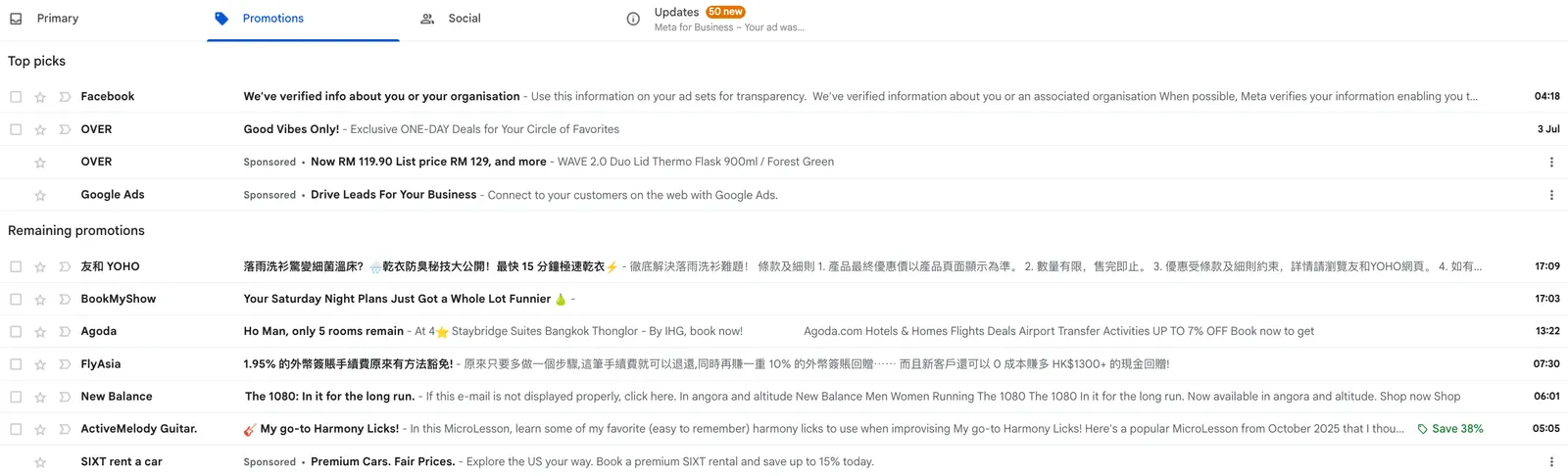
Desktop view
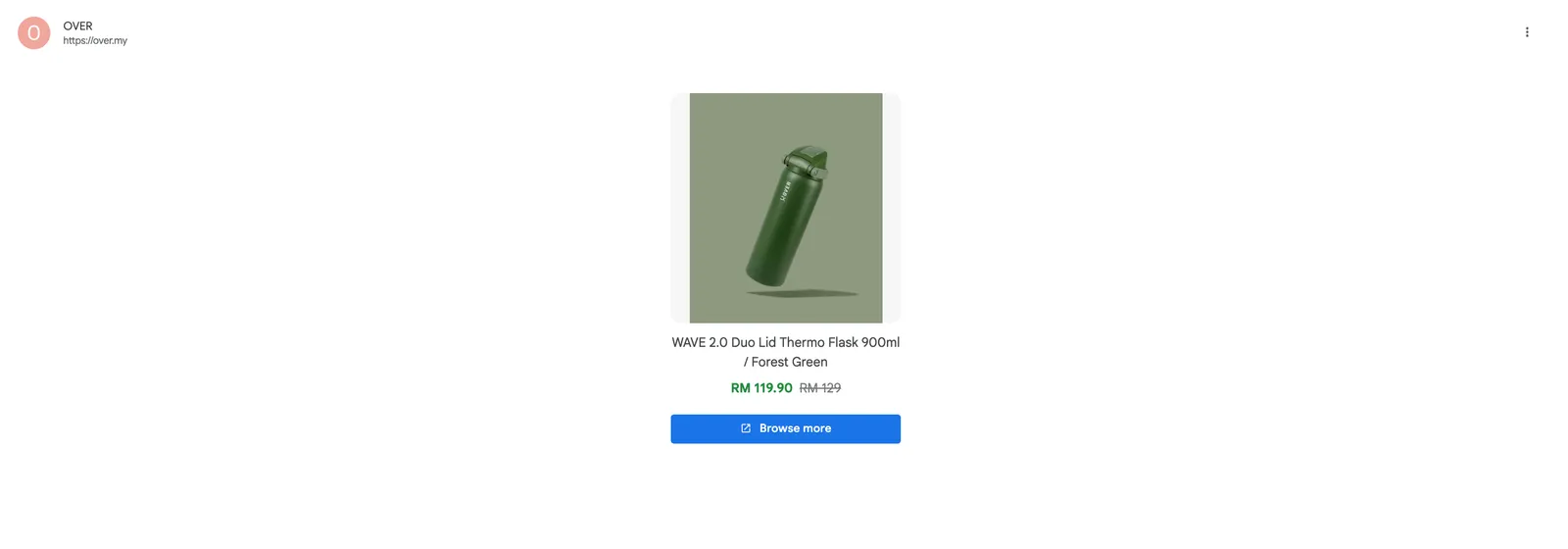
Desktop view — expanded
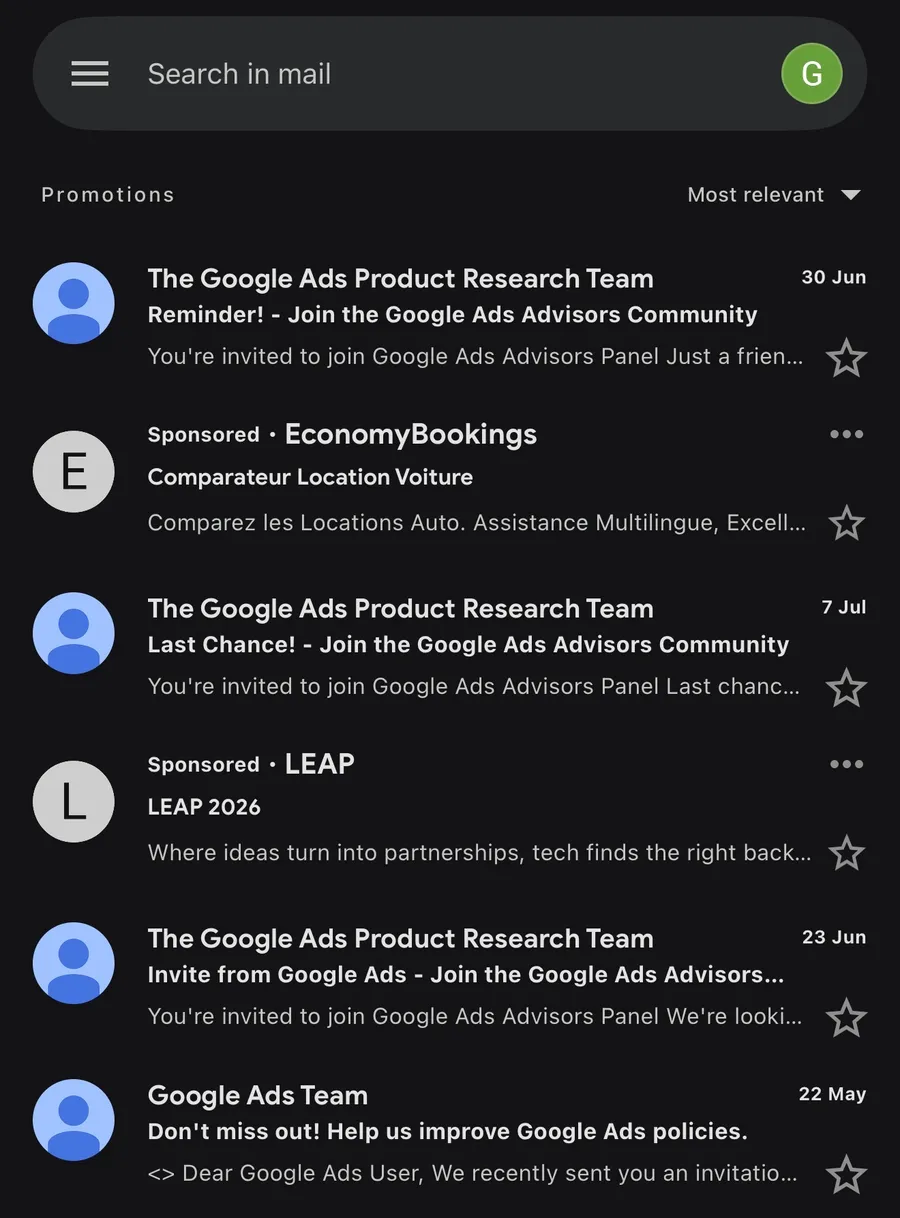
Mobile view
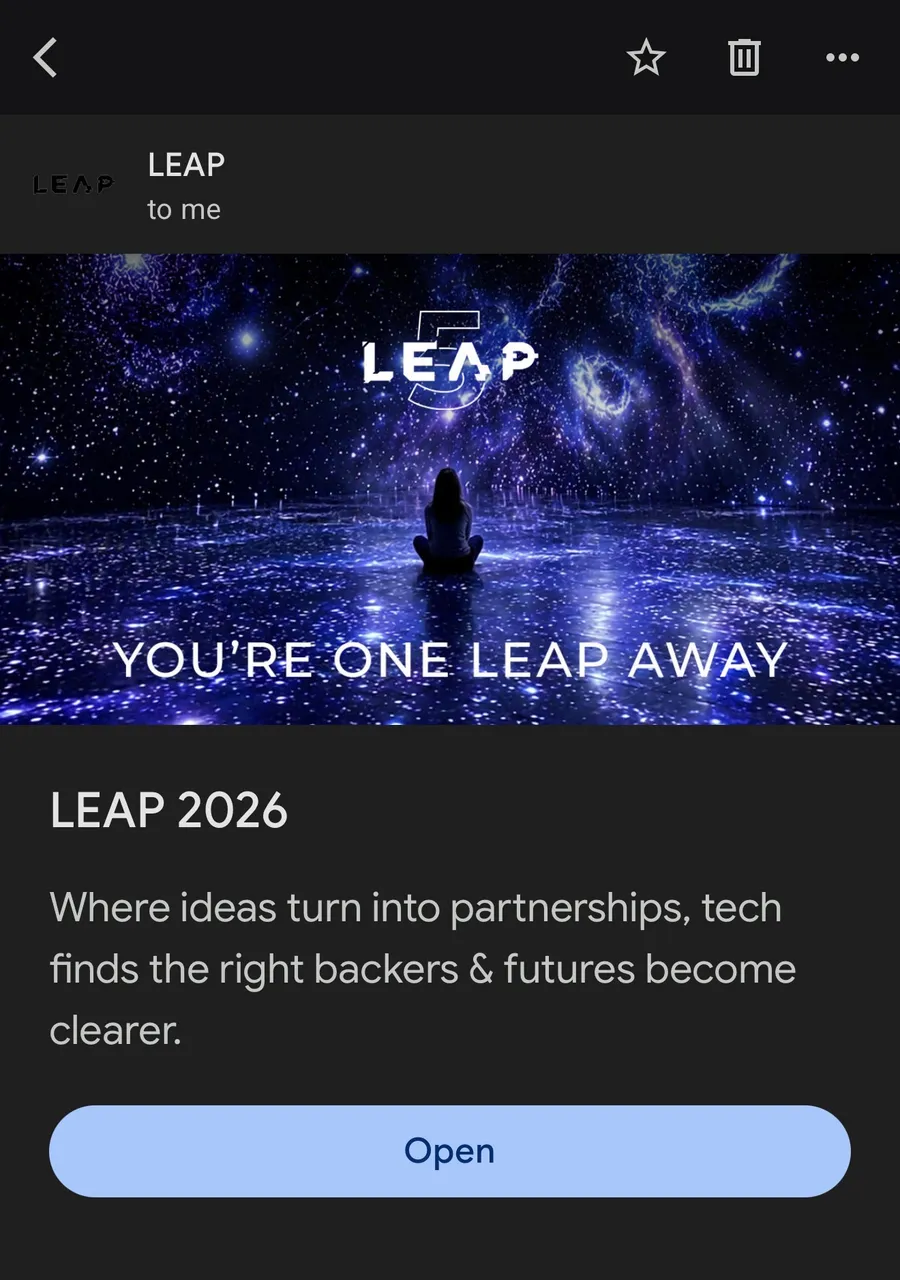
Mobile view — expanded
What changed is everything behind the placement: there is no "Gmail campaign" type to pick anymore, no GSP-specific ad formats to build, and no Gmail-specific metrics to optimise.
Why the Gmail placement is still worth your attention
The inbox mindset works in your favour
Banner and pop-up ads interrupt people who are busy doing something else. The Promotions tab is different: nobody opens it by accident. Users who click into it are actively browsing offers — which is why engagement on the Gmail placement has always punched above its weight. That logic held in the GSP era and it still holds inside Demand Gen.
Native by design
A Gmail ad reads like an email, not a banner. Native formats consistently attract engagement that display banners don't, and they aren't affected by banner blindness — most people have trained themselves to skip a leaderboard banner, but an unread line in the inbox still gets a look.
Less creative competition
Most HK and Malaysia advertisers concentrate spend on Search, Meta and standard display. Demand Gen's Gmail inventory remains comparatively quiet, which tends to show up as cheaper engagement than the equivalent social placement.
How to run Gmail ads today: Demand Gen
Gmail is one of the surfaces a Demand Gen campaign serves on, alongside YouTube (including Shorts) and the Discover feed. There is no way to buy Gmail on its own — you build a Demand Gen campaign and Google serves your creative across those surfaces. Gmail is only one slice of what the format does, so if you're new to it, our complete Demand Gen guide walks through the campaign type end to end.
Setup in practice:
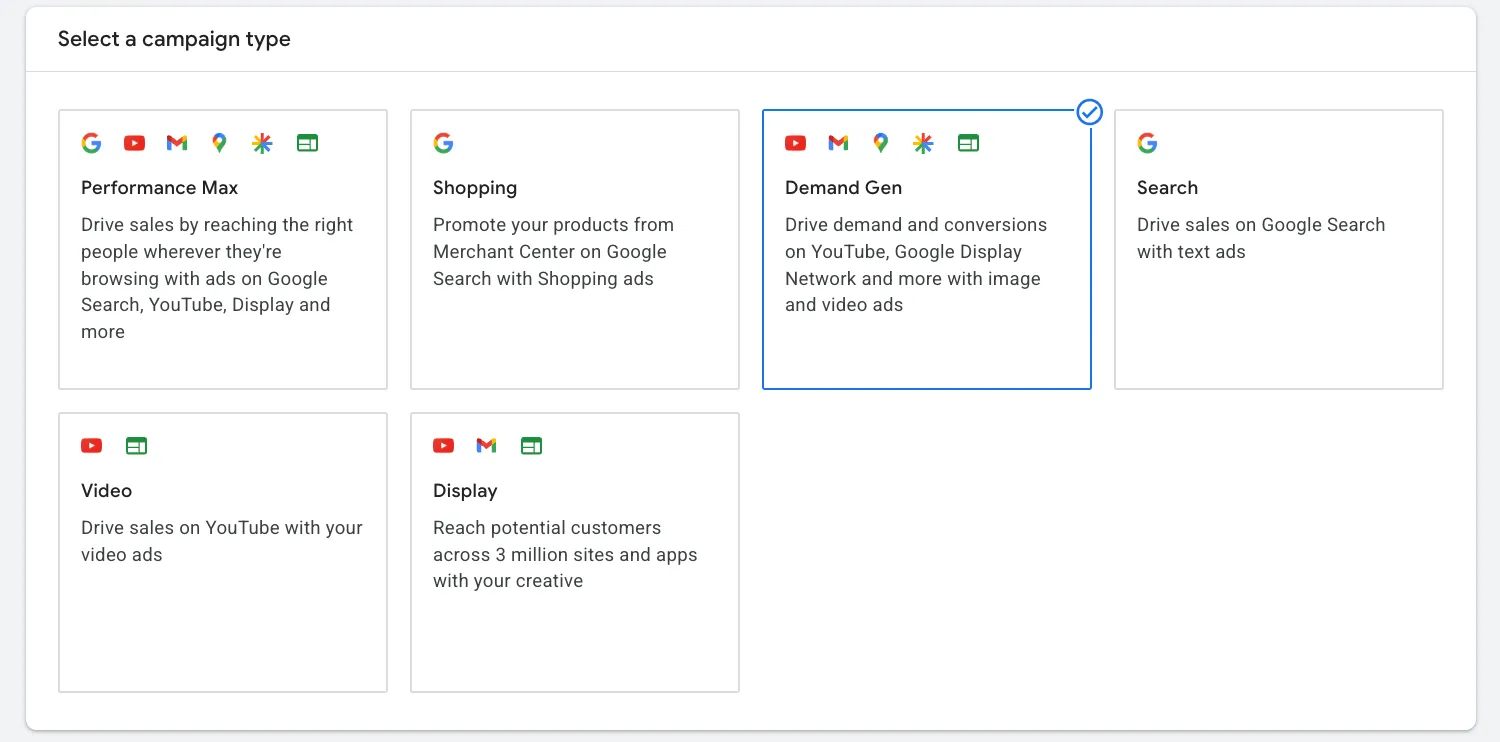
- Create a Demand Gen campaign in Google Ads and upload your assets — logo, headlines, descriptions, marketing images and (optionally) video. The same asset pool feeds Gmail, YouTube and Discover, so lead with your strongest square and landscape images.
- Choose your audiences. Your first-party data does the heavy lifting: remarketing lists, Customer Match, and lookalike segments built from them (these replaced the old Similar Audiences, which Google retired in 2023). Layer in-market and affinity segments for prospecting, and Google's optimized targeting can expand from there.
- Life events targeting is still available — and it remains one of the most natural fits for the inbox. B2B services can target "business creation", furniture brands "home renovation", pet brands "new pet". The right offer at a pivotal life moment is exactly the kind of message people open the Promotions tab hoping to find.
If you sell online, note that Performance Max also serves into Gmail automatically as one of its channels — you won't control it placement-by-placement, but your products can appear there without any extra setup.
Measuring Gmail performance in 2026
The GSP era had its own scoreboard — Gmail forwards, Gmail saves, and "Gmail clicks to website". Those metrics retired along with the campaign type. Demand Gen reports the standard set: impressions, clicks, engagement and, above all, conversions.
One old lesson still applies, though: an open is not a visit. A user can tap your teaser, read the expanded ad, and leave without ever reaching your site. So judge the placement on conversions and cost per conversion, not on click-through rate — and make sure conversion tracking is in place before you spend, see our Google Ads conversion tracking guide.
Creative testing works the way it does everywhere else in Demand Gen: run multiple images, headlines and descriptions, let Google rotate them, and review asset-level performance rather than settling the debate on gut feel.
A brief history: what GSP was
For historical reference (and because plenty of old documentation still references it): GSP let you build Gmail-specific ad units — collapsed/expanded ads with catalog images and video, single-image ads, and fully custom HTML5 creatives with multiple CTAs. You picked "Display → Gmail campaign" in the old interface and optimised against Gmail-specific metrics.
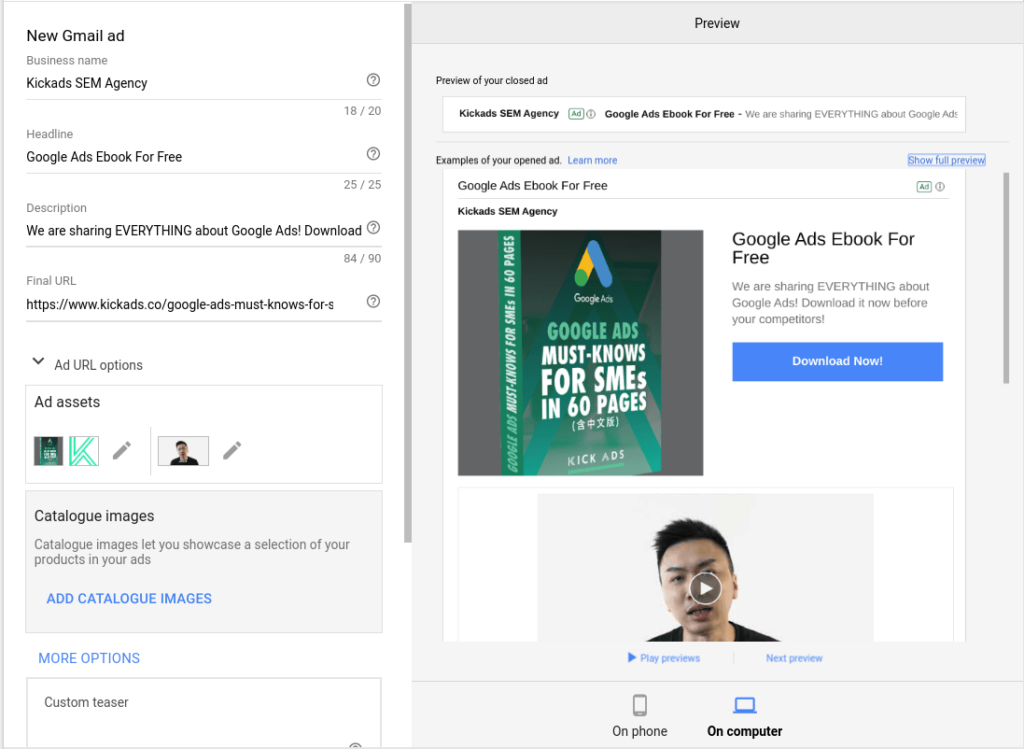
Google discontinued standalone Gmail campaigns in 2021, migrated the inventory into Discovery campaigns, and Discovery became Demand Gen in 2023–24. If a guide tells you to "create a Gmail campaign", it's describing an interface that no longer exists.
Conclusion
Gmail won't be your main source of conversions — it never was. But as one surface inside a Demand Gen campaign, it gives you cheap, native reach with an audience that has literally opened the door to promotions. If you're already running Demand Gen for YouTube and Discover, your ads are likely serving in Gmail today; it costs nothing extra to review how that placement converts and feed it better creative.
FAQ
Can I still run standalone Gmail (GSP) campaigns? No. Google discontinued standalone Gmail campaigns in 2021. Gmail inventory is now reached through Demand Gen campaigns, and Performance Max can also serve product ads into Gmail automatically.
How do I get my ads into the Gmail inbox in 2026? Create a Demand Gen campaign in Google Ads. Gmail is one of its serving surfaces alongside YouTube and the Discover feed, using the same uploaded assets — logo, headlines, descriptions, images and video.
Where do Gmail ads appear? At the top of the Promotions tab (and sometimes the Social tab) in the Gmail inbox. They carry an ad label but display like a normal email, expanding into a full ad when tapped.
What targeting works for the Gmail placement? Remarketing lists, Customer Match, lookalike segments built from your first-party data, in-market and affinity segments, and life events targeting such as business creation, home renovation or a new pet.
How should I measure Gmail ad performance? Use standard Demand Gen metrics and judge the placement on conversions and cost per conversion rather than clicks — a user can open the ad without ever visiting your site, so click-through rate flatters the placement.
Ready to grow with Google Ads?
Kick Ads is a certified Google Partner agency managing paid media for Hong Kong and Malaysia businesses since 2017.
Google Ads Management Hong Kong →Performance Max — Search + Gmail + YouTube →

About the author
Frankie Chan · Co-Founder, Kick Ads
Frankie is an ex-Googler and paid media strategist. He has managed Google Ads and Meta Ads for ecommerce and lead generation businesses across Hong Kong and Malaysia since 2017, working closely on strategy, reporting and client growth planning.