How to Make AI Video Ads With Seedance 2.5
By Frankie Chan, Co-Founder · Updated 13 August 2026 · 24 min read
Jump to section
- Which tool should you use for AI video generation in Hong Kong?
- Why do some AI videos look fake?
- What one AI video clip actually costs
- Six steps from two reference photos to a finished AI video ad
- Two AI video ads made with Seedance 2.5
- Ten AI video prompts you can copy for ten industries
- What AI video generation cannot do
- Is AI video generation worth it?
- FAQ
Two clips, same model, same account. The first asked for a cinematic commercial shot of a pineapple bun and came back looking like a plastic render sitting on a showroom plinth. The second asked for a cha chaan teng milk tea pour over a tea-stained cloth sock, a scorched steel pot, cup rings and a wet patch on worn laminate. It came back looking like a shop that has traded for twenty years.
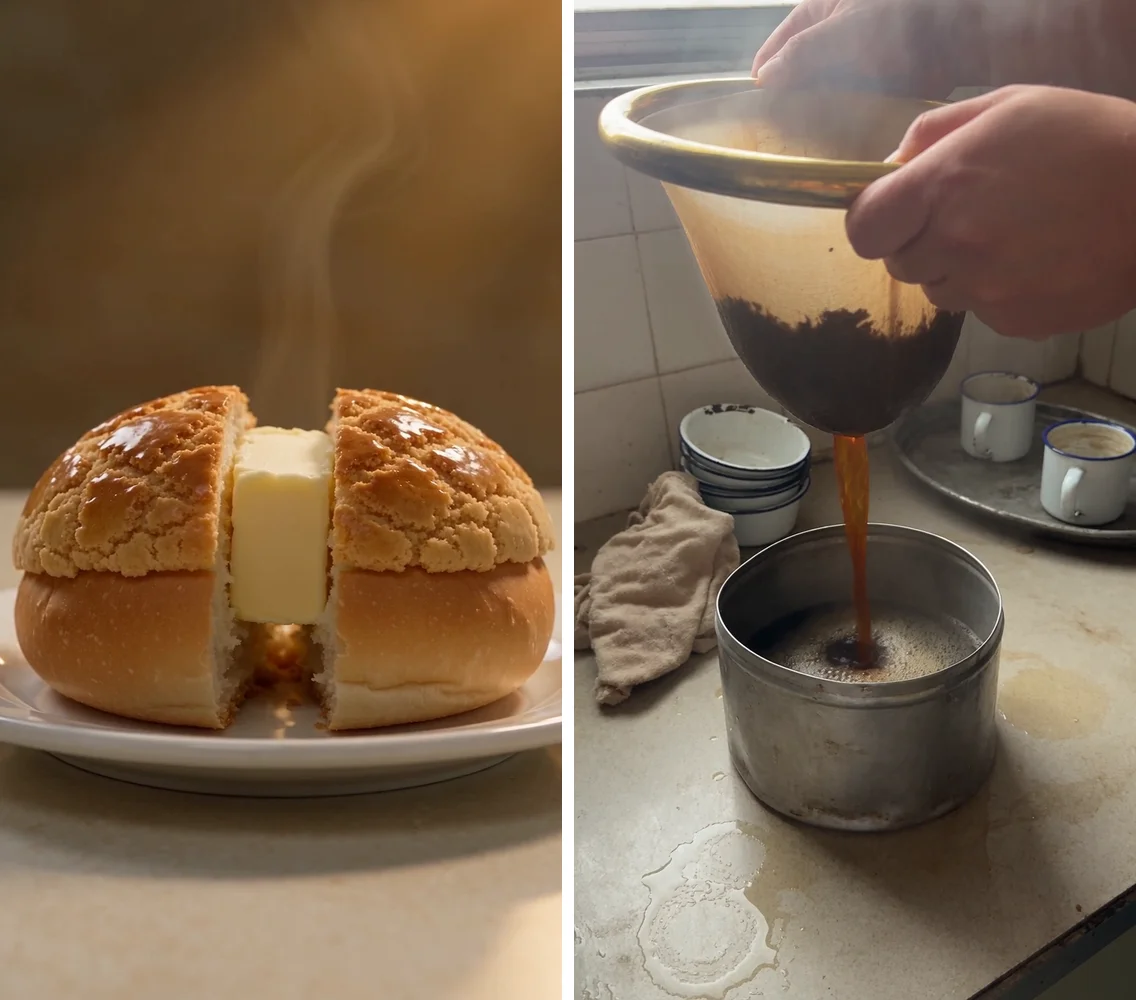
The second prompt used fewer words about how it should look. What changed is how much was on the counter.
Quick answer: On BytePlus Lumina, 720p Seedance 2.5 runs 46 credits a second. A 20-second ad generated as one take is 920 credits, or 1,104 if you cut it from three 8-second clips at 368 each. The end card is made in post.
The six steps below run from two reference photos to a 20-second ad you can upload. Both finished ads are here with what they cost, and the last section is ten industry prompts you can copy. For the model measured on its own, meaning pricing tiers, the text failures, Cantonese voiceover and cross-scene stability, read the Seedance 2.5 test.
Which tool should you use for AI video generation in Hong Kong?
Search for AI video generation and the first page fills with editors: Canva, CapCut, Adobe. Those cut footage you already have. Generating a shot that was never filmed is a different set of tools:
| Tool | Payable from Hong Kong | 8 seconds at 720p | Best for |
|---|---|---|---|
| BytePlus Lumina (Seedance 2.5) | Yes, international card | 368 credits | Product shots, real-world texture, Cantonese voiceover |
| Dreamina | Mainland product, payment friction from HK | Priced differently, we did not test it | Mainland market |
| Sora, Veo | Yes | Priced separately | Creative shorts |
Every clip here was generated on Lumina, because it takes an ordinary Hong Kong sign-up and it supports reference images that lock a real product into the shot. For how the model itself performs, see the full Seedance 2.5 test.
Why do some AI videos look fake?
Seedance 2.5 cannot render readable text, so the prompt behind the bun stripped the scene: no menus, no price cards, no posters, background blurred to nothing. What came back is a bun on a plate against a warm brown blur, with nothing else in the frame. The bun is wrong too. A pineapple bun is cut across and the butter goes in flat; this one is split down the middle with the butter standing upright, which is not how a cha chaan teng normally serves it.
What one AI video clip actually costs
Lumina prices by the second. 720p runs 46 credits per second, and aspect ratio changes nothing, so a 9:16 vertical costs the same as a landscape cut.
| Setting | Credits | ≈ HK$ |
|---|---|---|
| 4s, 720p | 184 | HK$7 |
| 8s, 720p (used for the ten library clips) | 368 | HK$14 |
| 10s, 720p | 460 | HK$18 |
| 20s, 720p (single take) | 920 | HK$35 |
| 30s, 720p (the single-take test) | 1,380 | HK$53 |
We are on the Ultra plan, US$239 for 48,200 credits, which works out to about HK$0.038 a credit. Every HK$ figure in the table uses that rate.
Pricing is linear, so what a 20-second ad costs depends only on how you generate it. Run it as one 20-second take and it is 920 credits. Cut it from three 8-second clips and it is 1,104, the extra 184 being the head and tail you trim off each clip. Splitting costs more and makes changes cheaper, and Step 2 below covers the trade.
If you are splitting, use 8 seconds a clip. An action that carries a consequence needs four to six seconds to start and finish, Seedance 2.5 settles in the first half second and often drifts in the last half second, and one trim off the tail leaves six to seven clean seconds. Ten seconds costs 25% more for footage that gets cut anyway.
To check the pricing yourself, one 4-second run at 184 credits will confirm the table.
Six steps from two reference photos to a finished AI video ad
Everything below was run on a live account, and the two ads at the end of this section came out of it.
Before you start: open an account and buy credits
Sign up at Lumina with an ordinary email address. It takes an international card and the credits land immediately. We are on the Ultra plan, US$239 for 48,200 credits.
The interface has two modes, Creation and Director. Everything here was made in standard Creation, which is where text-to-video, image-to-video and reference attachments all live.
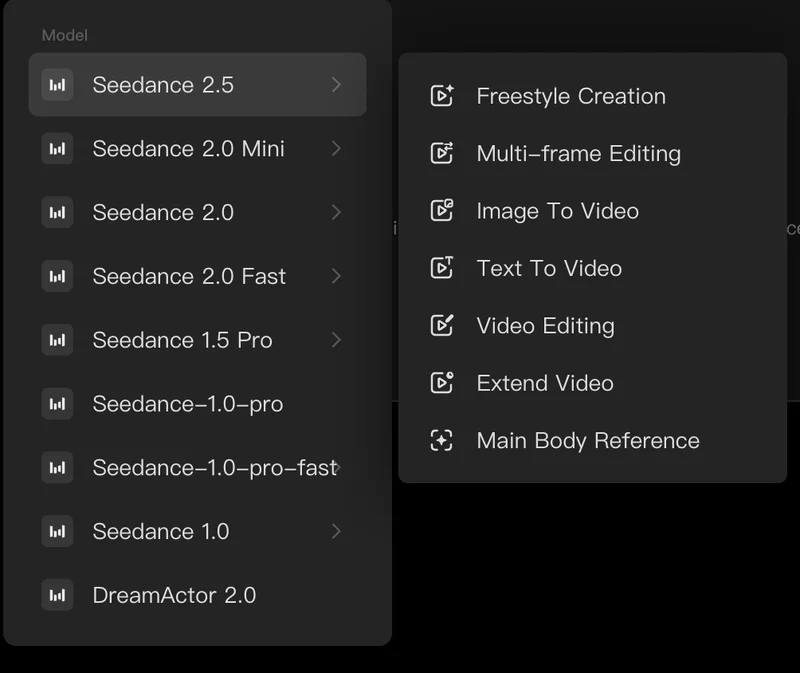
Aspect ratio, resolution and length are set in the panel.
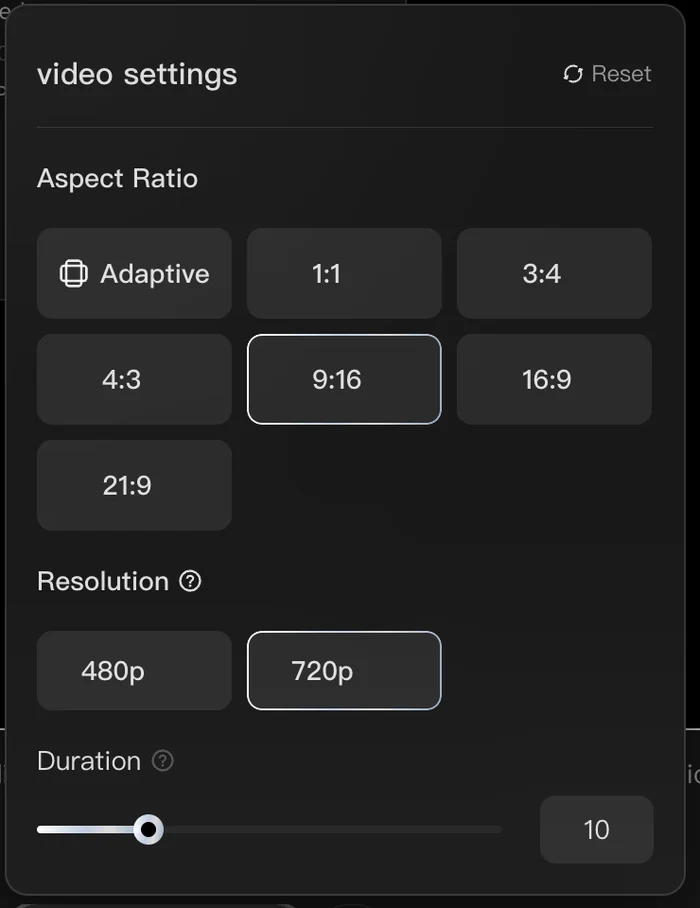
The generate button shows what the run will cost before you commit. Eight seconds at 720p is 368 credits.
Step 1. Get two reference photos
One photo is the subject: the thing you sell. A pineapple bun, a bottle, a car. One photo is the location: the room the subject lives in. Your counter, your workshop, your shelf.
You do not have to shoot anything new. A phone camera is enough, and an existing product shot works just as well, as long as both photos are flat, evenly lit and boring. A heavy filter or a shallow depth of field pushes its own look into every clip generated from it, and you will fight that look for the rest of the job, which is why a retouched campaign image is usually worse than a plain snap.
Shoot the subject square on against a plain surface with the label facing the lens and nothing overlapping it. Shoot the location wide, so the model can read the floor, the walls, the light direction and the general level of mess.
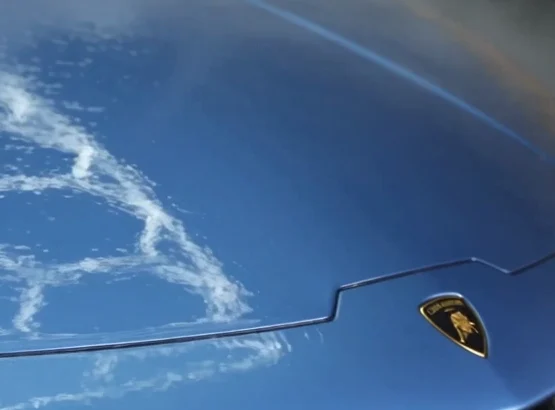
Seedance 2.5 reproduces what you give it, and a reference image carries more weight than the prompt. We attached a photo of a real car with a prompt that banned badges, emblems, logos, lettering and brand marks in five separate places, and the manufacturer's shield came back anyway, with invented lettering across the splitter alongside it.
A real brand in shot is usually fine. A car detailer films cars with manufacturer badges on them, and a cha chaan teng has a soft drink bottle on the counter. The awkward case is the other one: you describe a product in general terms, never name a brand, and Seedance 2.5 invents a convincing mark of its own that belongs to nobody and still reads as an imitation of somebody. Attach a real photo of your own product and let it reproduce that, or write the surfaces as plain and unmarked.
Step 2. Split the ad into three beats and give each one a job
An opening beat, a middle beat and a closing beat, each doing one job.
You can write those as three separate prompts and run them separately, or as three stages inside one prompt and run it as a single take. We tried both. The single take costs 1,380 credits and holds continuity all the way through: the same car, the same light, the same paint from first frame to last, with Seedance 2.5 handling its own transitions between beats better than we cut them by hand.
Splitting into three buys one thing: cheap changes. One bad hand costs 368 credits to re-run, where a single take means regenerating the whole 20 seconds for 920. So split when you want several versions of the same scene to test in ads, and run it in one take when the prompt is solid and you expect to ship the first result. Write the length honestly too. Ours ran 30 seconds when the story finished at twenty, and the last ten seconds were bought for nothing.
Whichever route you take, write all three beats before generating anything, because continuity has to be written in up front and post cannot put it back. Same light direction, same time of day, same surfaces named in all three.
The opening shot establishes the place. Wide enough to read as a real room, with the subject in it and something already moving in the first frame. Its job is to stop the scroll.
The middle shot is the proof. Get tight on the hands doing the work, whether that is the pour, the wipe or the wrap. This is the shot people actually watch and the one worth a second take.
The closing shot parks. Frame the subject with dead space on one side and no fast motion at the end, because the price, the offer and the logo all go into that space in post.
Every prompt, in a sequence or standalone, follows four rules.
1. Do not empty the scene. Name the clutter explicitly and pick clutter that carries no text. Worn laminate, water rings, cut stems, damp cloths, chipped enamel, scattered offcuts, puddles. Every prompt on this page still bans menus, price cards, packaging, whiteboards and posters, because those are surfaces the model will try to write on.
2. Put hands in the frame doing the work. Forearms are fine. Never ask for a face. Viewers judge whether a frame is real by the hands, so give them something to look at. Add "hands have five fingers in every frame" to the technical line and check it on every take.
3. Make something change, and give the change a consequence. In the milk tea clip above the camera holds still while the pour lands and the foam rises, so something finishes inside the eight seconds. The middle beat of the 20-second ad below pushes in on a slab of butter that never melts, which is a move toward a static object and exactly what this rule is about. A perfect state held for eight seconds is the CGI signature, so write the action as already running in the first frame.
4. One camera move per clip. Pick one and stay with it: a locked-off handheld frame with drift, a slow tilt, a lateral follow, or a push in. What to avoid is a slow push toward the hero object standing in for anything actually happening, which is stock-commercial grammar and stops the clip looking like something you shot. The middle beat of the cha chaan teng ad above is a push in, but the butter is melting while the camera moves, so it is following something.
Two smaller rules sit under those. Never ask for machinery with dials, screens, motors or nameplates, because the model invents hardware. And keep hand tools simple: scissors, a jug, a mitt, a cleaver.
Step 3. Generate with both references attached
Attach both photos to all three runs and tell the prompt which is which.
Both go on in Image To Video, added one at a time from the material menu beside the input box, which takes more than one. We added the subject photo first and the location photo second, and the @image 1 and @image 2 labels in the prompt follow that order. Keep track of it. Reversed, the model treats the room as the thing to reproduce faithfully.
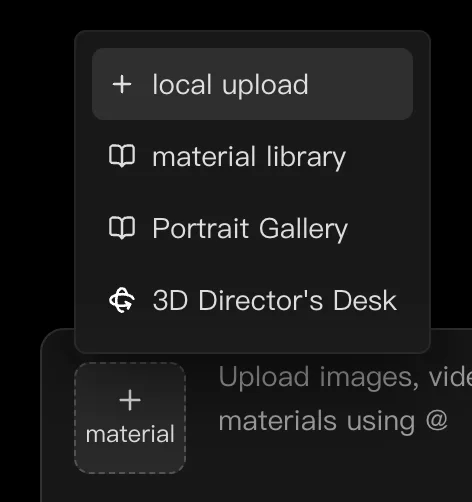
There is also a Main Body Reference option, which stayed unresponsive throughout our testing. Both images went on as ordinary attachments.
Every prompt then opens with the division:
@image 1 is the product: reproduce this exact item and its exact label
faithfully, do not redraw, restyle, re-space or re-colour it.
@image 2 is the location: reproduce this room, its surfaces, its light
direction and its layout, and stage the action inside it.
Without reference images, three shots come back as three different shops and three different cars, and they do not cut together as one place. With image 1 pinned to the subject and image 2 pinned to the scene, three separate 8-second runs edit as one continuous place.
Output settings live in the interface. Aspect ratio, resolution and duration are all set in the panel, and a run that says 9:16 in the prompt while the panel sits on its default ships landscape at full price. Use 9:16, 720p, 8 seconds.
Never put -- inside a prompt. Everything after it gets truncated and you pay full price for the truncated version.
Blocked prompts cost nothing. When the content filter rejects a run you get "Try another prompt/image~" with no explanation and no credit deducted, so paste the prompt back in sections until you find the tripwire. Ordinary words trip it. "Black mirror" blocked five versions of one prompt, and we assume it collides with the show title.
On a first run, 8 seconds at 720p is enough. That is 368 credits a run.
Step 4. Judge the clip before you spend another 368 credits
Watch the clip frame by frame against seven checks. Any failure means a re-run, and do not try to salvage it.
| Check | Reject when |
|---|---|
| Subject present | The person or object the action needs is not in frame at all, so the movement lands on empty air or a flat surface. |
| Subject fidelity | The subject drifts from image 1. Proportions changed, label re-spaced, a detail invented. |
| Colour | Anything carried in from a reference comes back a different colour, which is the fastest way to break continuity across three clips. |
| Hands | Fewer or more than five fingers in any frame, fused fingers, two right hands. |
| Invented text | Any letter, number or character-shaped mark on a background surface. Too blurred to read is still a reject. |
| The change | The action does not start and finish inside the clip. A held state is a reject even when it looks good. |
| Clutter | The background is empty or blurred down to nothing. |
Reject early. A re-run is 368 credits.
Step 5. Post-production is where every piece of text goes
Every piece of text you see in the two finished ads was added in post. Generated text fails on every take, in English and in Chinese, and no prompt fixes it. So the price, the offer, the phone number, the WhatsApp line, the logo, the subtitles and the end card are all added in CapCut or Canva after the fact.
Drop the end card onto the parked closing frame, then subtitle. Reels mostly get watched muted, so subtitles are not optional, and they get typed in post for the same reason as everything else.
The end card is a still. Build it in Canva at 1080x1920 and place it over the last two seconds, or hold it for another two seconds after the footage stops. Do not generate the end card. The brand name usually comes back misspelled.
Step 6. Voiceover and the offer
A clip with no offer is b-roll, not an ad. It can be the best-looking thing on the timeline and still return nothing, because nothing in it asks the viewer for anything.
Voiceover. Seedance 2.5 speaks Cantonese. Our own testing produced a Cantonese read that came back intelligible and correctly Cantonese, with pacing that sits slightly stiff next to a human read. Language control needs the official formula: state the language, the regional accent and the delivery style before the speaker and before the line itself. We asked for Mandarin inside a Hong Kong persona and got something close to Cantonese back, because the persona beat the language instruction. The same request rewritten to the official formula returned standard Mandarin. Audio has its own syntax as well, with () for music, <> for sound effects, {} for dialogue and 【】 for subtitles.
Real voice or generated? Generated Cantonese is good enough for b-roll, internal demos and testing volume. For a live ad, record it yourself on a phone. The stiff pacing lands hardest on the one line that carries the offer, which is the line that cannot afford to sound synthetic. A voice memo costs nothing and takes two minutes.
The offer. A specific offer answers four things: what the viewer gets, who it applies to, when it expires and how they claim it. "Five dollars off your first cup, in August, show this clip at the counter" gives a viewer something to do. "Come and try our milk tea" gives them nothing to do.
Stay inside Meta's advertising policies while you do it. Meta rejects exaggerated or unrealistic outcomes, before-and-after comparisons, and copy that implies knowledge of a viewer's personal attributes, so write about the product and never about the viewer's body, health, finances or status. Keep every number honestly redeemable: a countdown that never expires and a "first 20 customers" that never closes fail review for the same reason. Disclose the AI. Meta asks advertisers to flag realistic AI-generated content and the requirement is explicit for political and social-issue advertising, so switch it on in Ads Manager instead of deciding it does not apply to you. Whatever the offer promises also has to be visible on the page the click lands on, because review looks at the destination.
Two AI video ads made with Seedance 2.5
Both were built the way the six steps describe, as three separate 8-second runs cut in order with the end card made in Canva. 1,104 credits per ad, plus roughly twenty minutes in an editor.
We split them because at that point we had not confirmed a single take would hold continuity. It does, so redoing these two today we would generate 20 seconds in one run for 920 credits and save the 184 and the twenty minutes. Splitting still earns its place when you want several versions of one scene to test in ads.
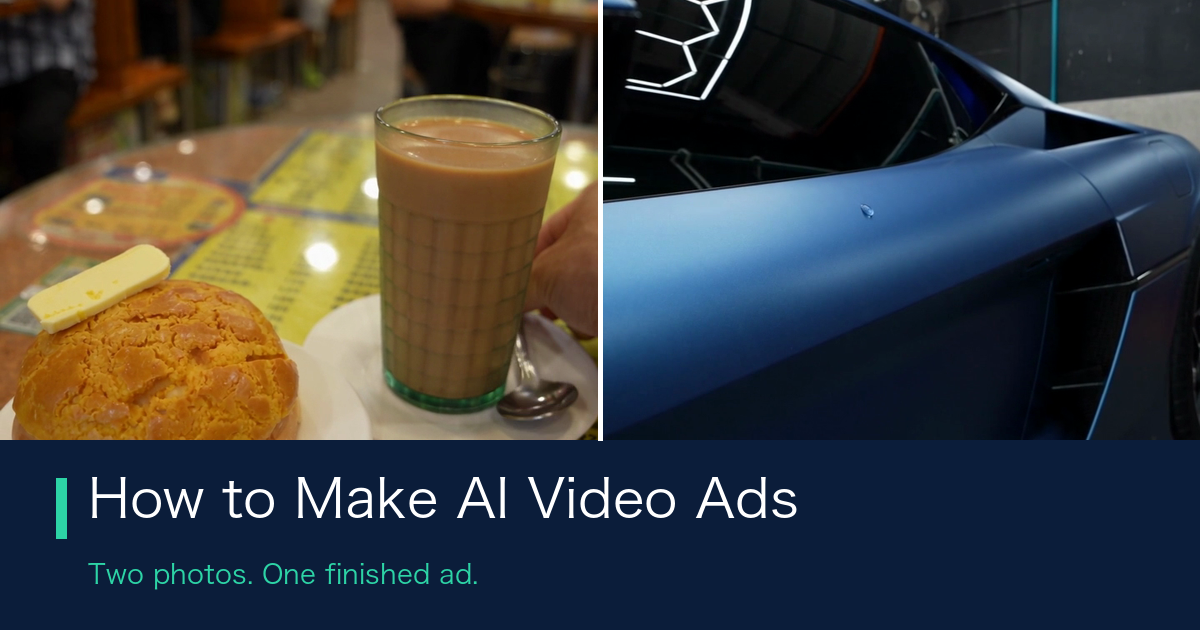
The subject reference was a photo of a pineapple bun and the location reference a photo of a cha chaan teng interior. The three beats are a hand laying a slab of butter on the bun, a push in on the butter sitting there, then a wider frame with the bun and a tall glass of milk tea. Continuity does not actually hold: the first beat is a pale marble counter under cool tube light, the second pulls in so tight the background is an unreadable tan blur, and the third sits on a brown lacquered table with a menu under the glass and a full booth of customers behind. It cuts as one shop only because the bun is the same in all three. Two more things fail our own check table: the menu under the glass in the third beat is rows of pseudo-characters, and several customer faces are in that same frame. For a live ad that beat needs a re-run, or the second half of it cut.
The subject reference was a photo of a car and the location reference a photo of a detailing workshop. The three beats are a pressure washer on the front end, a wash mitt working foam across the panel, then the cleaned body. Continuity holds on the car and the location, though the paint shifts from bright metallic blue in the first beat to dark navy in the other two. The badge did not stay out either: the manufacturer shield and bull render clearly on the nose. The lettering across the splitter is invented and changes letters between frames, so what leaked through the reference is the emblem, and the lettering is the text failure showing up again. The paint drifts too, bright blue in the first beat and dark navy in the other two, which is a reject on our own colour row. The green wall sign in the background carries invented lettering as well.
Neither is a showreel piece. They are what you can put behind a small daily budget on the same day you have the idea.
The same method runs on your own product photo and your own shop. Try one 8-second clip on Lumina. 368 credits tells you whether it holds up.
Ten AI video prompts you can copy for ten industries
These are the reference library. Each one is a standalone 8-second clip, so use them on their own, or lift one as the middle shot of a three-clip ad and write an opening and a closing around it. Each entry has the clip it produced, one line on what the model handled, one line on what broke, and the full prompt in a collapsible block. Paste them as they are.
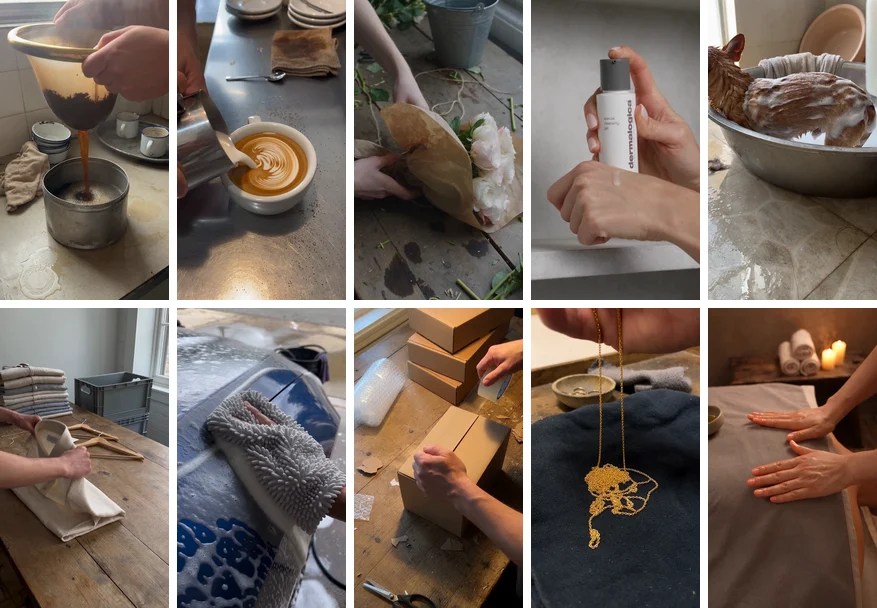
Settings for all ten: 9:16, 720p, 8 seconds, text-to-video, 368 credits. Number 4 is the exception and runs image-to-video with a real product photo attached.
1. Cha chaan teng: the milk tea pour
Handled: the one we were happiest with out of the ten. The tea-stained cloth sock, the scorched pot, the cup rings and the wet patch on worn laminate, the chipped enamel cups, the damp cloth. It reads as a shop with twenty years of trade behind the counter.
Broke: nothing, it came back right on the first run.
Click for the full prompt
Two hands pouring hot tea through a cloth tea sock held in a brass ring into a
dented stainless steel pot, the dark amber stream already falling in the first
frame, foam building on the surface as the pot fills and thick steam rolling up
across the frame. The counter is a worn cream laminate top with old cup rings
and a wet patch, a stack of chipped white enamel cups pushed to one side, a
damp stained cloth bunched next to them, a scratched steel tray holding two
more cups, and behind that plain grubby wall tiles with darkened grout, all of
it slightly out of focus. Flat cool overhead light from a bare tube fitting with
a warm patch of daylight from the left. The camera holds one fixed handheld
frame with small natural drift for the full duration, no push in and no other
camera movement. Photorealistic handheld phone footage, true to life texture,
mildly overexposed highlights, no cinematic grading. Vertical 9:16 composition,
no faces and no people beyond hands and forearms, hands have five fingers in
every frame, no text, letters, numbers, logos, signage, menus, price cards,
labels or printed packaging anywhere, every surface in frame blank and unmarked,
no machines or electronic equipment, shapes stay stable with no warping and no
flicker.
2. Coffee shop: latte art
Handled: usable. The leaf pattern forms cleanly layer by layer, the crema colour is right, and the scratched steel bar top with scattered grounds gives the frame something to sit on.
Broke: nothing worth reporting.
Click for the full prompt
Two hands pouring steamed milk from a small stainless jug into a plain white cup
of espresso, the pour already running in the first frame, the crema splitting
and a leaf pattern forming and settling as the cup fills to the rim. Shot
straight down onto a scratched stainless steel bar top scattered with loose
coffee grounds, a damp brown stained bar towel crumpled at the edge, a stack of
plain white saucers, a spoon lying in a small puddle, and water beads across the
metal. Warm side light from a window on the left, cool fill from above. The
camera stays in one fixed overhead frame with a small handheld sway for the full
duration, no push in and no other camera movement. Photorealistic handheld phone
footage, true to life texture, no cinematic grading. Vertical 9:16 composition,
no faces and no people beyond hands and forearms, hands have five fingers in
every frame, no text, letters, numbers, logos, signage, labels or printed
packaging anywhere, every surface in frame blank and unmarked, no machines or
electronic equipment in view, shapes stay stable with no warping and no flicker.
3. Florist: wrapping a bunch
Handled: holds up under a close look. Cut stems, twine offcuts and water stains on the bench, and the kraft paper creases the way paper actually creases when twine pulls tight.
Broke: one run and it was done.
Click for the full prompt
Two hands wrapping a bunch of white and pale pink flowers in brown kraft paper
on a battered wooden work bench, the hands already folding the paper in the
first frame, then drawing a length of natural twine around the stems and pulling
it tight so the paper crushes and creases sharply and two cut leaves fall onto
the bench. The bench is covered in cut stems, leaf trimmings, short offcuts of
twine and dark wet patches, with a grey plastic bucket of water half in frame
and a pair of plain scissors lying open beside it. Soft daylight from a window
on the right, cool and slightly grey. The camera makes one slow tilt down from
the flower heads to the hands over the full duration, no other camera movement.
Photorealistic handheld phone footage, true to life texture, no cinematic
grading. Vertical 9:16 composition, no faces and no people beyond hands and
forearms, hands have five fingers in every frame, no text, letters, numbers,
logos, signage, labels, printed paper or printed packaging anywhere, the kraft
paper is completely blank, every surface in frame unmarked, shapes stay stable
with no warping and no flicker.
4. Skincare with a real product photo attached
Handled: this one could go straight into an ad. The label reads "dermalogica" letter for letter, registered mark included, with all three lines of small type matching the reference photo. Of the methods we tried, this is the only one that got a real label into generated footage.
Broke: nothing, but it took two runs. On the first, a hand covered the label and the bottle sat half out of frame, which wasted the reference entirely. The prompt was rewritten to pin the bottle centred with the label unobstructed and the second take was clean. Budget two takes on anything carrying a real label.
Click for the full prompt
@image 1 is the product: reproduce this exact bottle and its exact label
faithfully, do not redraw, restyle, re-space or re-colour it. Two hands lift the
bottle from a cluttered bathroom shelf and twist the dropper open in the first
frame, then squeeze one drop of clear serum onto the back of the other hand
where it lands and slowly spreads and catches the light. The shelf is crowded
with a damp folded towel, a plain unmarked ceramic cup holding a toothbrush, a
hair tie, a small dish with water pooled in it, and beyond it fogged tiles with
water spots and a mirror edge, all softly out of focus. Soft daylight from one
side, slightly cool. The camera holds one fixed handheld frame with small
natural drift for the full duration, no push in and no other camera movement.
Photorealistic handheld phone footage, true to life skin texture with visible
pores, no cinematic grading. Vertical 9:16 composition, no faces and no people
beyond hands and forearms, hands have five fingers in every frame, no text,
letters, numbers, logos or labels anywhere except the label carried in from the
reference image, every other surface in frame blank and unmarked, shapes stay
stable with no warping and no flicker.
The four above are copy-paste ready. Open a Lumina account, swap the trade vocabulary and the product photo for your own, and run the rest unchanged.
5. Pet grooming: the rinse (rejected)
Handled: the water behaves. Suds slide off in sheets and the wet coat flattens and darkens the way it should.
Broke: the animal. The head is turned away and cropped at the frame edge, so all you get is one tall tapered ear on a long neck, and it reads as a fawn rather than a small brown dog. Foam texture is mushy on top of that. This one is a reject and it is published here as a reject. We did not try again, so all we can say is that this clip was not recoverable, and no amount of clutter changes the shape of that head.
Click for the full prompt
Two hands lathering white soap suds along the wet back and shoulder of a small
brown dog standing in a shallow stainless steel tub, then lifting a plain
plastic jug and pouring warm water over the fur so the suds slide off in sheets
and the wet coat flattens and darkens. Only the dog's back, shoulder and one ear
are in frame and its head is turned away from the camera. The tub sits on a
scuffed tiled floor with puddles and stray wet fur, a soaked towel draped over
the tub rim, a plain rubber mat and an overturned plastic basin beside it.
Bright flat daylight from a window on the left. The camera holds one fixed low
handheld frame with small natural drift for the full duration, no push in and no
other camera movement. Photorealistic handheld phone footage, true to life wet
fur texture, no cinematic grading. Vertical 9:16 composition, no human faces and
no people beyond hands and forearms, hands have five fingers in every frame, no
clippers, dryers, machines or electronic equipment anywhere, no text, letters,
numbers, logos, signage, labels or printed packaging anywhere, every surface in
frame blank and unmarked, the dog keeps a stable anatomy with four legs and no
warping and no flicker.
6. Fashion ecommerce: linen fabric
Handled: the weave has visible slubs, and the hem swings and settles instead of freezing mid-air.
Broke: the action undoes itself. The hands fold the shirt and press it flat, then lift the whole thing open again, so eight seconds end where they started. This breaks rule three above: the change has to have a consequence, and here the consequence is that nothing happened. Secondary: the stack of garments behind carries faint invented label marks even with the ban written into the prompt, so crop that corner or pick a frame where the stack sits further out of focus.
Click for the full prompt
Two hands press and smooth a folded oatmeal linen shirt on a worn wooden table
in the first frame, then pick it up by the shoulders and let it fall open so the
fabric unfurls downward, the creases releasing and the hem swinging and settling.
The table is crowded with a leaning stack of folded garments in muted colours,
a loose thread, a crumpled sheet of plain tissue paper, two bare wooden hangers
and an open grey plastic crate at the edge, all slightly out of focus. Soft
daylight from a large window on the right, cool and even. The camera holds one
fixed handheld frame with small natural drift while the fabric moves through it,
no push in and no other camera movement. Photorealistic handheld phone footage,
true to life woven fabric texture with visible slubs, no cinematic grading.
Vertical 9:16 composition, no faces and no people beyond hands and forearms,
hands have five fingers in every frame, all fabric completely plain with no
print, no pattern, no tags and no stitching text, no text, letters, numbers,
logos, labels, tape measures or printed packaging anywhere, every surface in
frame blank and unmarked, shapes stay stable with no warping and no flicker.
7. Car detailing: the foam wipe
Handled: this one also demonstrates rule three. Foam sheets off the wet blue paint, a sharp reflection of the sky opens on the cleaned panel, and there are puddles on the concrete underneath.
Broke: nothing, because the frame was written tight enough to give it no chance. No badge, grille, light or wheel appears anywhere in shot. Describe a car generically and the model reaches for a real carmaker's trade dress, so the framing has to exclude every surface that identity lives on.
Click for the full prompt
A hand in a soaked wash mitt drags across a wet deep blue painted car panel
already covered in white foam in the first frame, the foam sheeting away behind
the mitt and clear water running down while a sharp mirror reflection of the sky
opens up on the cleaned paint. Framed tight on a plain curved painted panel with
no badge, no grille, no lights, no window and no wheel in view. Below and behind,
soft focus wet concrete with puddles, a black bucket with a coiled hose beside
it and a damp folded towel over the bucket rim. Overcast daylight, cool and
diffuse, with one bright soft highlight sliding along the paint. The camera makes
one slow lateral follow alongside the panel for the full duration, no push in and
no other camera movement. Photorealistic handheld phone footage, true to life
water and paint texture, no cinematic grading. Vertical 9:16 composition, no
faces and no people beyond a hand and forearm, the hand has five fingers in every
frame, no text, letters, numbers, logos, badges, emblems, signage or printed
packaging anywhere, every surface in frame blank and unmarked, no machines or
electronic equipment, shapes stay stable with no warping and no flicker.
8. Online store: sealing the box
Handled: usable, and it came back right on the first run. The tape pulls, sticks and flattens under the heel of the palm, and the box is visibly sealed by the end. Kraft and tape textures both hold.
Broke: nothing we could fault.
Click for the full prompt
Two hands fold the flaps of a plain kraft cardboard box shut in the first frame,
then pull a strip of clear packing tape across the seam and press it down firmly
with the heel of the palm so the tape flattens and the box is sealed. Shot
straight down onto a scarred wooden desk covered in working mess: torn offcuts
of bubble wrap, a crumpled ball of plain paper, three more flat kraft boxes
stacked unevenly, a pair of scissors and a scattering of paper dust. Warm
tungsten light from above with a cooler daylight edge from the left. The camera
stays in one fixed overhead frame with a small handheld sway for the full
duration, no push in and no other camera movement. Photorealistic handheld phone
footage, true to life cardboard and tape texture, no cinematic grading. Vertical
9:16 composition, no faces and no people beyond hands and forearms, hands have
five fingers in every frame, the boxes and tape are completely blank with no
print, no text, letters, numbers, logos, barcodes, labels, address slips or
printed packaging anywhere, every surface in frame unmarked, no machines or
electronic equipment, shapes stay stable with no warping and no flicker.
9. Jewellery: the chain pour
Handled: usable. The chain falls in a continuous line, coils into a loose pile and catches small points of light as it lands. The metal reads correctly and the cloth sits dark and flat behind it.
Broke: nothing. The prompt bans gemstone cut detail, hallmarks and engraving, which is what keeps it clean. Those are the surfaces the model would try to write on.
Click for the full prompt
A fine yellow metal chain already pouring from between two fingers in the first
frame, falling in a thin continuous line onto dark crumpled velvet cloth where it
coils into a loose pile, catching small bright points of light as it lands. The
velvet lies on a worn wooden tray with a shallow ceramic dish of loose plain
rings pushed to one side, a soft grey polishing cloth bunched next to it and fine
dust visible on the wood. A single warm lamp from the upper left with deep shadow
on the right. The camera holds one fixed close handheld frame with small natural
drift for the full duration, no push in and no other camera movement.
Photorealistic handheld phone footage, true to life metal and velvet texture, no
cinematic grading. Vertical 9:16 composition, no faces and no people beyond hands
and forearms, hands have five fingers in every frame, no gemstones with cut
detail, no hallmarks, no engraving, no text, letters, numbers, logos, boxes,
labels or printed packaging anywhere, every surface in frame blank and unmarked,
shapes stay stable with no warping and no flicker.
10. Massage: the press
Handled: oil goes into the palm, the palms rub together and push out. The hands themselves are fine, five fingers throughout. Candlelight, steam and the rolled towels behind all sit right.
Broke: there is nobody on the table. The cloth is draped over a flat surface with no shoulder and no back under it, so the hands are working oil into a flat sheet. Anything showing work done on a body has to put the body in the prompt, because the model will not supply one.
Click for the full prompt
Two hands tip a small ceramic bowl and pour a little oil into one palm in the
first frame, rub the palms together, then press slowly and firmly along a
client's shoulder and upper back over a folded grey towel so the towel creases
and gathers under the pressure. The client lies face down with the head turned
fully away from the camera and out of focus. Around the table are rolled damp
towels stacked unevenly on a low wooden shelf, two burning candles, a folded
linen sheet slipping off the edge and a worn wooden floor below. Warm
candlelight from the right with soft shadow, fine steam drifting. The camera
makes one slow lateral drift along the client's back for the full duration, no
push in and no other camera movement. Photorealistic handheld phone footage, true
to life skin and fabric texture, no cinematic grading. Vertical 9:16 composition,
no visible faces, hands have five fingers in every frame, no medical or
professional equipment of any kind, props limited to towels, candles, bowls and
furniture, no text, letters, numbers, logos, signage, labels or printed packaging
anywhere, every surface in frame blank and unmarked, shapes stay stable with no
warping and no flicker.
What AI video generation cannot do
The twenty earlier test runs set the boundary, and nothing in this round moved it.
Generated text fails every time. A four-letter brand name came back misspelled twice, once from a prompt that spelled it out letter by letter. Chinese signage renders as pseudo-characters that drift shape between frames. Leave every text surface out of the scene and set type in post.
Trade dress gets invented, and it gets imported. We described a product generically and never named a brand, but the colour combination happened to belong to a famous one and the model handed back that brand's design language unprompted. Feed a reference photo of a real branded object and the model hands back that brand's actual badge, whatever the prompt says about it. Reference images override prompt prohibitions, so the only reliable controls are the framing and the photo you upload.
We could not get professional or medical hardware out of it. We asked several times and what came back was an object that exists nowhere, which is why the gym prompt was cut from this set.
We uploaded one photorealistic face and got "The input image may contain real people" back, so we did not find a route to a recurring AI presenter.
720p was the ceiling on our plan when we ran these, in August 2026. Upscale before you upload, because soft footage next to natively shot Reels reads as low quality before it reads as AI.
Reference images are the one reliable exception to all of this, and the two finished ads above are the proof. The receipts for every failure, with frames, are in the full Seedance 2.5 test.
Is AI video generation worth it?
We generated ten single clips and kept nine, with the pet one rejected on animal anatomy. Two finished 20-second ads came to 1,104 credits each, and the 30-second single take was 1,380. About 8,200 credits in total with re-runs.
Style adjectives remain the weakest lever available, and what decides whether a clip passes as a real Hong Kong business is how much mess you were willing to put on the counter, whether a hand is doing something, whether that something finishes, and whether the camera stayed put. What decides whether three clips read as one business is the pair of reference images, and nothing else we tried did it. Get both right, put an offer on the end, and you have an ad.
If you want the full model teardown with every failure frame, read the Seedance 2.5 test, or try Lumina and start with one subject photo, one location photo and three prompts.
FAQ
How much does a finished 20-second AI ad cost? 920 credits as a single 20-second run, or 1,104 if you cut it from three 8-second clips at 368 each. The end card and every piece of on-screen text are made in post at no extra generation cost.
How much does an 8-second AI video cost? 368 credits at 720p. Pricing is linear at 46 credits per second, and aspect ratio does not change it.
Do I really need two reference images? If the clip has to be recognisably your shop, yes, whether you split it or run one take. Without them every run invents a different shop and a different car. A one-off standalone clip does not need them.
Is one long run better than three 8-second clips? Continuity holds either way, and the single take is cheaper: 920 credits for 20 seconds against 1,104 cut from three. Seedance 2.5 also handles its own transitions between beats better than we cut them by hand. The main thing splitting buys is cheap changes, since a re-run costs 368 against 920 to regenerate the whole 20 seconds. Split when you want several versions of a scene to test, run one take when the prompt is solid.
Can I use a photo of a branded product as a reference? Only if the brand is yours. The model reproduces what you upload, and prompt wording banning logos or badges does not override it. We proved that with a real car photo, where the manufacturer badge came through clearly.
Can I get my real product label into an AI video? Yes, through image-to-video with the product photo attached. Our skincare clip reproduced a "dermalogica" label letter for letter, registered mark and small type included. Prompted text fails every time, so the reference image is the only route.
Does Seedance 2.5 speak Cantonese? Yes, and intelligibly, with pacing that sits slightly stiff against a human read. State language, accent and delivery before the speaker and the line, like Dialogue language: Cantonese (香港廣東話). The owner says in a warm natural Hong Kong accent: {line}. Leave it vague and it picks a persona for you. For a live ad, record a real voice on a phone and keep the generated read for b-roll and demos.
Why does my AI video look fake even though the lighting is good? Most likely the scene is empty. We emptied the background to avoid the text failures, and a counter with nothing on it reads as fake regardless of how well it is lit. Name the clutter explicitly and pick clutter that carries no text.
Which Hong Kong industries work best? The line is whether the shot needs a person's body in it. Anything built on hands, water, fabric, paper, food or steam works, and cha chaan teng, florist, car detailing, packing and jewellery all came back usable on the first take. Anything that shows a real person being treated we could not do: our massage clip came back with nobody on the table at all, just cloth over a flat surface. We have not tried chiropractic or aesthetics. On equipment we tried a gym and could not get it out.
Why was the pet grooming clip rejected? The dog's head is turned away and cropped at the frame edge, leaving one long ear on a long neck, and it reads as a fawn. We did not run it a second time, so all we know is that this one was not recoverable.
Should I write prompts in English or Chinese? Either. The same brief run in both languages produced output of the same quality in our earlier test.
Can Seedance 2.5 write Chinese signage? No. Background signage comes back as pseudo-characters and specified characters change shape between frames within one take. Keep text surfaces out of the scene and add type in post.
How many takes should I budget? One for the straightforward prompts and two for anything carrying a real label or a live animal. On a three-clip ad, budget a fourth run for the middle shot, since that is the one people actually watch.

About the author
Frankie Chan · Co-Founder, Kick Ads
Frankie is an ex-Googler and paid media strategist. He has managed Google Ads and Meta Ads for ecommerce and lead generation businesses across Hong Kong and Malaysia since 2017, working closely on strategy, reporting and client growth planning.