
ChatGPT Ads Guide 2026: Hong Kong Access, Setup and Costs
By Frankie Chan, Co-Founder · Updated 8 October 2026 · 24 min read
Jump to section
- Can Hong Kong businesses run ChatGPT Ads?
- Where ChatGPT Ads are available in Asia
- What a ChatGPT ad looks like and who sees it
- How ChatGPT matches ads to conversations
- ChatGPT ad formats
- ChatGPT Ads Manager updates from September 2026
- How to create a ChatGPT ad campaign, step by step
- Targeting options in ChatGPT Ads
- How much do ChatGPT Ads cost?
- Measuring ChatGPT Ads results
- ChatGPT Ads compared with Google Ads
- How we would plan a first ChatGPT Ads test
- FAQ
ChatGPT Ads are OpenAI's ad product: sponsored listings that appear below ChatGPT's answers. On 23 September 2026 OpenAI started rolling them out in Singapore, Malaysia, Thailand, Indonesia, the Philippines, Vietnam and Taiwan. Hong Kong is not on the list. This guide covers what that means for Hong Kong businesses, how the ads look and who sees them, how to create a campaign step by step, what OpenAI says about cost and measurement, and how we would plan a first test. Every platform detail below was checked against OpenAI's own announcements and Help Center on 7 October 2026.
Quick answer: ChatGPT Ads appear below ChatGPT's answers for users on the Free and Go plans, labelled Sponsored. As of 7 October 2026 they are available in more than 60 countries, including Malaysia, Singapore, Taiwan, Thailand, Indonesia, the Philippines and Vietnam. Hong Kong is not one of them. Self-serve Ads Manager requires the company that advertises and pays to be registered in an available country, so a Hong Kong business needs a company in one of those markets to test it.
Can Hong Kong businesses run ChatGPT Ads?
Not from a Hong Kong company, as of 7 October 2026. Two facts from OpenAI decide this.
- The advertiser has to be based in an available country. OpenAI's Ads Manager availability page says the legal entity that will advertise and be billed must be based in a country on its list. Hong Kong is not on the list.
- Hong Kong is not a market OpenAI lists for ChatGPT Ads. The September announcement says ads are available in over 60 countries and links to the same list. Hong Kong is also missing from OpenAI's list of countries where ChatGPT is supported.
That still leaves a few routes for a Hong Kong business.
- Use a company you already have in an available market. A group with a registered company in Malaysia, Singapore, Taiwan or another listed country can open an account under that entity. OpenAI's billing guide says the billing details and card should match the business entity and country used when the account was created. Kick Ads has an office in Malaysia and has opened its own Ads Manager account under its Malaysian company. If your company is registered in Malaysia or another available market, we can help you open the account and run a small first test.
- Buy through OpenAI's sales team or an agency partner. OpenAI's announcement names its Ads Solutions team and agency partners including dentsu, Havas Media, Omnicom Media, Publicis Groupe and WPP. This changes how you buy. The ads still run only in the listed markets.
- Register interest. You can sign up at ads.openai.com from anywhere. OpenAI's FAQ says it will notify you when your country becomes available, and that creating an account does not give you access before then.
Can an agency run ChatGPT Ads for your brand?
OpenAI's account setup guide says to create a separate account for each advertiser. Its verification guidance checks that the account, ads and landing pages accurately represent your business and any relationships with other brands. We have not found an OpenAI page that says whether an agency's company can be the advertiser of record for a client's brand, so we would not plan a campaign on that basis. The route OpenAI documents is an account in the brand's own name, with the agency invited as a user (Admin, Member or Viewer).
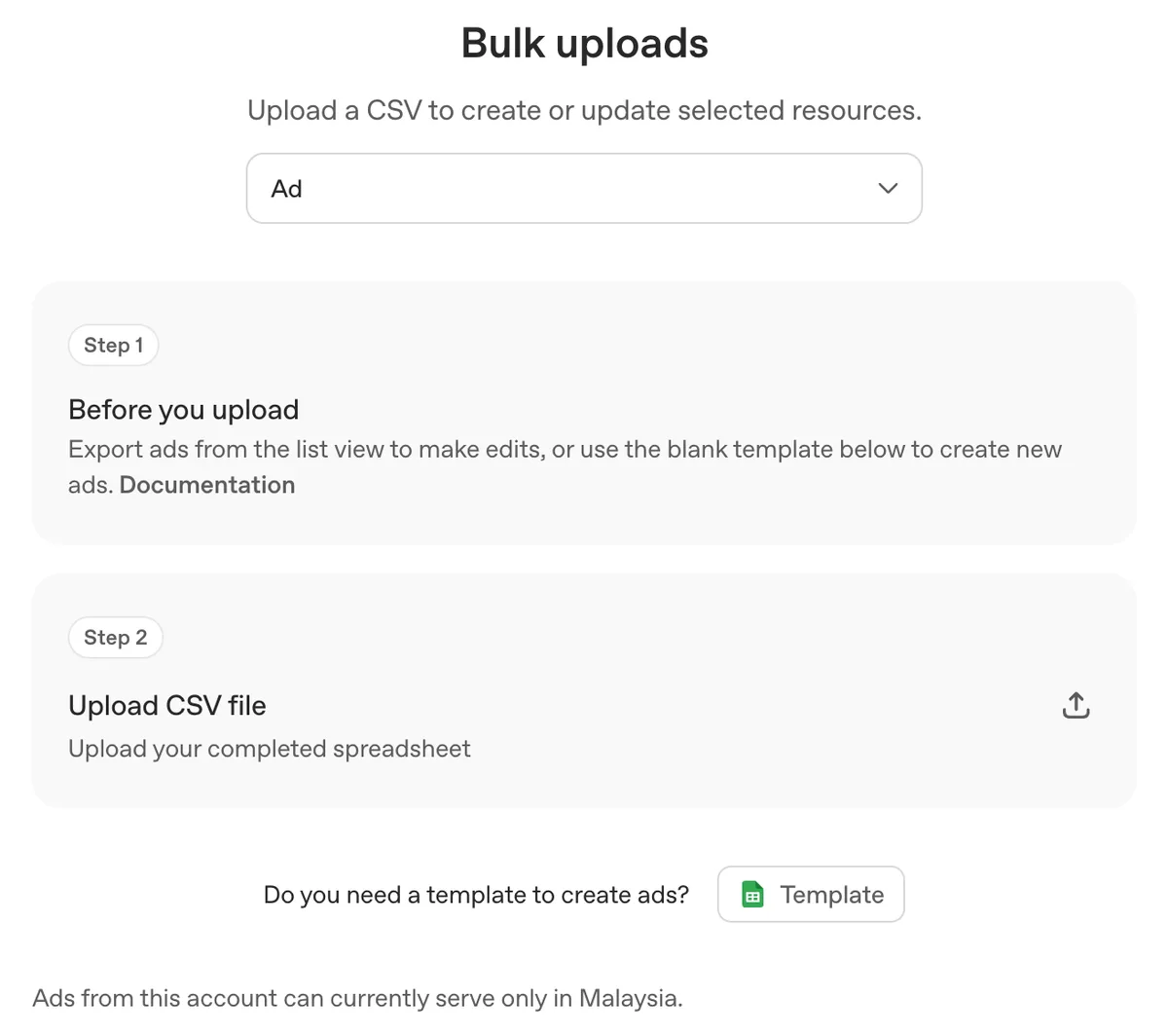
Kick Ads has a registered company in Malaysia, and our own Ads Manager account is set up with Malaysia as its location. When we checked it on 7 October 2026, new campaigns defaulted to Malaysia, and the bulk upload screen said: "Ads from this account can currently serve only in Malaysia." That matches the home-country limit described below. For a client with a company in an available market, we can manage the client's own account as an invited user.
Where ChatGPT Ads are available in Asia
OpenAI's 23 September 2026 announcement added seven markets: Indonesia, Malaysia, the Philippines, Singapore, Thailand, Vietnam and Taiwan. Australia, New Zealand, Japan, South Korea and India were already live. In Asia Pacific, the availability list on 7 October 2026 showed self-serve access in:
- Australia, New Zealand
- Japan, Korea, Taiwan
- India
- Singapore, Malaysia, Thailand, Indonesia, the Philippines, Vietnam
One limit matters for anyone opening a new account. OpenAI's campaign guide says some new self-serve accounts can at first advertise only in their home country, the country tied to the ad account. The account becomes eligible for other supported countries after identity verification is approved and it has reached the required spend in the home country. A new account under a Malaysian company should expect to start with Malaysia.
What a ChatGPT ad looks like and who sees it
Ads appear below the end of a ChatGPT response, labelled Sponsored and visually separated from the answer. According to OpenAI's Help Center, each ad has the advertiser name, a favicon, a title, a line of copy, a landing page and an image. One ad unit can show several items from one advertiser, or items from several advertisers.
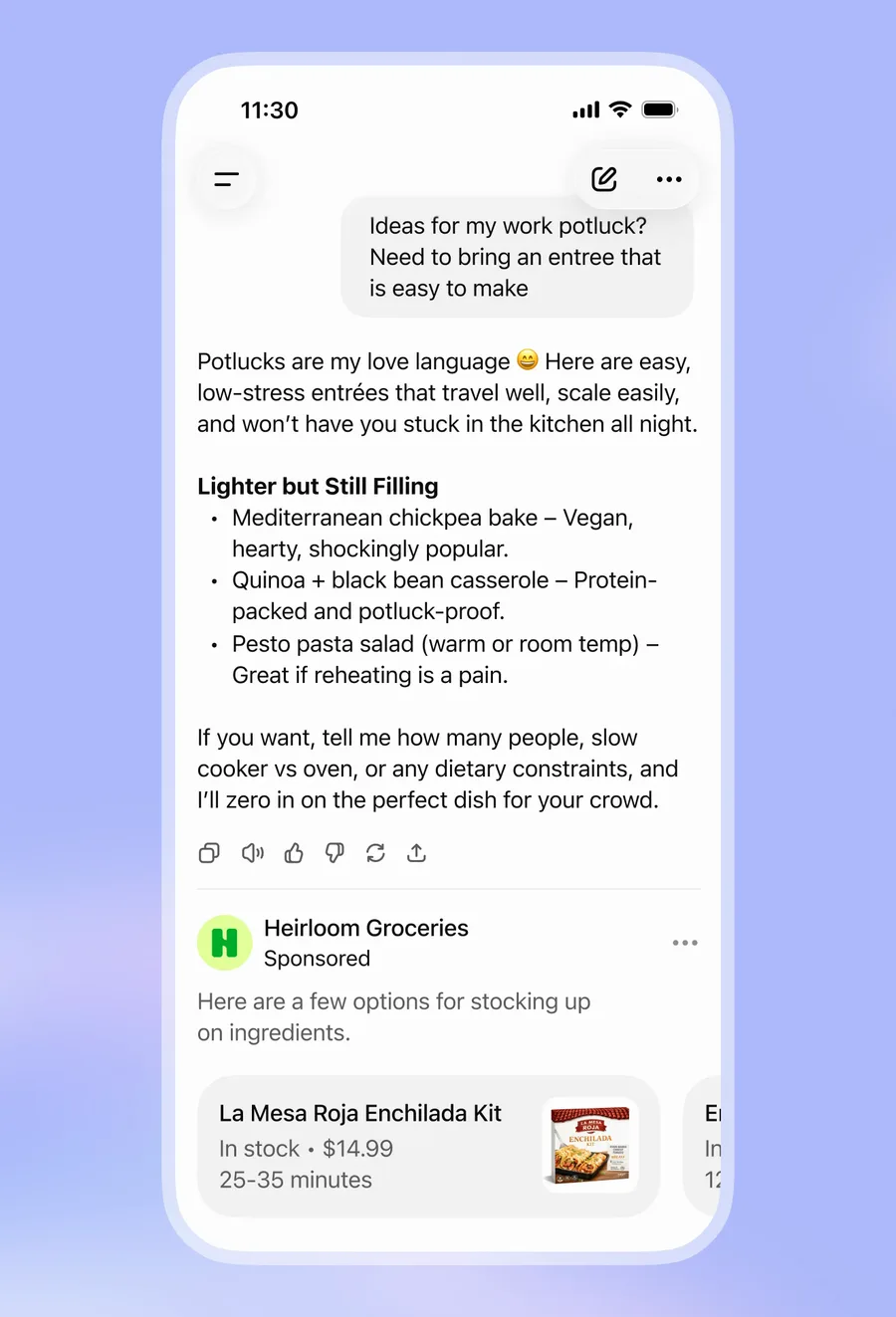
Image: OpenAI, from Our approach to advertising and expanding access to ChatGPT (16 January 2026). OpenAI published it as an example of the format.
OpenAI's user FAQ sets out who sees ads and where they are kept out:
- Ads are shown to users on the Free and Go plans. Plus, Pro, Business, Enterprise and Edu accounts do not see ads.
- Accounts identified as belonging to people under 18 do not see ads, and neither do Temporary Chats.
- Ads are not eligible to appear near sensitive or regulated topics, including personal health, mental health and politics.
- OpenAI says ads do not influence ChatGPT's answers, and advertisers do not see users' chats. Advertisers get aggregated reporting such as views and clicks.
How ChatGPT matches ads to conversations
There are no keywords to bid on. OpenAI says its system picks ads using the context and intent of the current conversation, the ad's landing page, title and copy, the advertiser's context hints and targeting, and, when the user has ad personalisation on, signals from their wider ChatGPT use. When several ads qualify, a relevance-weighted second-price auction decides which shows first.
Context hints are the closest thing to keywords. You add them per ad group to tell the system what you sell, who it helps and when it is useful. OpenAI's guide to context hints gives this example: "cushioned everyday running shoes for beginners training for their first 5K" adds more than "running shoes". Hints are not exact-match keywords and do not guarantee delivery in any conversation. The ad group screen in Ads Manager says the same: hints "guide matching but aren't exact-match targeting rules".
Step 6 of the setup guide below shows the hint we wrote for our own test campaign.
For teams coming from Google Ads, three habits cause problems:
- A keyword list pasted into context hints. OpenAI asks for a natural phrase about one idea.
- One ad per ad group. OpenAI's ad creation guide recommends many distinct title and copy variations so the system finds more conversations where an ad fits. The bulk upload checklist recommends titles of 16 to 24 characters (50 maximum) and copy of 32 to 48 characters (100 maximum).
- A landing page that blocks OpenAI's crawlers. Landing pages must not block OAI-AdsBot or OAI-SearchBot. If your
robots.txtwas written to keep AI crawlers out, check it before launch. Our GEO guide explains which bot does what.
ChatGPT ad formats
Standard ads. The unit shown above: advertiser name, image, title, copy and a link. Step 7 of the setup guide below shows the ad editor.
Product feed ads (beta). Retailers upload a product feed in Ads Manager under Tools → Feeds, by CSV or TXT upload, a hosted URL or SFTP. Product cards show the product image, title, star rating, price, sale price and brand. You then create a campaign with the Product feed campaign type, filter which products each ad group can use, and set one ad template per ad group. OpenAI's product feed guide notes that uploaded items expire after two weeks, so a hosted URL or scheduled SFTP upload is the practical choice, and that new product feed campaigns can only target at country level. If you already run a Merchant Center feed for Google Shopping, most of the product data work is done, though the feed has to be mapped to OpenAI's specification.
Image ads during image generation (US test). On 5 October 2026 OpenAI announced a visual ad format that appears while Free and Go users are generating images, kept separate from the image being created. Testing begins later in October 2026 in the US with an initial group of advertisers. OpenAI has not said when it will reach Asia.
Sponsored Agents (limited alpha). A format where people chat with an AI representative of a business, opened from an ad. OpenAI's Help Center says it is limited to selected advertisers and OpenAI is not taking early-access requests.
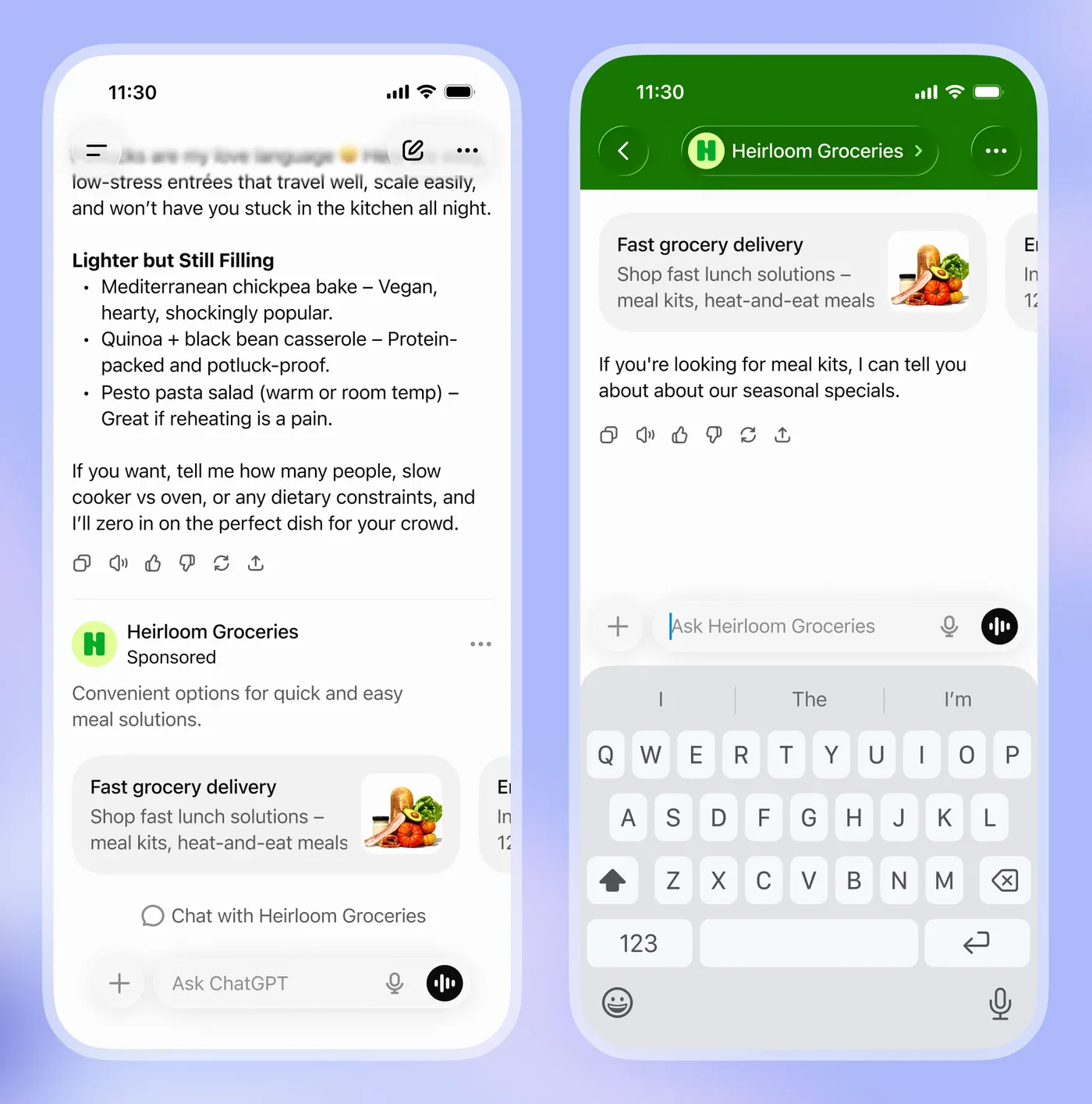
Image: OpenAI, from Our approach to advertising and expanding access to ChatGPT (16 January 2026). It shows how OpenAI described a chat-with-advertiser ad before launch.
ChatGPT Ads Manager updates from September 2026
OpenAI emailed advertisers about four Ads Manager changes at the end of September, and Search Engine Roundtable published the email on 30 September 2026. We checked each one against OpenAI's documentation.
- Bulk creation for product feed campaigns. The email says you can create several product feed campaigns and ad groups from a spreadsheet, with ad templates generated automatically, via Campaigns → Bulk uploads → Bulk sheet and the Product feed template. OpenAI's Ads Manager overview still said on 7 October that CSV upload does not support creating product feed campaigns, so check which template your account shows before planning around it.
- Product review status in the Products tab. According to the email, you can track products through review and see why a product was rejected. OpenAI's Help Center describes the Products tab as a reporting view: a product appears once it has delivery data, which can take up to seven hours after delivery starts.
- Conversions beyond the campaign goal through the API. OpenAI's reporting documentation confirms you can retrieve attributed events that are not the campaign's goal. For example, a campaign can optimise for sign-ups while you report the purchases it drove, without changing its goal.
- Separate account, brand and legal names. Since 25 September 2026 these are managed separately in Settings → General. The Account Name is internal and changing it triggers no review. The Brand Name is shown with your ads, and changing it pauses ad serving until the new name is approved. Changing the Legal Name restarts business review and may pause serving. We would settle the brand name before launch, and schedule any rename outside a sale period with time left for review.
How to create a ChatGPT ad campaign, step by step
We set up Kick Ads' own Ads Manager account and launched two test campaigns on 7 October 2026. The account is registered to our Malaysian company and bills in USD, and the screenshots below come from it. Ads Manager is still in beta, so the screens and limits in your account may differ. The results of that one-day test are at the end of this section.
Before you create a campaign
OpenAI's setup guide and quickstart give this order for a new account.
- Check your company and industry are eligible. The company must be registered in an available country. Then check OpenAI's policy eligibility table. Outside the US, many health categories are not allowed at all, including hospitals and urgent care, medical testing, telehealth, cosmetic procedures and dietary supplements. Some financial products, such as deposit accounts, credit cards, insurance, mortgages and investing, are limited to select approved advertisers. Others, including personal loans, buy now pay later and crypto, are not allowed, and neither are legal services. A clinic or insurer should check this before anything else.
- Sign up at ads.openai.com with the OpenAI login you use for ChatGPT. You can enter your website URL to draft a first ad and campaign, or skip that and go straight to Ads Manager. If you use the first option, OpenAI says the ads can go live once they pass review, so pause the campaign if you are not ready to spend.
- Enter the account details carefully. Country or region, currency and time zone cannot be changed after the account is created. Ours is set to Malaysia, USD and Hong Kong time. The advertiser name you enter fills the Account, Brand and Legal Name fields until you change them.
- Set up billing. Add a billing profile and a credit card. Billing is postpay: your card is charged when unpaid spend reaches the account's payment threshold, and any balance left at month end is charged then. We added a credit card issued in Malaysia, the same country as the company on the account.
- Complete business verification. Ads may not serve until the account is verified. The Help Center gives up to seven business days for this review. Step 9 below shows the verification screen we were sent to.
- Invite your team or agency under Settings → Users as Admin, Member or Viewer.
Create the campaign
Open Create → Create campaign. The Overview page also lists the setup tasks still open. Ours showed three: add a payment method, verify a phone number from the ad account's country, and set up conversions. If the campaign will optimise for leads or sales, set up conversion tracking first (the next part of this guide).
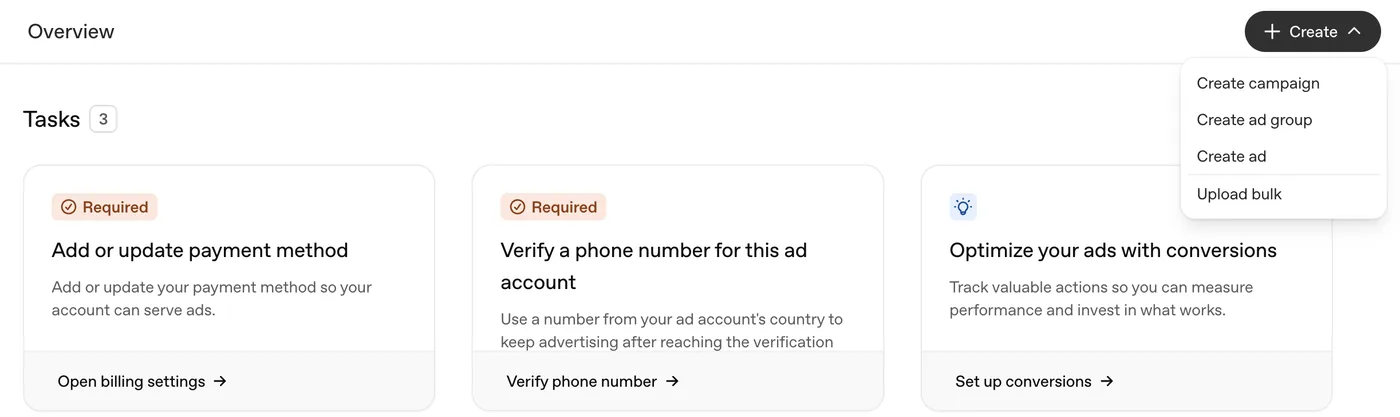
Name the campaign and choose the campaign type and objective. Campaign type is Standard or Product feed. The objective is Reach, Clicks or Conversions, and some Help Center pages call Reach "Views". The location defaulted to Malaysia, the account's home country, and we left it there.

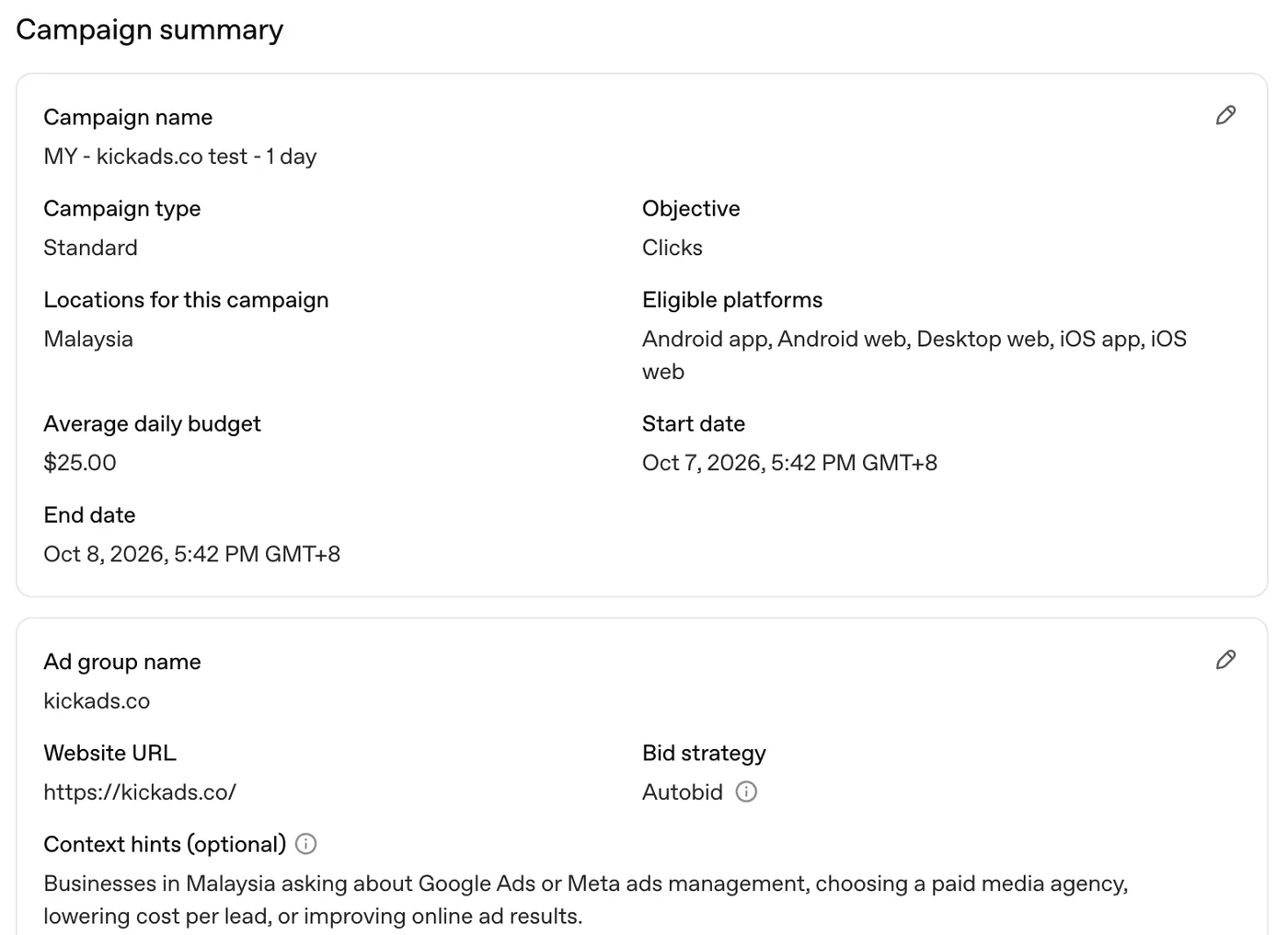
Set the budget and dates. You can choose a daily budget or a campaign total budget. Our account would not accept less than US$25 a day, or less than US$100 for a campaign total budget. Under the amount, the screen shows the most the campaign can spend: twice the daily budget in one day and seven times it over seven days. We set US$25 a day with an end date one day later because these were tests.
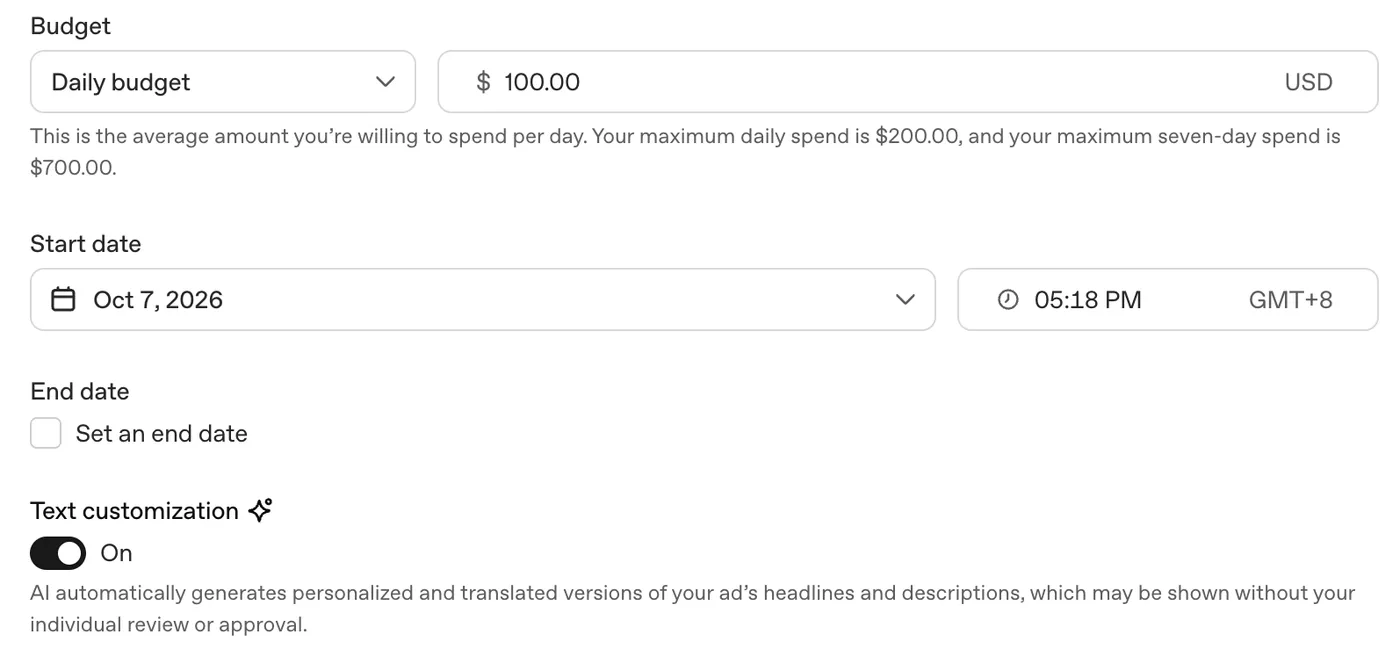
Decide on Text customization. It is switched on by default. The screen says AI generates personalised and translated versions of your headlines and descriptions, which may be shown without your individual review or approval. We turned it off so that OpenAI does not rewrite or translate our copy before we have read it. If your wording needs approval, for example in a regulated category, we would turn it off as well.
Add tracking parameters. The optional Tracking parameters field adds text to the landing page link when someone clicks the ad. We added UTMs at campaign level:
utm_source=chatgpt&utm_medium=cpc&utm_campaign=...&utm_id={campaign_id}&utm_content={ad_id}. That lets GA4 split ChatGPT traffic by campaign and by ad. The supported placeholders are{campaign_id},{ad_group_id},{ad_id},{ad_account_id}and{oppref}.Create the ad group. Enter a name, the default destination URL and the context hints. The bid strategy showed Autobid. We wrote the context hint as one sentence about the customer's situation, as OpenAI's guide recommends (see the context hints section above).
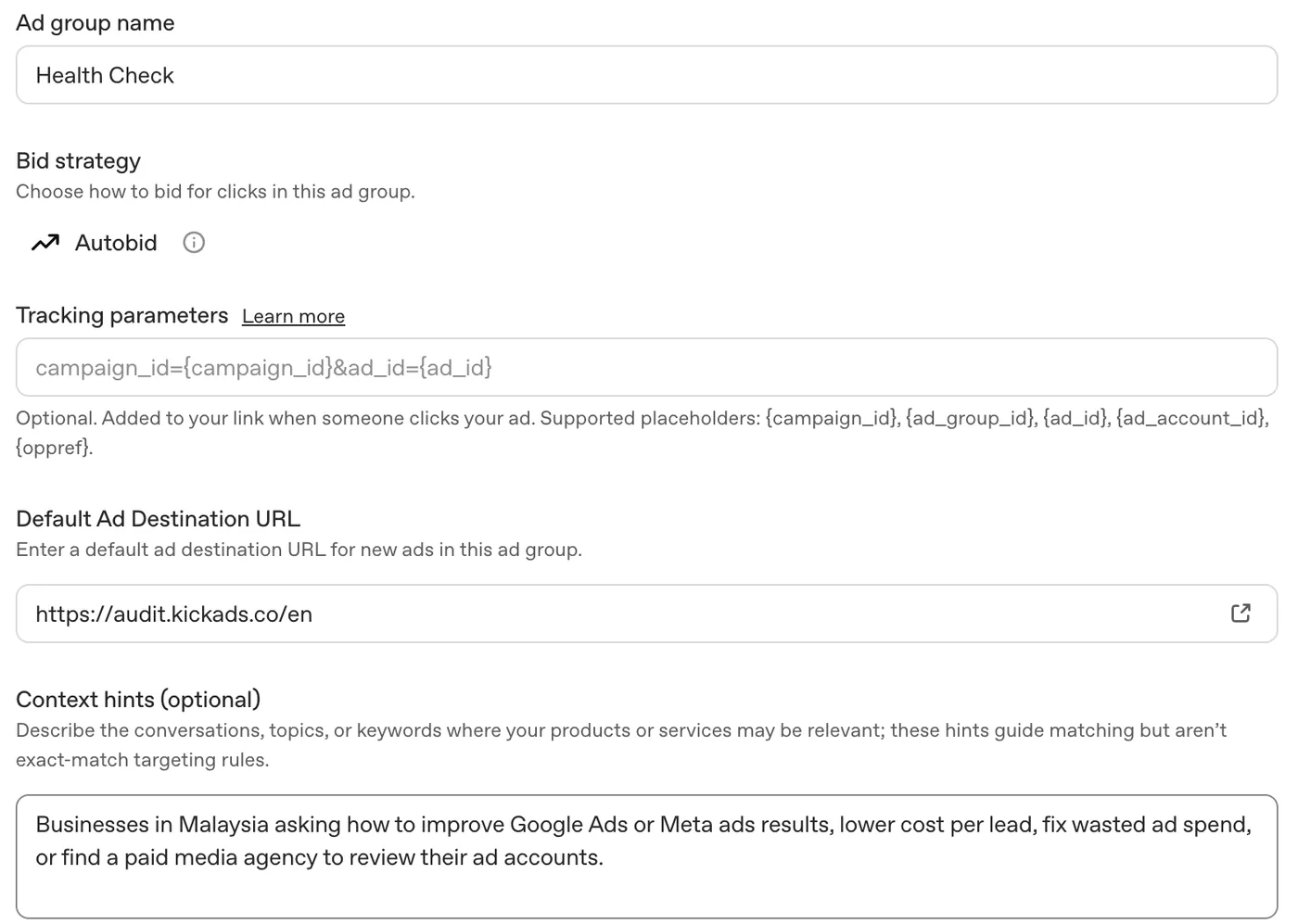
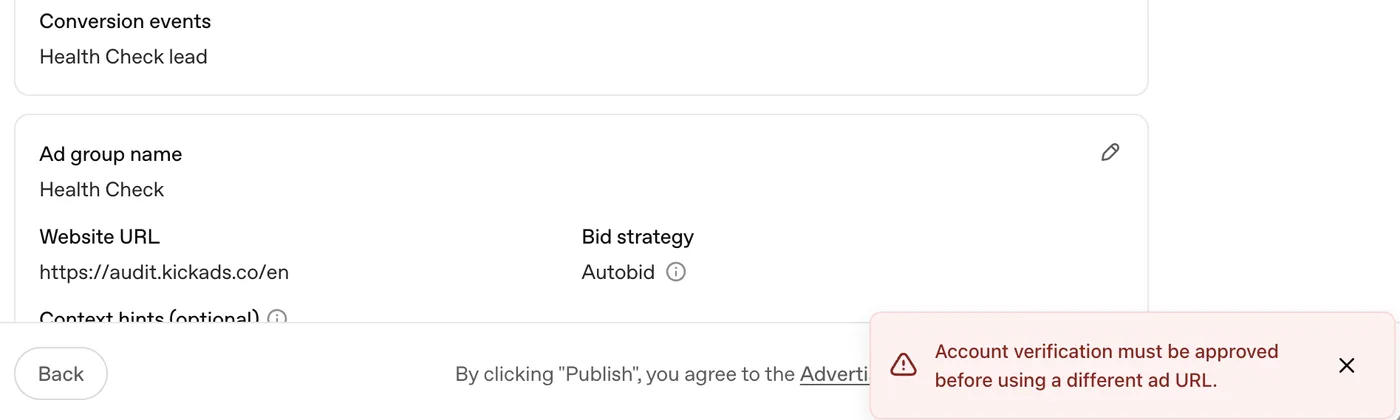
Check the destination URL before you go further. Until account verification is approved, our account could only send ads to the URL already approved on the account, which is kickads.co. When we tried audit.kickads.co, publishing stopped with the message "Account verification must be approved before using a different ad URL". Both test campaigns point to kickads.co for now.
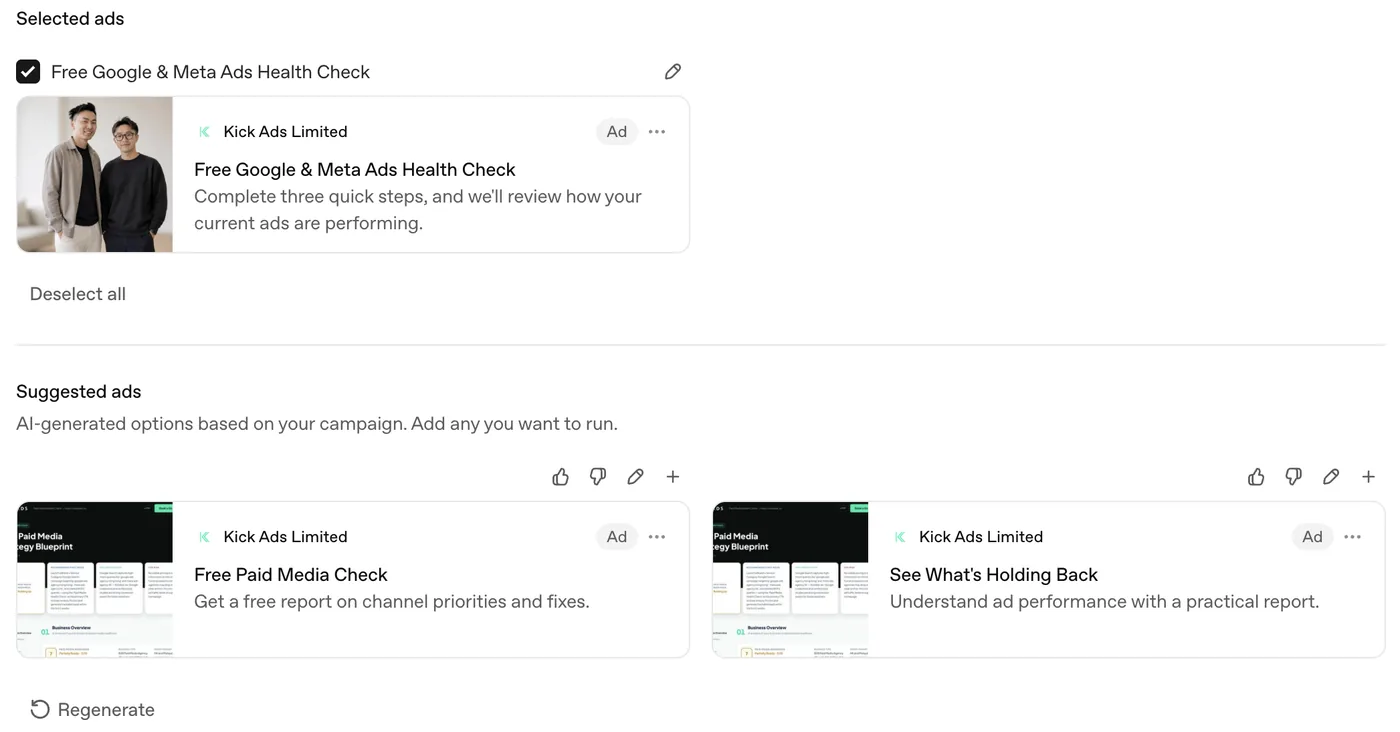
Write the ad. The headline allows 50 characters and the description 100. You upload an image and can crop it. Under your own ad, Ads Manager shows Suggested ads: AI-generated options based on the campaign, using images from your landing page. You can add, edit or ignore them. OpenAI recommends several distinct ads in each ad group.
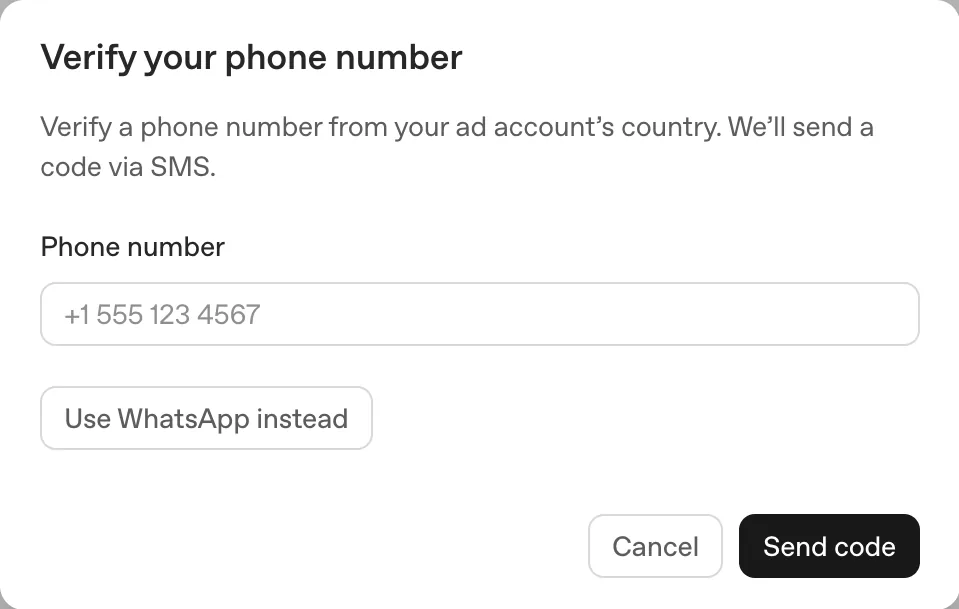
Review and publish. The Campaign summary lists every setting on one screen. The first time we clicked Publish, Ads Manager asked us to verify a phone number from the ad account's country. The code comes by SMS, or by WhatsApp if you choose that. A Hong Kong group opening an account through an overseas company needs a local number in that country ready at this point.
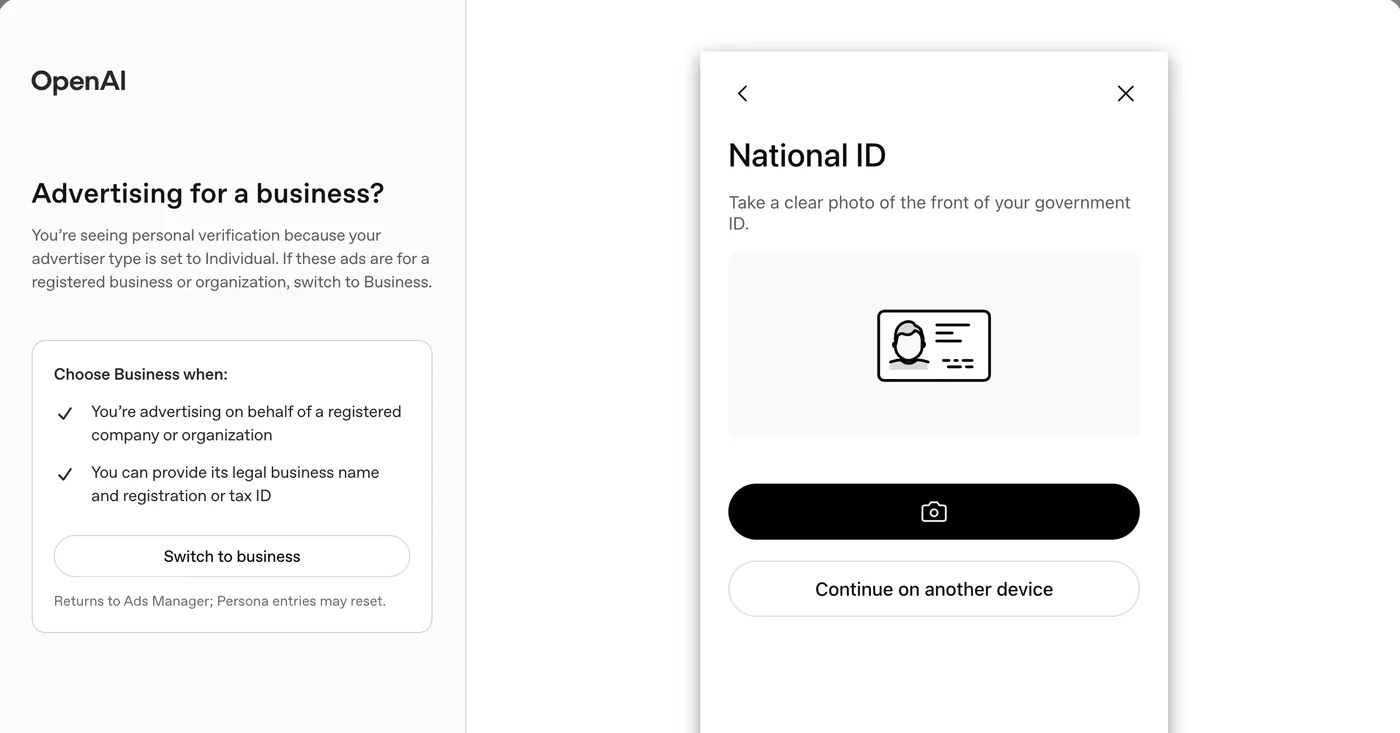
Complete identity verification. Account verification opens an identity check run by Persona. When the account's advertiser type is Individual, it asks for a photo of a government ID. For ads placed on behalf of a registered company, the panel offers Switch to business, which asks for the legal business name and a registration or tax ID instead. A company account should normally use Business.
After publishing, both test campaigns showed Serving in the campaign list on 7 October 2026.
Set up ChatGPT Ads conversion tracking
The Conversions page in Ads Manager shows a four-step checklist: create a data source, create a conversion event, implement and log the event, and link the event to a campaign. This is how we set it up for a lead form.
Create a data source. Go to Conversions → Create data source and give it a name. We named ours after the site it tracks.
Install the Pixel setup code. Ads Manager shows a Pixel ID and a script. Paste the script into the
<head>of every page, near the top, once per page. Google Tag Manager works too.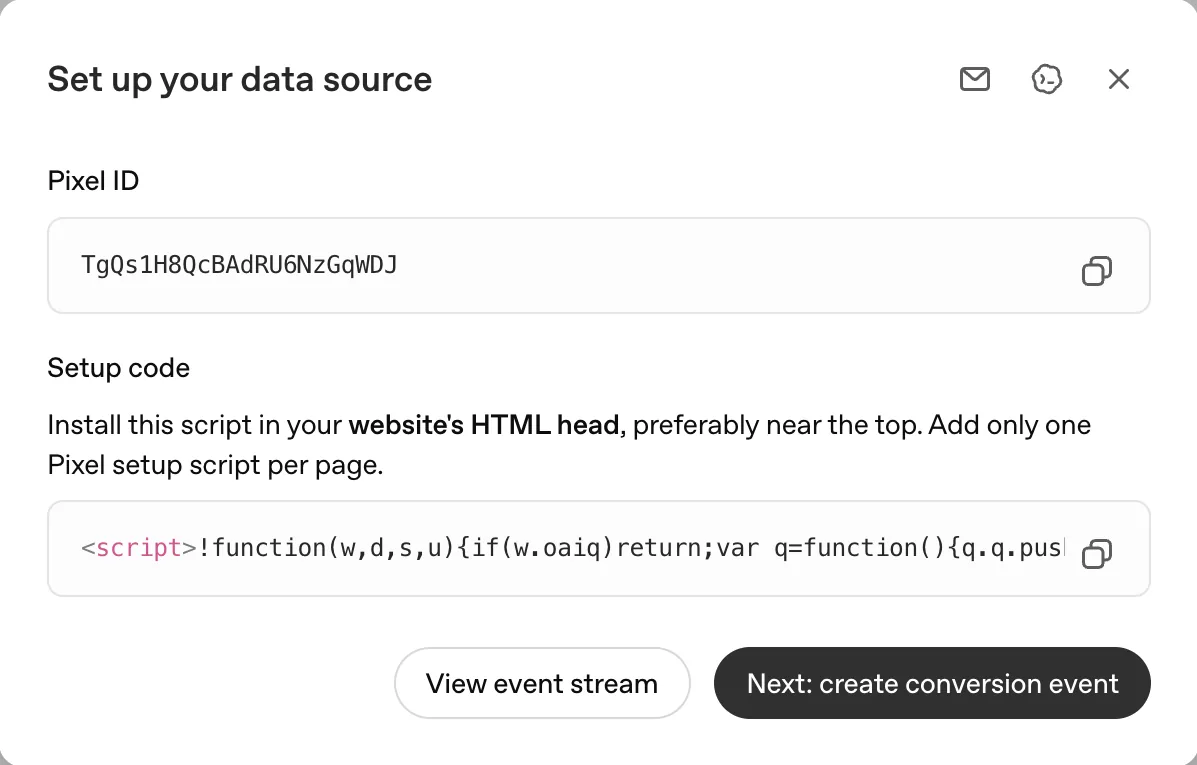
Create the conversion event. Choose the data source and a base event. The list includes Lead created, Appointment scheduled, Order created and Registration completed, among others. We chose Lead created, named the event, and kept the attribution windows the form showed: 30-day click and 1-day view.
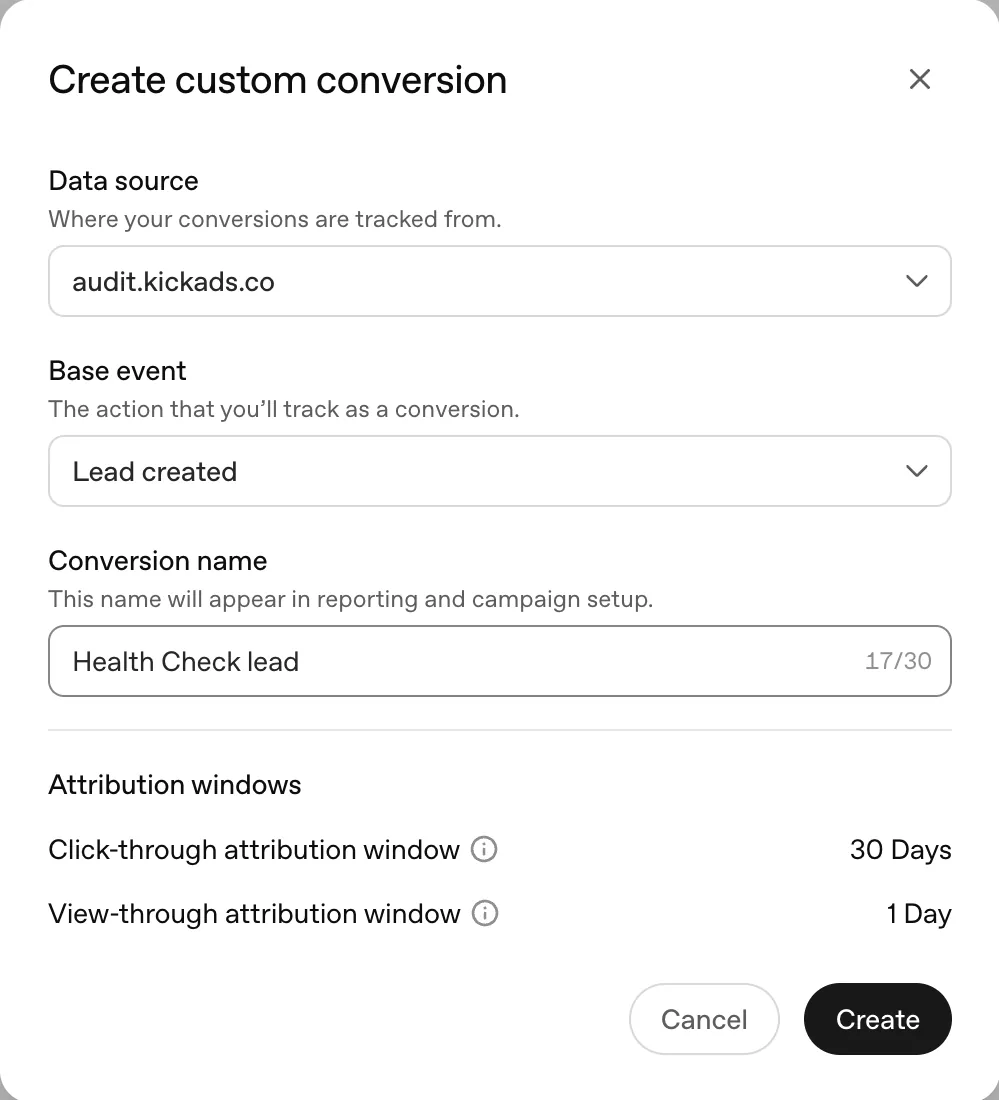
Fire the event when the lead happens. Run this call on the action you count as a lead, for example a form submit or a click on a WhatsApp button:
oaiq("measure","lead_created",{type:"customer_action"})The Event Stream tab on the Conversions page is where you can check whether events are arriving.
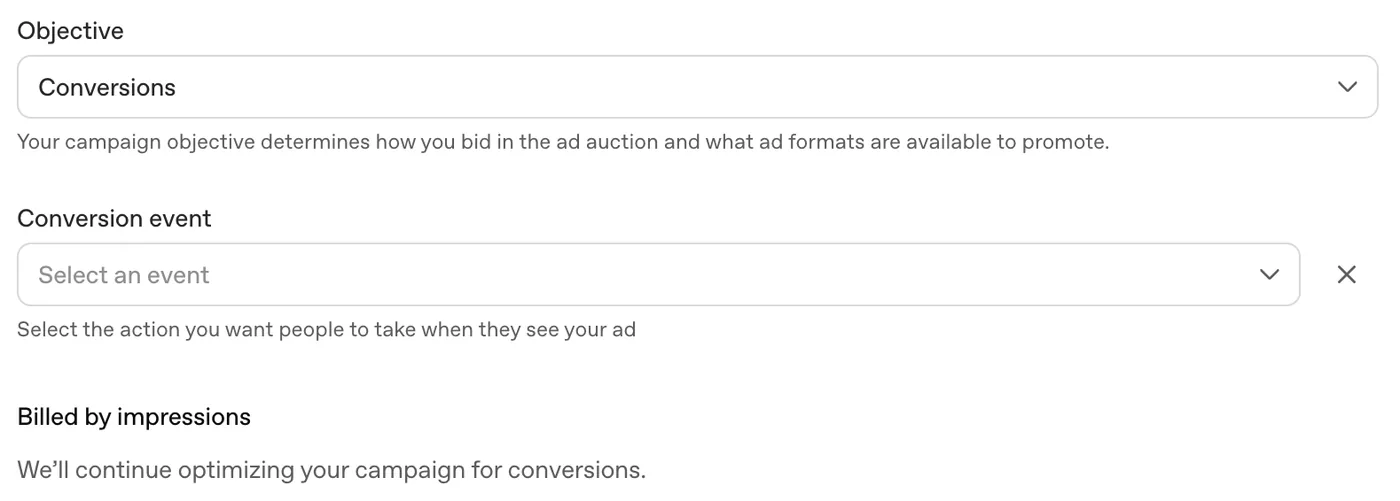
Choose the Conversions objective and the event. In the campaign, set the objective to Conversions and pick the event you created. The form then showed "Billed by impressions", and the campaign summary listed CPM as the billing method. OpenAI's documentation also lists oCPC for this objective (see the cost table below).
Results of our one-day test (7 October 2026)
These numbers come from Kick Ads' own ad account. Both campaigns ran in Malaysia only on 7 October 2026 and sent traffic to kickads.co. We paused them the same evening after about US$62 of spend. OpenAI still marked the figures as preliminary when we read them on 8 October. Two campaigns and 130 clicks are far too small a sample to say anything about what a lead would cost.
| Clicks campaign | Conversions campaign | |
|---|---|---|
| Billed by | Click (CPC) | 1,000 impressions (CPM), average US$7.45 |
| Impressions | 6,340 | 3,513 |
| Clicks | 75 | 55 |
| CTR | 1.18% | 1.57% |
| Spend | US$36.03 | US$25.84 |
| Average CPC | US$0.56 | US$0.51 |
| Conversions recorded by OpenAI | 0 | 0 |

In total the two campaigns spent about US$62 for 130 clicks, and OpenAI recorded no conversions. In GA4 for 1 to 8 October, the source/medium chatgpt / cpc had 103 sessions (about 79% of the 130 clicks) from 100 active users, with a 75.73% engagement rate and an average engagement time of 11 seconds. Over the same dates, google / organic visitors averaged 37 seconds. The ChatGPT ad visitors made two WhatsApp clicks and submitted no lead forms. Our Pixel fires lead_created on a WhatsApp click, yet Ads Manager still showed 0 conversions when we read it on 8 October. Either OpenAI had not attributed those clicks yet or they did not match its attribution, and we could not tell which.

GA4 put chatgpt / cpc in the default channel group Paid Other. If you report by channel, ChatGPT ads will sit in Paid Other unless you build a custom channel group. Because we tagged the ads with UTMs, they also stay separate from chatgpt.com / ai-assistant, which is traffic from links inside ordinary ChatGPT answers. That source brought 12 sessions with 22 seconds of average engagement and one WhatsApp click over the same dates, too few to compare with any confidence.
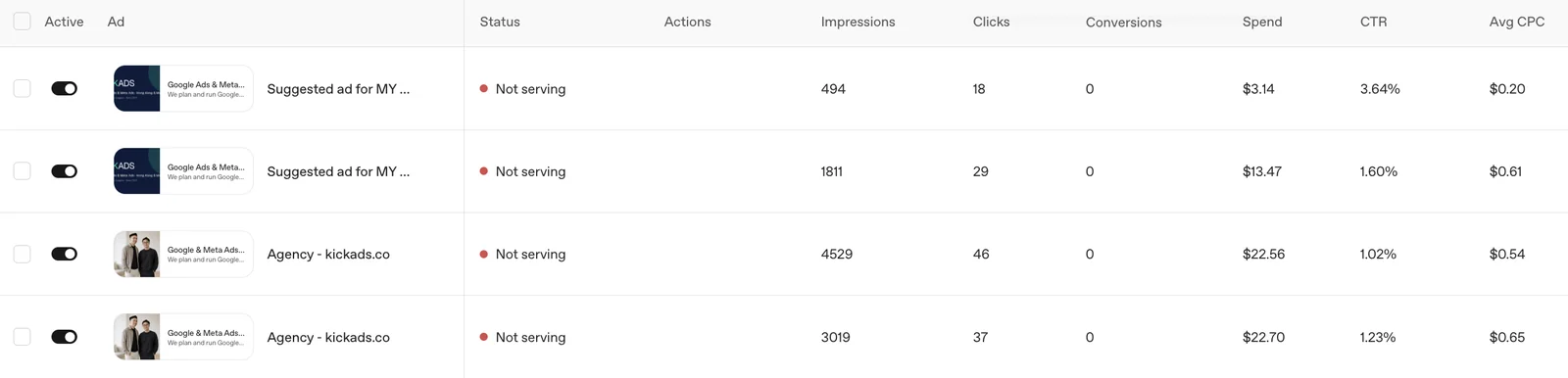
OpenAI added an ad of its own. Each campaign ended up with a "Suggested ad" that we did not create. Text customization was off throughout, so this appears to be a separate feature. The suggested ad reused the old Kick Ads logo banner from the account's first ad and used the headline "Google Ads & Meta Ads Agency Hong Kong & Malaysia". Our own ad used a photo of the two founders and the headline "Google & Meta Ads Agency in Malaysia". Both had the same description. Across the two campaigns they compared like this:
| OpenAI's suggested ad | Our ad | |
|---|---|---|
| Image | Kick Ads logo banner | Photo of the founders |
| Headline | Google Ads & Meta Ads Agency Hong Kong & Malaysia | Google & Meta Ads Agency in Malaysia |
| Impressions | 2,305 | 7,548 |
| Clicks | 47 | 83 |
| CTR | 2.04% | 1.10% |
| Spend | US$16.61 | US$45.26 |
| Average CPC | About US$0.35 | About US$0.55 |
| Leads | 0 | 0 |
In the Conversions campaign the suggested ad's CTR was 3.64% against 1.23% for ours (494 against 3,019 impressions), a gap that is unlikely to be chance (two-proportion test, p < 0.001). In the Clicks campaign it was 1.60% against 1.02% (1,811 against 4,529 impressions), which is borderline at p ≈ 0.05. OpenAI gave the suggested ad only about a quarter of the impressions, so the two ads did not get an even split. The image, the "Hong Kong & Malaysia" wording or OpenAI's own delivery could each explain the gap, and one day of data cannot tell us which. Suggested ads can be paused or removed in the Ads tab like any other ad.
Watch the card on day one. OpenAI charged our Malaysian card the same evening. At that point Ads Manager still showed US$0.00 of preliminary spend and kept showing it for hours. The Billing page listed two payments of US$27.00 that day, a US$50 billing threshold and an outstanding balance. The card statement also had a US$50 line that does not appear in OpenAI's billing activity. It appears to be a card authorisation hold. On the first day the card and the Billing page were more up to date than the campaign table. Two campaigns at the US$25 minimum can each spend up to twice their daily budget in one day.
Targeting options in ChatGPT Ads
OpenAI's campaign guide lists these controls:
- Countries, and for campaigns other than product feed campaigns, states or regions, cities, markets and postcodes where available.
- Platforms: Android app, Android web, desktop web, iOS app and iOS web.
- Custom audiences built from email addresses, phone numbers (plain or SHA-256 hashed) or Google Advertising IDs. According to OpenAI's audience guide, an audience needs at least 25,000 matched users to be used for inclusion or bid adjustments, and OpenAI recommends 100,000. Smaller lists can be used as exclusions.
Most of the targeting comes from the conversation and your context hints. A Hong Kong business used to building audiences in Meta should expect fewer manual levers.
How much do ChatGPT Ads cost?
OpenAI does not publish a rate card. Prices come from an auction, and what you pay depends on the objective you pick.
| Objective | What you pay for | Optimises toward |
|---|---|---|
| Reach (called Views in some Help Center pages) | Every 1,000 impressions (CPM) | Reach |
| Clicks | Each valid click (CPC) | Traffic |
| Conversions | Valid clicks (oCPC) or impressions (oCPM) | One supported standard conversion event |
The figures OpenAI does publish:
- Starting bid: for CPC campaigns, the Help Center recommends a maximum bid of US$3 to US$5 per click to start.
- Minimum daily budget: set per billing currency. It is US$25 for USD accounts, and the campaign guide lists separate amounts for MYR, SGD, TWD and other currencies.
- How daily budgets pace: a daily budget is an average over a Sunday to Saturday week. Spend can reach twice the daily budget on one day and seven times it over the week.
- Payment threshold: new card-billed accounts start with a low threshold, which can rise with successful payments. OpenAI's example starts at US$25.
OpenAI's FAQ says there are no performance benchmarks yet across advertisers, industries or campaign types. Kick Ads has not run ChatGPT Ads for a client yet. Our own one-day test in Malaysia is reported above, and it was too small to give a CPA. Any cost you plan with should come from your own test.
Measuring ChatGPT Ads results
Ads Manager reports impressions, clicks, spend, CTR, average CPC, average CPM and conversions. Conversions need setup:
- OpenAI Pixel and Conversions API. You can use either or both. OpenAI appends a click reference called
opprefto the landing page URL. Keep it through redirects, and send the same event ID through both methods so OpenAI can deduplicate. The Pixel can be deployed through Google Tag Manager. See OpenAI's conversion measurement guide. - Attribution windows. You can report on a 7, 14 or 30-day click window with a 0 or 1-day view window. The model is last-touch. Conversions can take 24 to 48 hours to appear, and spend data can lag 7 to 8 hours.
- UTM parameters on landing page URLs work, so GA4 can show ChatGPT Ads traffic alongside your other channels. A direct GA4 connection is in beta and currently covers connection setup only.
- Partners. On 5 October 2026 OpenAI added integrations with Hightouch, Tealium and LiveRamp for sending conversion data, and named attribution partners including AppsFlyer, Adjust, Branch, Singular, Triple Whale and Northbeam. It is also exploring geo-based incrementality tests with Haus, Measured and WorkMagic.
- Brand safety. Negative Phrases are available to qualifying advertisers, and OpenAI is running brand suitability pilots with DoubleVerify and Integral Ad Science.
The same announcement quotes early partner results, for example that WeightWatchers' attributed CPA on ChatGPT Ads was 15.3% below its blended paid search benchmark, according to DV Rockerbox. OpenAI chose these examples, and its own FAQ says there are no cross-advertiser benchmarks yet, so we would treat them as anecdotes.
If your Google Ads conversion setup already works, the same habits apply here. Our Google Ads conversion tracking guide covers the event design.
ChatGPT Ads compared with Google Ads
| Google Ads (Search) | ChatGPT Ads | |
|---|---|---|
| How ads are matched | Keywords and match types | Conversation context plus your context hints |
| Where the ad shows | Search results, plus Google's other networks | Below a ChatGPT answer |
| Available to Hong Kong advertisers | Yes | No, as of 7 October 2026 |
| Buying | CPC, CPM and Smart Bidding | CPM, CPC, oCPC and oCPM |
| Shopping or product ads | Shopping and Performance Max | Product feed campaigns (beta) |
| Benchmarks | Years of industry data | None published yet |
Being cited inside a ChatGPT answer is a separate thing from a ChatGPT ad. Citations are organic, you cannot pay for them, and OpenAI says ads do not influence the answer. If you want your pages to appear in AI answers, that is the work covered in our GEO guide. An ad sits below the answer and is labelled.
For customers in Hong Kong, ChatGPT Ads are not an option yet, and Google Search remains the main paid channel for people looking for a product or service.
How we would plan a first ChatGPT Ads test
This applies to a business with a company in an available market. It is a starting plan, and we would adjust it once the first data comes in.
- Pick one market. A new account may be limited to its home country anyway.
- Pick offers people research in a conversation. Products or services that people compare, plan or ask advice about are more likely to get relevant matches than an impulse purchase or a brand name search.
- Set up conversion tracking first. Use the Pixel, and the Conversions API if leads or orders close offline. Without it you can only judge on clicks.
- Build three to five ad groups by customer situation, each with specific context hints and several distinct ads.
- Set a CPA you would accept before launch, based on what Google Search costs you in the same market.
- Run for four to six weeks before judging, and compare CPA and lead quality against Search in the same period.
We would fund this from a test budget and leave Google Search budgets where they are until the results are in.
FAQ
Can I run ChatGPT Ads in Hong Kong? Not as of 7 October 2026. Hong Kong is not on OpenAI's list of available markets, and self-serve Ads Manager requires the advertiser's legal entity to be based in an available country. A Hong Kong group with a company in Malaysia, Singapore, Taiwan or another listed market can advertise in that market through that company.
Which Asia-Pacific markets can run ChatGPT Ads? On 7 October 2026 OpenAI's list included Singapore, Malaysia, Thailand, Indonesia, the Philippines, Vietnam, Taiwan, Japan, Korea, India, Australia and New Zealand. The first seven were added on 23 September 2026.
Who sees ads in ChatGPT? Users on the Free and Go plans. Plus, Pro, Business, Enterprise and Edu accounts do not see ads, and OpenAI does not show ads to accounts it identifies as under 18.
Do ChatGPT ads change ChatGPT's answers? OpenAI says no. Ads run on separate systems, appear below the answer labelled Sponsored, and advertisers cannot shape or rank ChatGPT's responses.
How much do ChatGPT Ads cost? OpenAI does not publish fixed prices. You buy on CPM, CPC or a conversion objective in an auction. OpenAI recommends starting CPC bids at US$3 to US$5. In our own one-day test in Malaysia on 7 October 2026, the average CPC was US$0.51 to US$0.56, though one day of data is not enough to plan a budget on.
What is the minimum budget for ChatGPT Ads? OpenAI's campaign guide sets the minimum daily budget at US$25 for USD accounts, with separate amounts for other currencies. In our own USD account on 7 October 2026, a campaign total budget had to be at least US$100.
Can I advertise products from a product feed? Yes, in beta. Retailers can upload a feed in Ads Manager and create Product feed campaigns that show product cards with images, prices and ratings. New product feed campaigns can only target at country level.
Can an agency run ChatGPT Ads for my brand? OpenAI asks for a separate account for each advertiser, with billing that matches the advertiser's legal entity. The documented route is an account in your company's name with the agency invited as a user. We have not found OpenAI guidance on running a client's brand under the agency's own company.
Is a ChatGPT ad the same as being mentioned in ChatGPT's answer? No. Mentions and citations in answers are organic and cannot be bought. Ads appear below the answer and are labelled Sponsored. Getting cited is covered in our GEO guide.
Have a company in Malaysia, Singapore or Taiwan and want to test ChatGPT Ads? We can check whether your business and industry are eligible, set up tracking, and plan a test against your Google Search results. Message us on WhatsApp or book a free strategy call →.

About the author
Frankie Chan · Co-Founder, Kick Ads
Frankie is an ex-Googler and paid media strategist. He has managed Google Ads and Meta Ads for ecommerce and lead generation businesses across Hong Kong and Malaysia since 2017, working closely on strategy, reporting and client growth planning.