
Google My Business Hong Kong: 2026 Business Profile Guide
By Frankie Chan, Co-Founder · Updated 4 August 2026 · 8 min read
Jump to section
- From Google My Business to Google Business Profile
- Where the controls live
- Creating or claiming a profile
- Business information: three fields that cause the trouble
- Services: Google edits this by itself, so check it
- Photos
- Posts: three formats
- Reviews: the replies are worth more than the score
- Reading the performance report
- What is different in Hong Kong
- Common mistakes
- FAQ
Search for your own company on Google and the card that appears on the right used to be called Google My Business. Most people in Hong Kong still call it that. Google renamed the product to Google Business Profile some time ago and retired the standalone app, which is why searching for the old name rarely gets you to a management screen.
Short answer: a Business Profile is free, and you manage it directly in Google Search or the Google Maps app. There is nothing to download. Sign in with the account that manages the profile, search your own business name, and the management panel appears above the results.
This is a full setup and management guide: where the controls actually live, what belongs in each field, which wording can get a profile suspended, how to read the performance report, and the situations Hong Kong businesses hit most often. Every screenshot is from our own profile.
From Google My Business to Google Business Profile
Two things are worth separating.
Nothing changed for your customers. The card they see in Search and Maps works the same way: address, phone, hours, photos, reviews.
What changed is how you manage it. Google's own documentation states that the Google My Business app is no longer available, and that you use the Google Maps app or Google Search instead. Maps supports most of what businesses relied on the old app for, including claiming a business, editing information, responding to messages, managing reviews and checking performance metrics.
Where the controls live
The fastest route is to sign in with the account that manages the profile and search your business name on Google. If you are an owner or manager, a management panel appears above the results.
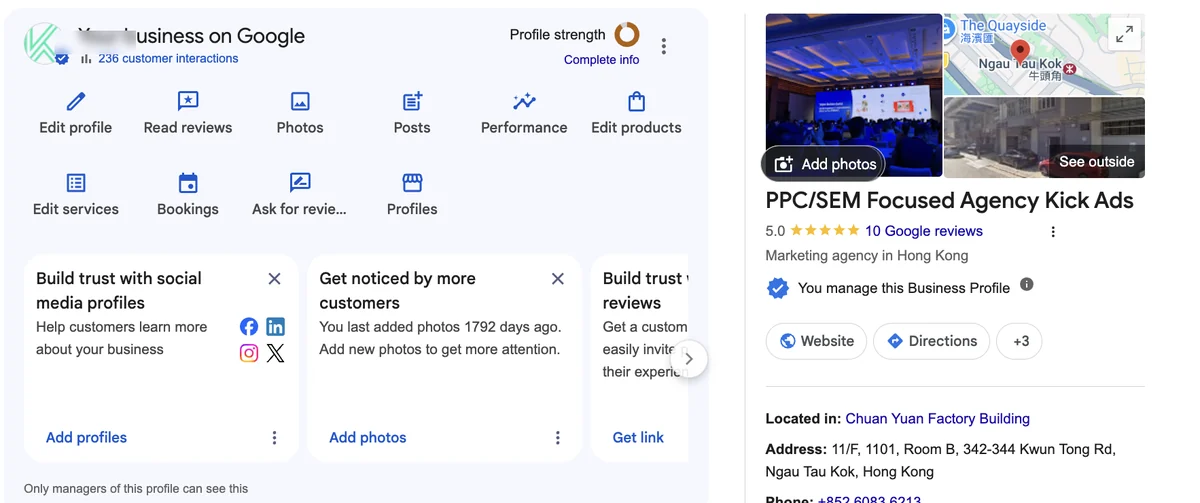
Each icon maps to one job: edit profile, read reviews, photos, posts, performance, products, services, bookings. That is essentially the old app, moved into Search. On a phone, open the Google Maps app, tap your profile picture, then your Business Profile.
Note the card in the middle of that panel: "You last added photos 1792 days ago." That is our own profile, nearly five years without a new photo. Google surfaces that prompt because photos genuinely affect how a profile performs.
Creating or claiming a profile
There are two situations.
Your business does not exist on Google at all. Create a new profile from Maps or Search and fill in name, category, address and contact details.
Your business is already on Google but you did not put it there. This is common in Hong Kong, because Google generates listings from map data, directories and user submissions. What you need here is to claim it: find "Claim this business" on the card, then complete verification.
Verification depends on the category and location, and can be by postcard, phone, email or video. Hong Kong shops and offices usually get postcard or video. You cannot edit anything until verification is done.
Business information: three fields that cause the trouble
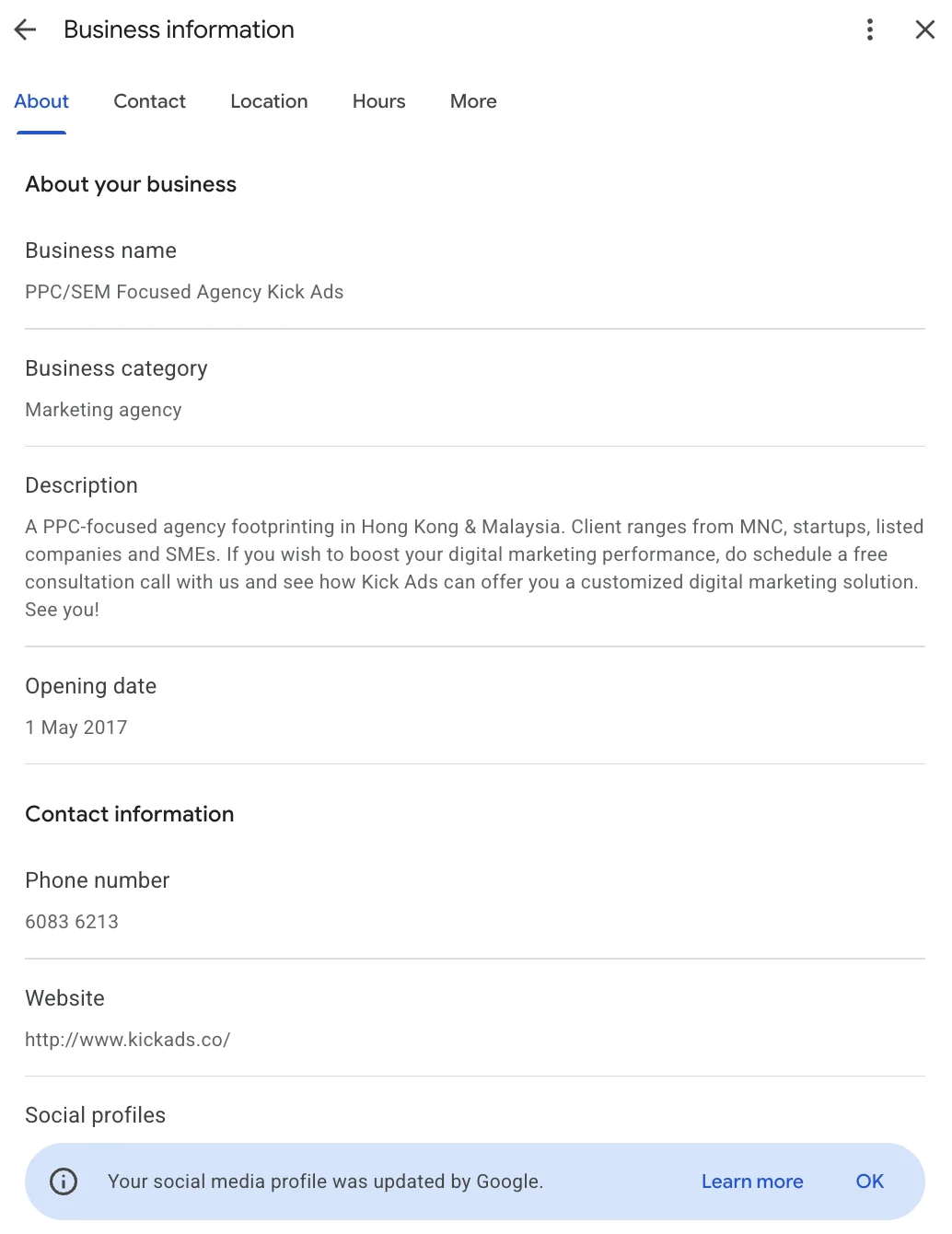
The name field takes your real business name only
This is where most profiles go wrong. Google requires the name to be the real-world name of the business, with no marketing wording or service descriptors. The official examples are blunt: "TD Bank, America's Most Convenient Bank" should be "TD Bank"; "Verizon Wireless 4G LTE" should be "Verizon Wireless".
Plenty of Hong Kong businesses stuff service keywords around the name to chase local rankings. It may buy a little visibility in the short term, but the guideline says including unnecessary information in the name is not permitted and could result in suspension of the profile. The more common outcome is that Google quietly rewrites the name, or a competitor reports it and Google rewrites it anyway. Your reviews and photos all hang off that one profile, so it is a poor risk.
Category decides which searches you turn up in
The primary category matters more than most owners expect, because it drives what Google thinks you are eligible to appear for. Pick the one closest to your core business and put the rest in secondary categories. A clinic whose main work is spinal treatment is far better served by "chiropractor" than by "clinic". For clinics, what happens after that first search is its own job: the clinic booking and enquiry flow.
The description cannot carry promotions or links
Google is specific here too: no promotional content, no calls to action, and no links of any kind. What belongs there is what you do, what you sell, and the mission and history of the business.
So "Call now to book, first consultation free!" is a violation. Describing what you do, who you serve and what you specialise in is both compliant and more useful to the person reading it.
Services: Google edits this by itself, so check it
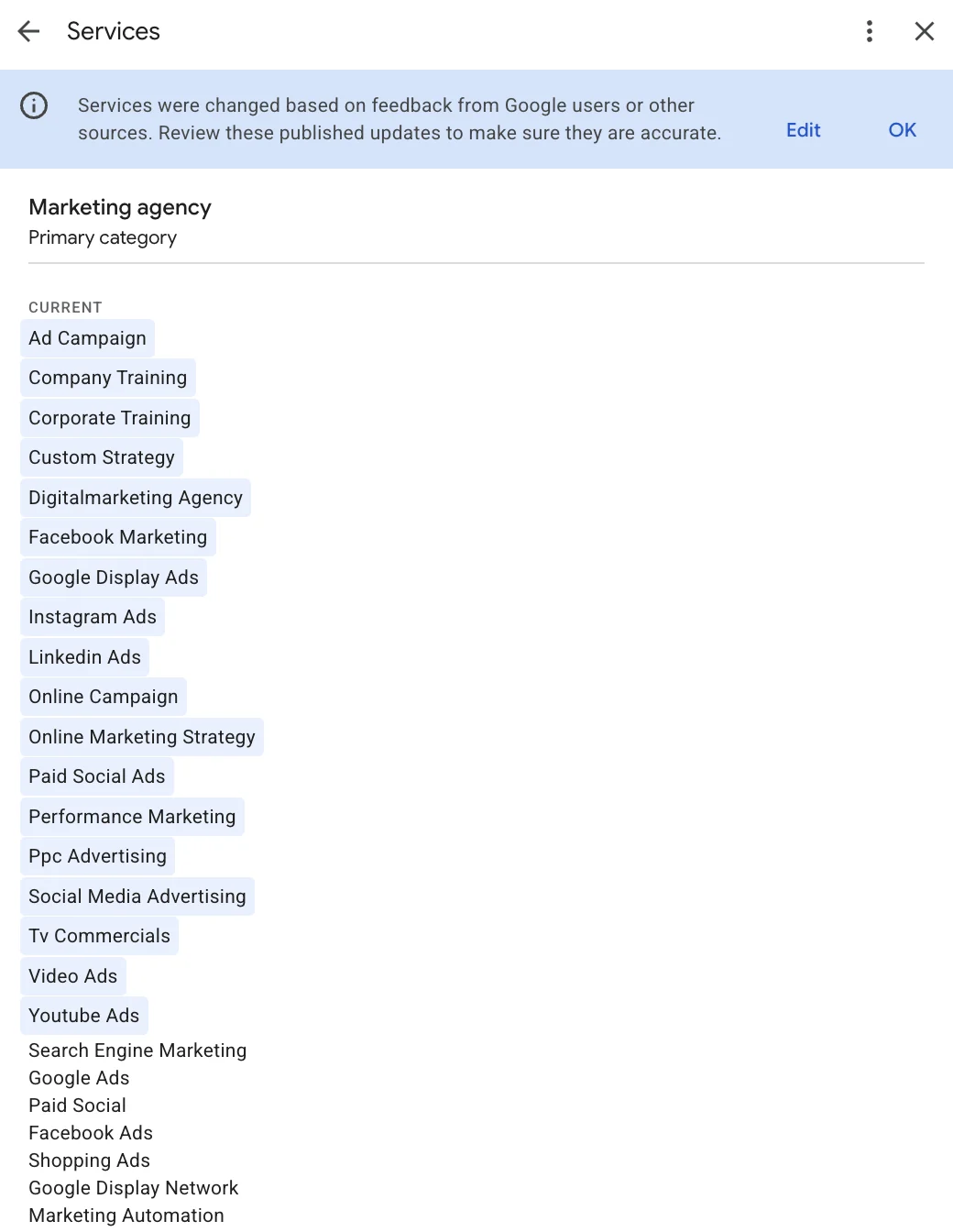
This is the section Hong Kong businesses most often leave empty. Services are the specific things you offer, listed on the card, and filling them out properly gives you more surface for long-tail queries.
The more important detail is the banner at the top of that screenshot: services were changed based on feedback from Google users or other sources. Google adds services it believes you offer, and it does not always get it right. Our own list picked up "Tv Commercials". We do not make TV commercials.
Services are not a set-and-forget field. Review the list quarterly and remove anything that is not yours.
Photos
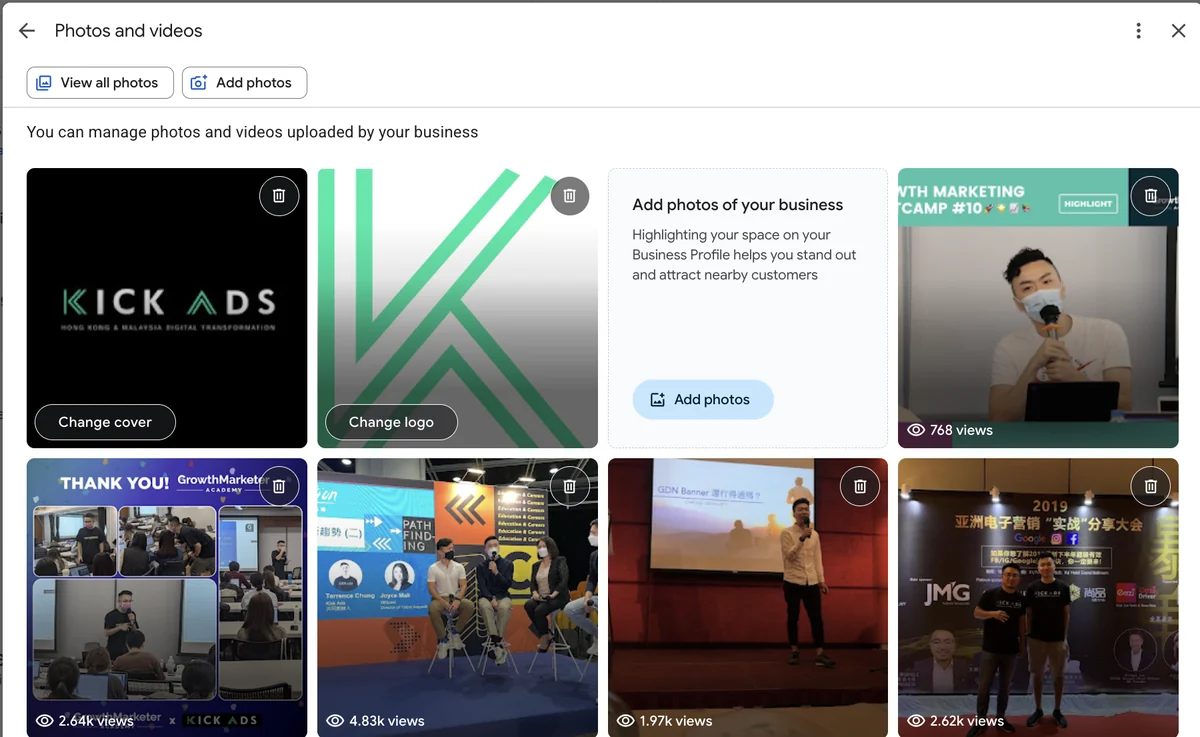
Photos decide whether someone picks you. At minimum: the exterior so customers recognise the place, the interior, the team or work in progress, and the product or the result.
Hong Kong addresses add a practical problem. A lot of companies sit inside industrial or commercial towers where signage is poor. In that case a photo of the building exterior plus a floor indicator does more than any written direction.
Frequency beats volume. A batch uploaded at opening and never touched again is exactly the state of our own profile.
Posts: three formats
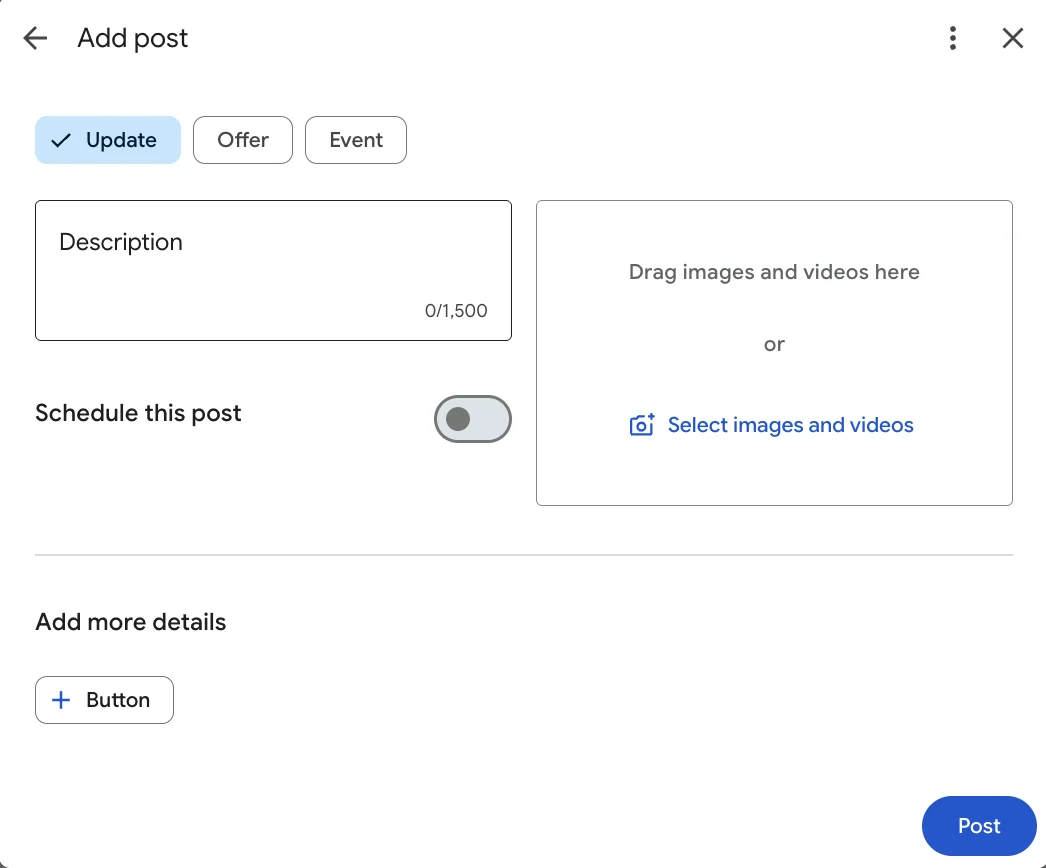
Posts appear on the card and come in three types. Update for general news such as a new service, a move, or changed hours. Offer for time-limited discounts, with start and end dates. Event for anything with a fixed date.
Each post allows up to 1,500 characters, takes images or video, and can carry one button such as "Book" or "Learn more". Posts can also be scheduled.
In practice posts do not generate large reach. Their value is that they are one of the few parts of the card you directly control, and a recent post answers "is this company still trading?" better than anything else on the profile.
Reviews: the replies are worth more than the score
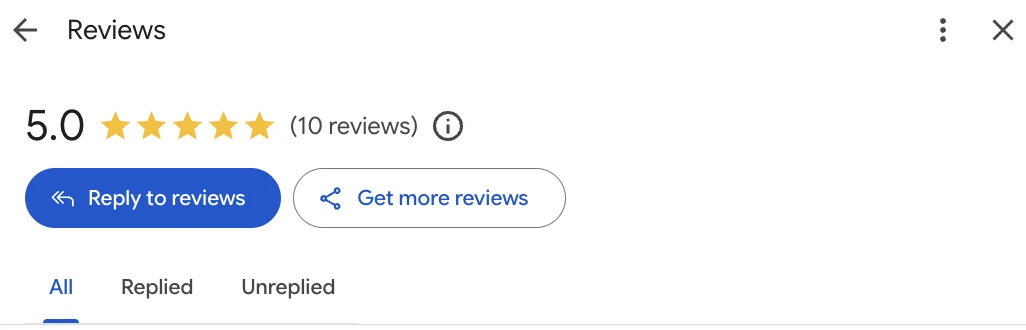
Two things matter.
Reply to everything, including the bad ones. The Replied and Unreplied filters exist so nothing slips. Replies are public, and the next person reads how you handled it as much as the complaint itself. A calm, specific, non-defensive reply persuades more than a five-star review does.
Never buy reviews or trade discounts for them. It breaches Google's policies, the reviews get removed when detected, and the profile itself is at risk. What you can do is ask customers after the job is done; the management panel gives you a ready-made review link.
Reading the performance report
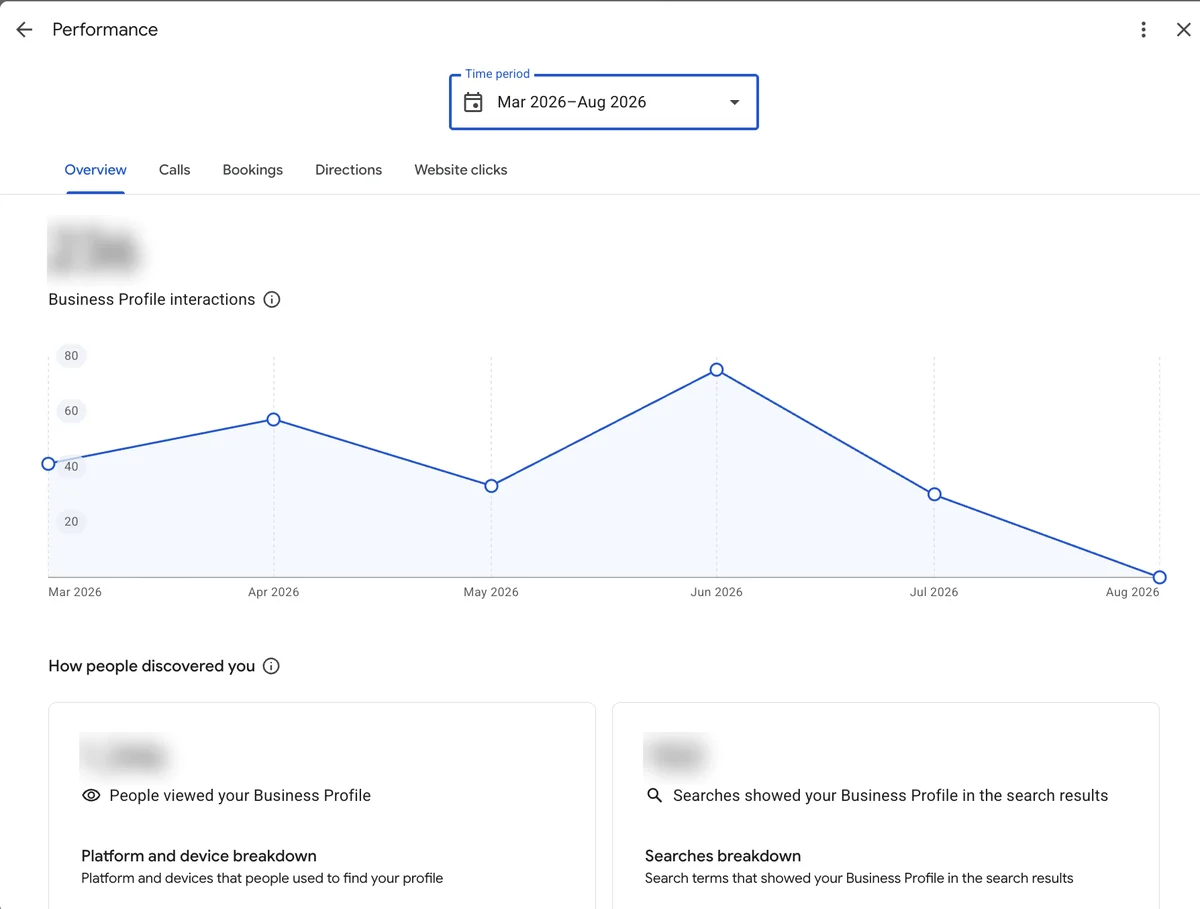
Interactions are calls, bookings, direction requests and website clicks combined, with tabs to break each out.
Profile views is how many people saw your card.
The searches report lists the search terms that showed your profile. This is the most useful part, because it tells you the words customers actually use, which are frequently not the words you would have guessed. Those terms feed straight into your website copy and your Google Ads keywords.
One caveat when reading any of it: these numbers are exposure and interaction, not revenue. To connect profile traffic to real enquiries you need conversion tracking working on the website end.
What is different in Hong Kong
Industrial and commercial buildings. Put the floor and unit in the address, and drag the map pin to the right spot. In Ngau Tau Kok, Kwun Tong or Lai Chi Kok a single street number can cover several towers, and a pin that is fifty metres out sends customers to the wrong lobby.
Service-area businesses. No shopfront and you travel to the customer, so set a service area rather than publishing an address. Cleaning, repairs, photography and private tutoring all fall here.
Traditional Chinese. A Hong Kong profile should be written in Traditional Chinese. Obvious, except that profiles set up from mainland or Taiwan templates routinely carry simplified characters or Taiwanese phrasing.
Phone format. Include +852 so mobile users can tap to call.
Hours, especially public holidays. Google has a special-hours setting. Update it before Chinese New Year.
Common mistakes
Keywords stuffed into the name, which Google rewrites or suspends. A description written as an advertisement, complete with phone number and URL. Services left blank, or never checked after Google added its own. Photos frozen at opening day. Replying only to the good reviews. And treating the profile as done once it exists.
A Business Profile does not generate demand on its own. Its job is to make you look credible, complete and open at the moment someone is already searching for you or for what you do. That costs nothing but attention.
If you also run paid search, the two work together: the same customer often sees the ad, then searches your company name to check you out, and this card is what they land on. Our Google Ads service covers that side.
FAQ
Are Google My Business and Google Business Profile the same thing? Yes. Google My Business is the old name; the product is now Google Business Profile. Nothing was removed, but management moved into Google Search and Google Maps.
What happened to the Google My Business app? It is no longer available. Google's documentation directs owners to the Google Maps app or Google Search, and Maps supports most of the original features.
Does a Business Profile cost anything? No. Creating, verifying and managing it are free.
Can I have a profile without a shopfront? Yes. Businesses that travel to customers should set a service area instead of publishing a street address.
Can I put keywords in the business name? No. Google requires the real business name, and including unnecessary information can result in suspension. In practice Google often just rewrites it.
How long does verification take? Phone and email are usually same-day, postcard takes one to two weeks, and video verification waits on a human review.
Why did my services change on their own? Google adjusts services based on user feedback and other sources. It is normal, it is not always accurate, and you should review the list and remove anything that is not yours.
Does a Business Profile help my Google Ads? Indirectly. The location can be linked to the ads account for location assets, and a complete profile raises credibility when someone searches your name after seeing an ad. Ad performance itself still comes down to keywords and bidding.

About the author
Frankie Chan · Co-Founder, Kick Ads
Frankie is an ex-Googler and paid media strategist. He has managed Google Ads and Meta Ads for ecommerce and lead generation businesses across Hong Kong and Malaysia since 2017, working closely on strategy, reporting and client growth planning.