
Why Meta (Facebook) Ads ROAS Is Higher Than Shopify Sales
By Frankie Chan, Co-Founder · Updated 5 November 2026 · 8 min read
Jump to section
Ads Manager ROAS is usually higher than the revenue in your store for three reasons: the ad set's attribution setting counts purchases from people who only saw an ad, a Shopify store can send Meta two purchase events for one order, and Meta and Google each take credit for the same order. Each one can be measured in your own account.
This is written for Hong Kong ecommerce owners who compare the ROAS column in Ads Manager with Shopify revenue at month end and find that the two do not agree. Both numbers can be correct at once, because each one measures a separate thing. This post shows how to measure each cause in your own account.
1. The attribution setting counts purchases after a view
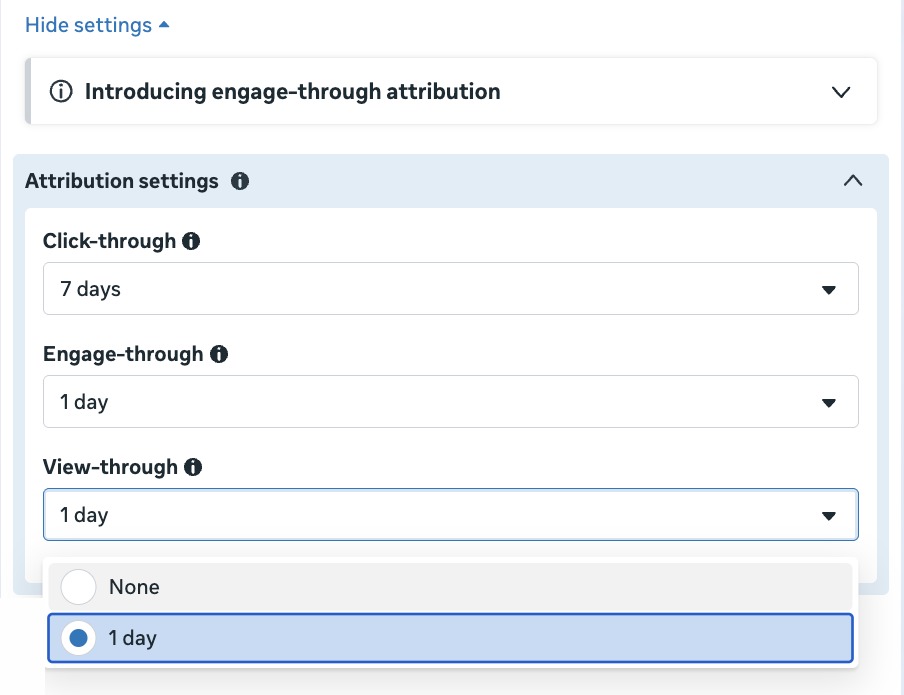
Every ad set carries an attribution setting. Meta's help page on the setting lists the standard options as click-through at 1 or 7 days, view-through at 1 day, and engage-through at 1 day, where an engaged view of a video ad is 5 seconds (Meta Business Help Center). In most of the Meta accounts we manage, the setting in use is 7-day click plus 1-day view, with engaged view added on video ad sets. The ROAS column in Ads Manager follows whatever the ad set is set to. A customer who scrolled past the ad without clicking and bought the next day is counted at full order value.
In March 2026 Meta renamed engaged-view attribution to engage-through, cut the video threshold from 10 seconds to 5, and limited click-through to link clicks (Meta newsroom, 3 March 2026).
The setting sits in the ad set under Attribution settings. It has a separate window for click-through, engage-through and view-through. Meta uses this setting for delivery as well as for reporting. Setting view-through to None therefore changes what the ad set optimises toward. To read the effect of view-through without changing delivery, use the Compare attribution settings columns described below.
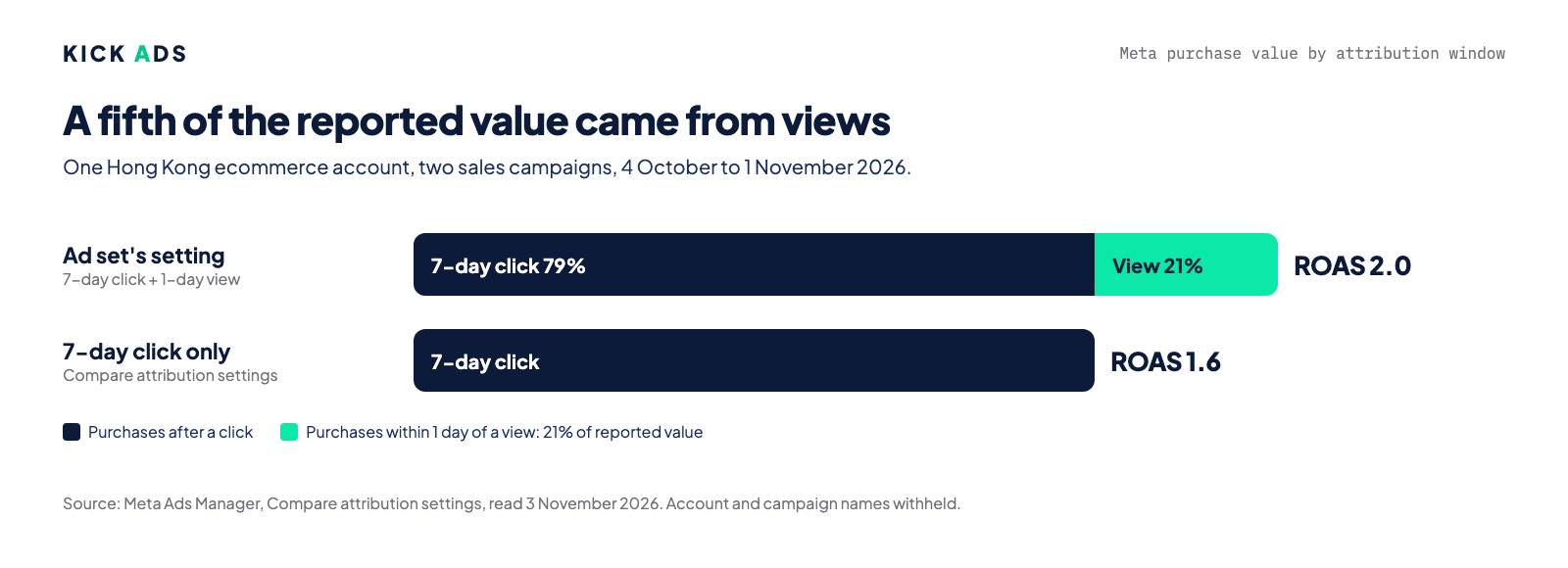
One account shows the size of the effect. A Hong Kong ecommerce account we manage ran two sales campaigns from 4 October to 1 November 2026, an Advantage+ sales campaign and a second sales campaign. On the ad set's attribution setting, about a quarter of the purchases the two campaigns recorded came through the 1-day view window and the rest through 7-day click. ROAS on the setting in use was 2.0. On 7-day click alone it was 1.6. View-through accounted for about a fifth of the reported purchase value. These are account totals. The screenshot below also shows each sales campaign on its own.
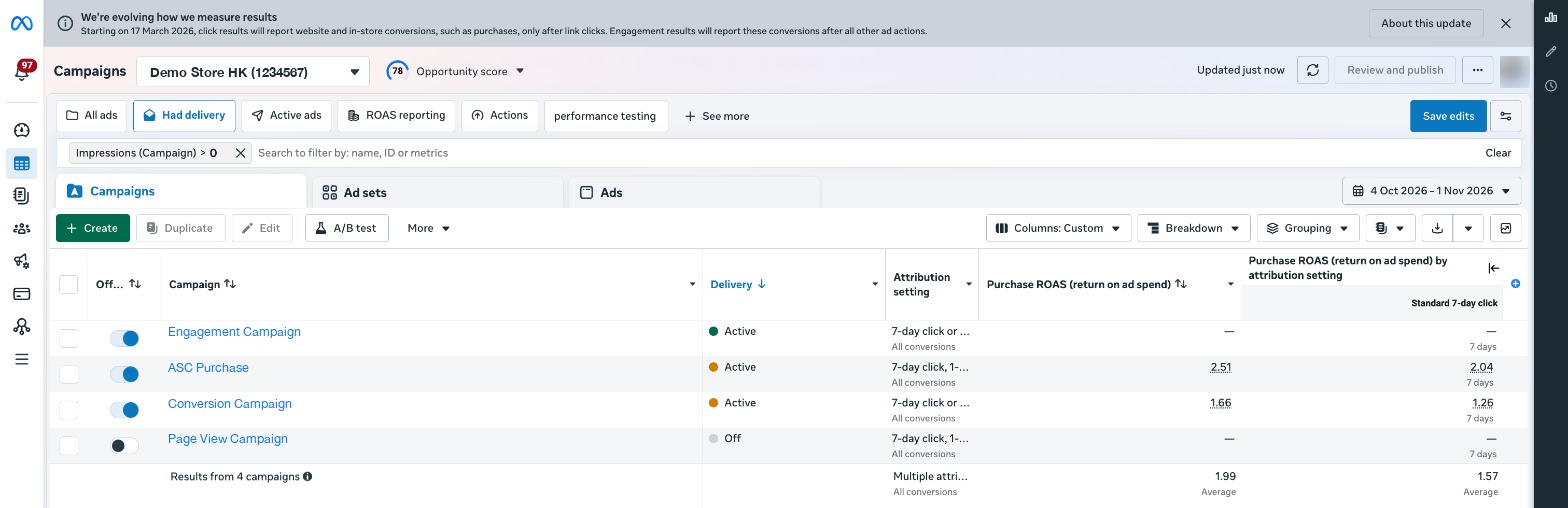
Over the same dates, two other ecommerce accounts show the same pattern. In the second, ROAS on the setting in use was 6.65 and 4.25 on 7-day click, so more than a third of purchase value came through view-through. In the third, the figures were 1.05 and 0.83, about a fifth.
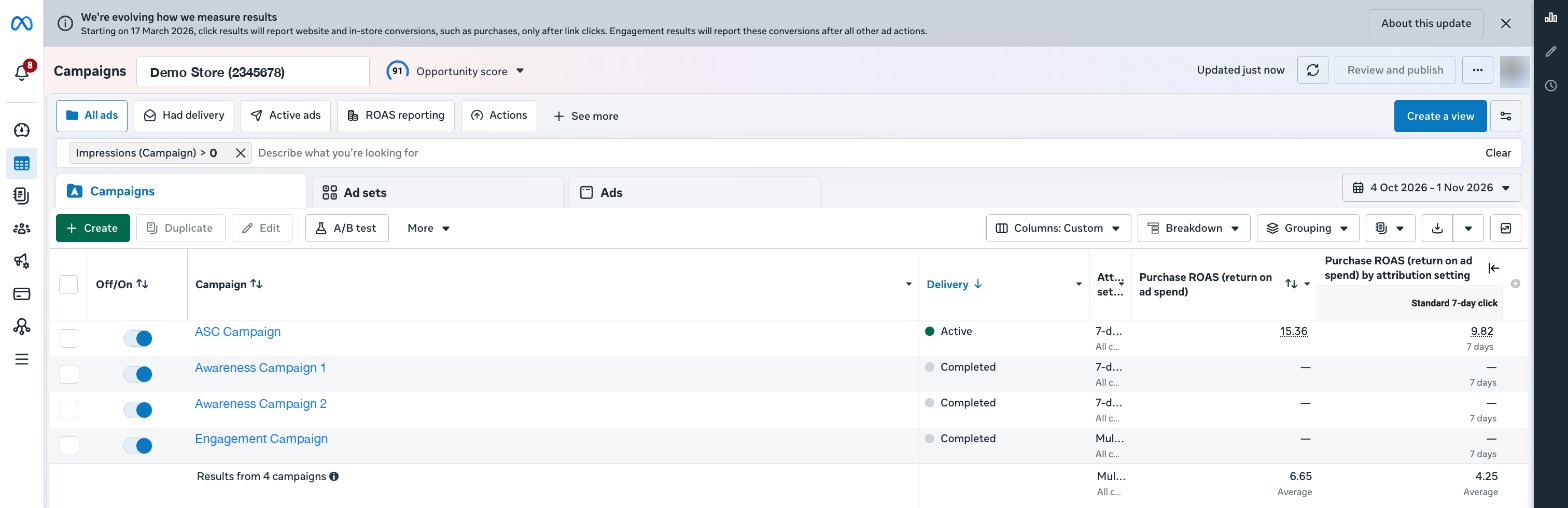
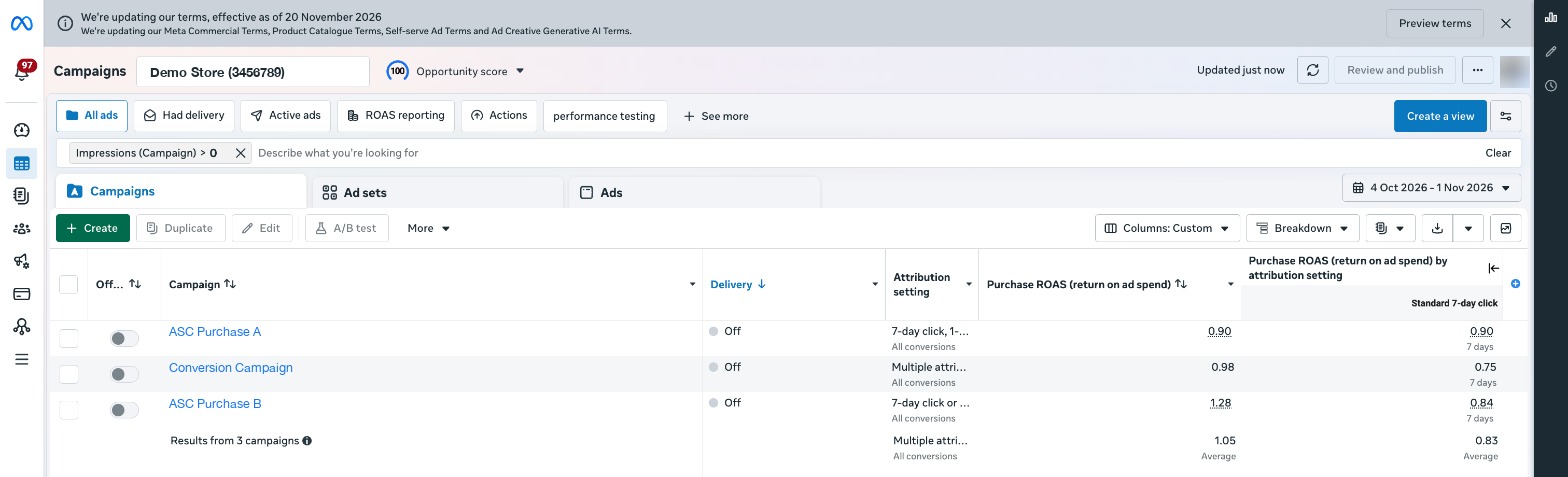
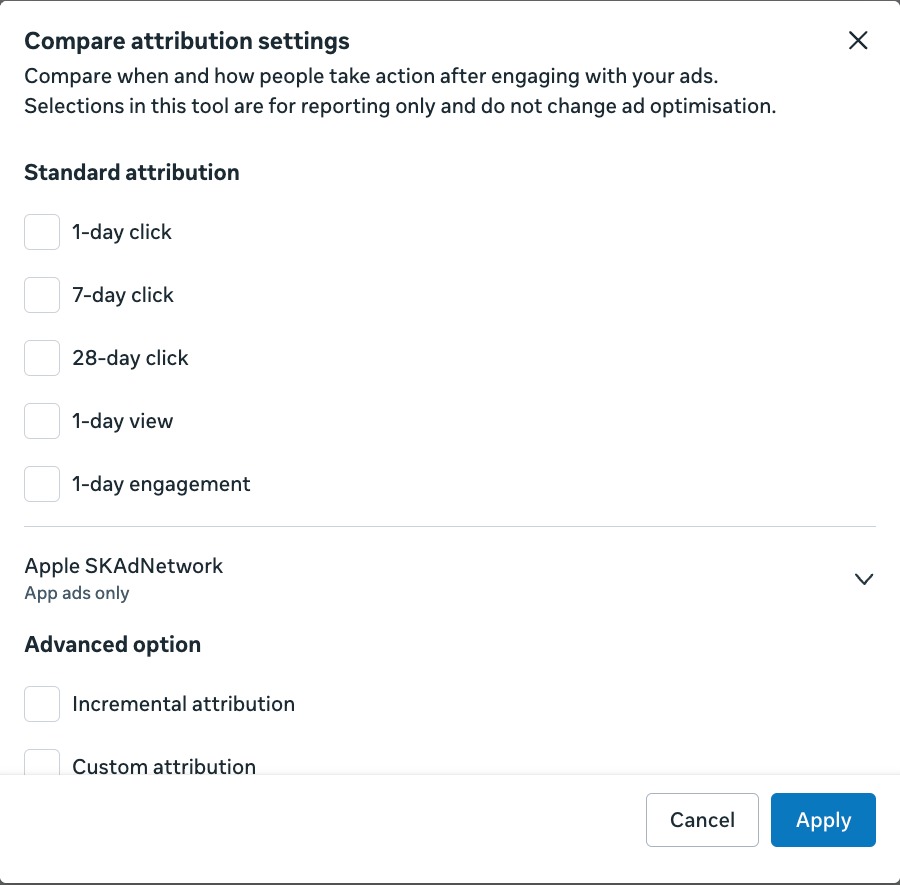
The attribution setting cannot tell you whether a view-through purchase would have happened anyway. It can show how much purchase value sits in the view window. In Ads Manager, open the Columns menu, choose Compare attribution settings and tick 7-day click and 1-day view. Both appear as columns beside the setting in use. The two columns then sit next to each other for every campaign.
2. Duplicate purchase events on Shopify
Shopify's help page on the Meta pixel warns that adding a pixel on top of the Facebook & Instagram sales channel means "your store will have more than one pixel on it, which can result in duplicate or incorrect data in your reports" (Shopify Help Center). The same page tells stores working with an agency to make sure a second pixel will not duplicate data. Shopify's pixel migration page lists "tracking the same event more than 1 time" as a common issue when moving between pixels (Shopify Help Center).
Meta removes a duplicate only when a browser event and a server event reach the same pixel with the same event ID and event name, within 48 hours of the first one (Meta for Developers, deduplication). Two pixel installs that both fire in the browser are not deduplicated. They send Meta two purchases for one order, and ROAS doubles for that order.
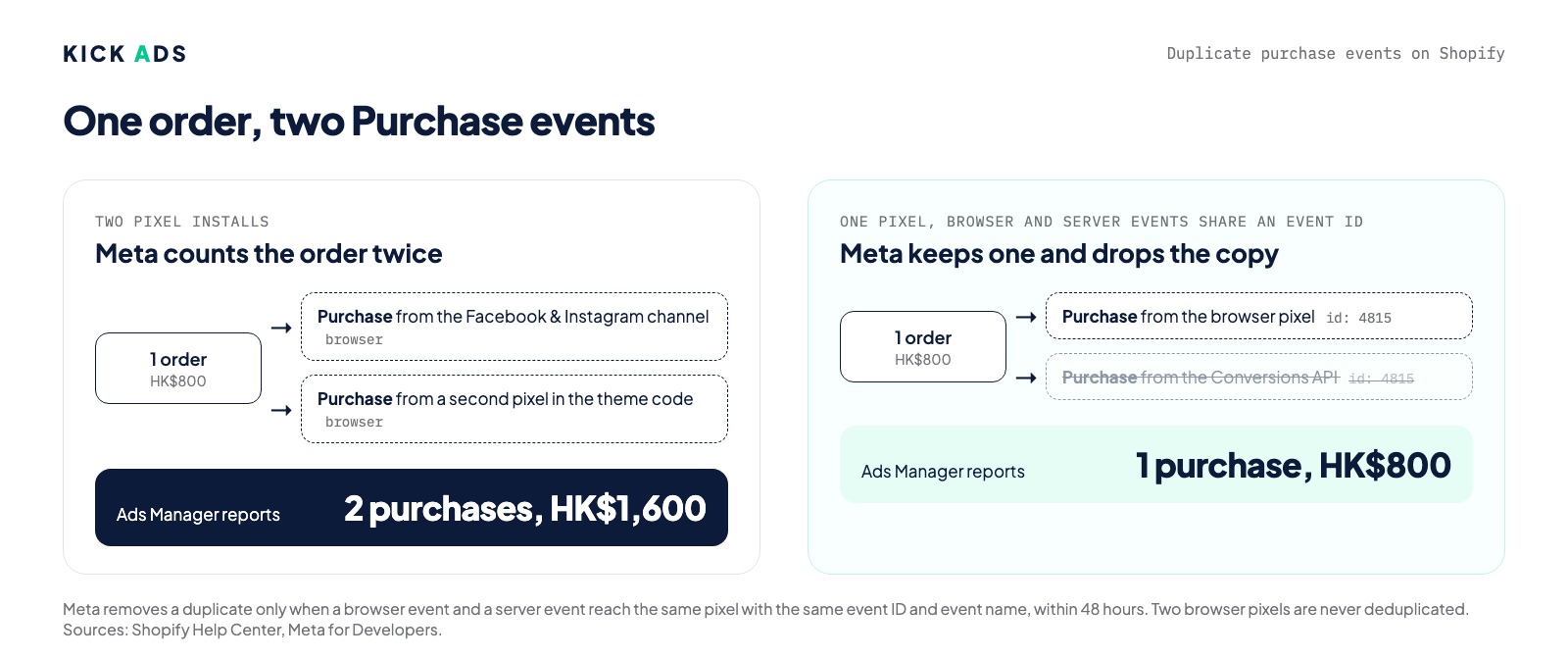
We have not confirmed duplicate purchase events in an account we manage, and we have not fully ruled them out either. In the September 2026 audit of the third account, Ads Manager's purchase count and the pixel's website purchase count matched exactly over 90 days. That comparison cannot show a duplicate that both counts include. We include the check because Shopify documents the problem and the check takes about ten minutes.
The check runs in Events Manager. Open Data Sources and count the pixels attached to the store; one is normal and two is a flag. Open the Purchase event under your pixel and compare the event count for the last 7 days with the number of orders in Shopify admin for the same 7 days. If the Meta count is close to double, place a test order through the Test Events tab and watch whether one Purchase arrives or two.
3. Meta and Google both credit the same order
A customer clicks a Meta ad on Monday, searches your brand name on Thursday, clicks the Google ad and buys. Meta counts the order inside its 7-day click window. Google counts it too, under its own attribution model. Add the two platforms' reported revenue together and the total is larger than what Shopify recorded, because the same order appears in both. Each platform reports on its own clicks, so one order can appear in both. MER, the marketing efficiency ratio, uses store revenue divided by total ad spend across every platform, so each order is counted once.
How to compare Ads Manager ROAS with Shopify revenue
Collect four figures for the same date range in Ads Manager and in Shopify. The example is the ecommerce account from section 1, for 4 October to 1 November 2026, scaled to HK$100 of ad spend.
| Figure | Example account | Where to find it |
|---|---|---|
| Purchase value on the ad set's setting | HK$199 | Ads Manager, default columns |
| Purchase value on 7-day click | HK$157 | Compare attribution settings, 7-day click |
| Ad spend | HK$100 | Ads Manager |
| Store revenue | Not published | Shopify Analytics, total sales |
- Subtract the 7-day click value from the value on the ad set's setting. What is left is view-through. In the example it is HK$42 for every HK$100 of ad spend. That is about a fifth of the reported value.
- Add Google's reported conversion value for the same dates to the Meta 7-day click value. If the total is higher than store revenue, the excess comes from orders both platforms counted or from duplicate purchase events.
- Divide store revenue by ad spend on every platform. The result is MER. It counts each order once.
When view-through is more than a third of reported value, we recommend reporting and setting targets on the 7-day click figure.
Fixing one attribution window
Month-on-month comparison only works if every month is read on the same window. We recommend picking 7-day click for the comparison and keeping it. Meta said in its March 2026 notice that advertisers may notice changes in Ads Manager reporting after the definition change; 7-day click was affected by one change, the move to link clicks only. The setting in use was also affected by the engaged-view threshold falling from 10 seconds to 5, so the 7-day click series needs less explaining. Keep the setting in use for day-to-day optimisation if that is what the ad sets bid on, and report on the fixed window.
Holdout tests
The attribution setting shows which purchases followed an ad. Whether those purchases would have happened without the ad is a separate question, and the only clean test of it is a holdout: stop ads for one group of customers or one region and compare store revenue against a matched group that kept seeing ads. In Hong Kong a geographic split is difficult because the market is one city. A two-week pause with store revenue read against the previous weeks is a rougher version, and seasonality and promotions can distort it. We recommend a holdout only when monthly spend is large enough for the revenue difference to show above normal week-to-week noise.
FAQ
Is the ROAS in Ads Manager wrong? Not by itself, unless purchase events are duplicated. It is the purchase value Meta attributed under the ad set's attribution setting, divided by spend. It becomes misleading only when it is compared with store revenue as if the two measured the same thing.
Should I switch every ad set to 7-day click? Not necessarily. The setting also tells Meta which conversions to optimise for, and a tighter window may give the algorithm fewer signals on a small account. We recommend keeping the setting in use for delivery and reading 7-day click as a reporting column beside it.
What is MER and how is it different from ROAS? ROAS is one platform's attributed revenue divided by that platform's spend. MER is store revenue divided by spend on every platform for the same period, so an order that two platforms both claim is counted once.
At what point should the view-through share change what I do? There is no official threshold. In the accounts we manage we treat a view-through share above a third of reported value as the point to report on 7-day click and set targets on it, because a large part of the headline figure then comes from people who did not click.
ROAS gap check
Send us one month's Ads Manager ROAS and the same month's store revenue on WhatsApp. We reply with the gap split by cause: how much is view-through, how much is platform overlap, and whether the purchase event count points to duplication. No form and no login. Message us on WhatsApp.

About the author
Frankie Chan · Co-Founder, Kick Ads
Frankie is an ex-Googler and paid media strategist. He has managed Google Ads and Meta Ads for ecommerce and lead generation businesses across Hong Kong and Malaysia since 2017, working closely on strategy, reporting and client growth planning.