Meta Ads Manager: The Complete 2026 Tutorial for Hong Kong
By Frankie Chan, Co-Founder · Updated 18 August 2026 · 10 min read
Jump to section
- What is Meta Ads Manager?
- The three-level structure: Campaign, Ad set, Ad
- Build your first campaign, step by step
- Reading the reporting
- Where the Pixel, conversion events and custom audiences plug in
- Business Manager, Ads Manager, Events Manager: who does what
- Common Ads Manager settings to check
- Hong Kong specifics
- FAQ
If Boost Post is the only way you have ever run a Facebook or Instagram ad, Meta Ads Manager can look like a cockpit with too many buttons. It is not. Underneath the busy interface sits a simple, logical structure, and once you can see it, building a campaign and reading its results becomes routine.
This is a hands-on tutorial for the tool itself: how to navigate Ads Manager, where each setting actually lives, how to build your first campaign step by step, and how to read the reporting without fooling yourself. We manage Meta and Google Ads for businesses across Hong Kong and Malaysia, so this is written from the operator's seat.
It is also the operational companion to our Facebook and Instagram ads guide, which covers the strategy: which objective to pick, how much to budget, and how to think about audiences and creative. Here we stay on the tool. Every time a strategic choice comes up, we point you back to that guide rather than repeat it.
What is Meta Ads Manager?
Meta Ads Manager is the tool where you build, run and measure paid ads across Facebook, Instagram, Messenger and WhatsApp from one place. It lives inside your business's Meta account and organises every campaign into three levels: campaign, ad set and ad. You use it to set your goal, define your audience, budget and placements, upload your creative, publish, and then read the results. It is not the same as the Boost button on a post. Boost is a shortcut with most controls hidden; Ads Manager is the full control panel.
The three-level structure: Campaign, Ad set, Ad
Almost every point of confusion in Ads Manager comes from not knowing which level a setting lives on. There are three, and they nest inside each other.
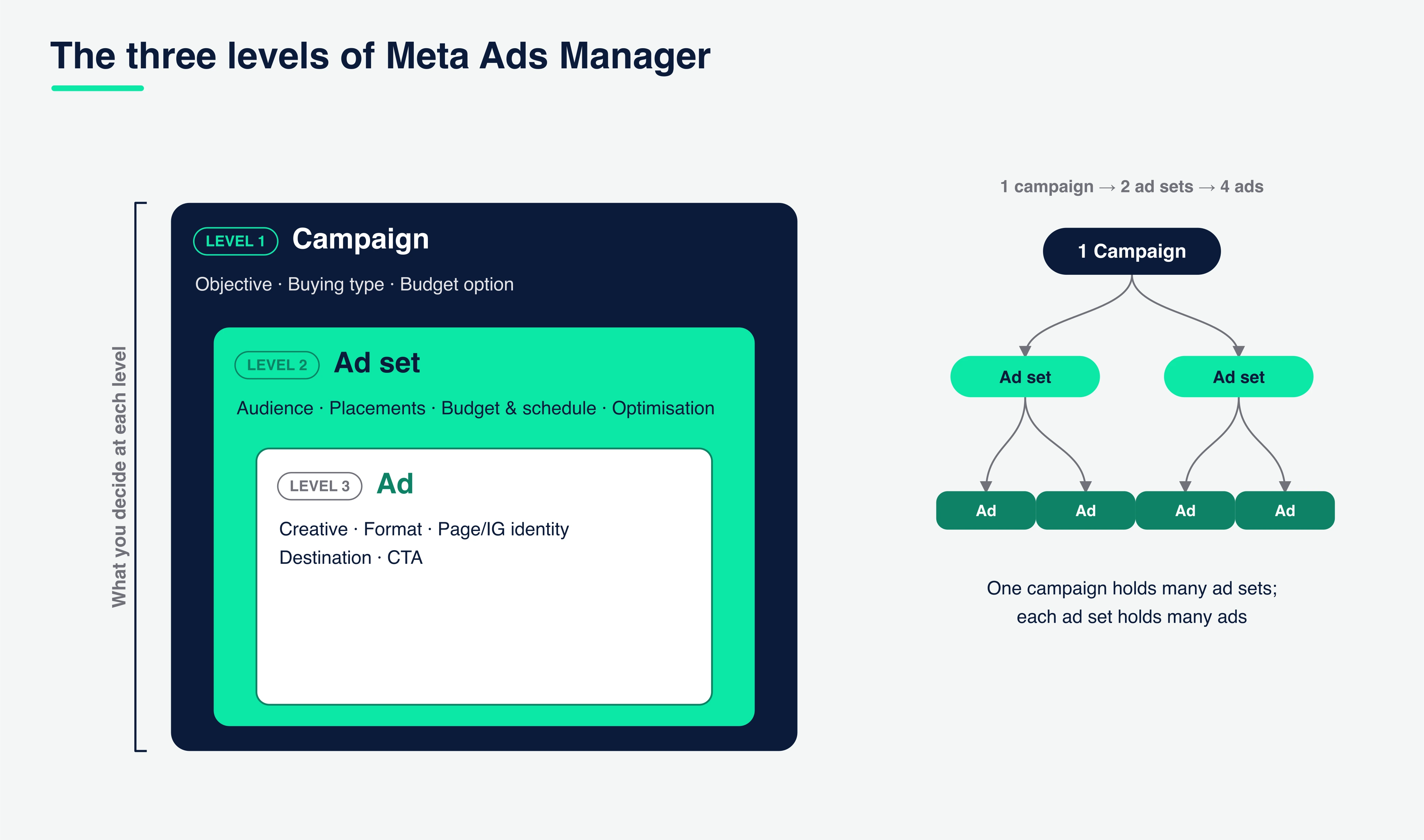
Campaign is the top level. Here you choose your objective (the outcome Meta optimises towards) and your buying type. You also decide whether the budget is controlled here, using Advantage campaign budget, which lets Meta move spend between ad sets automatically, or down at ad-set level.
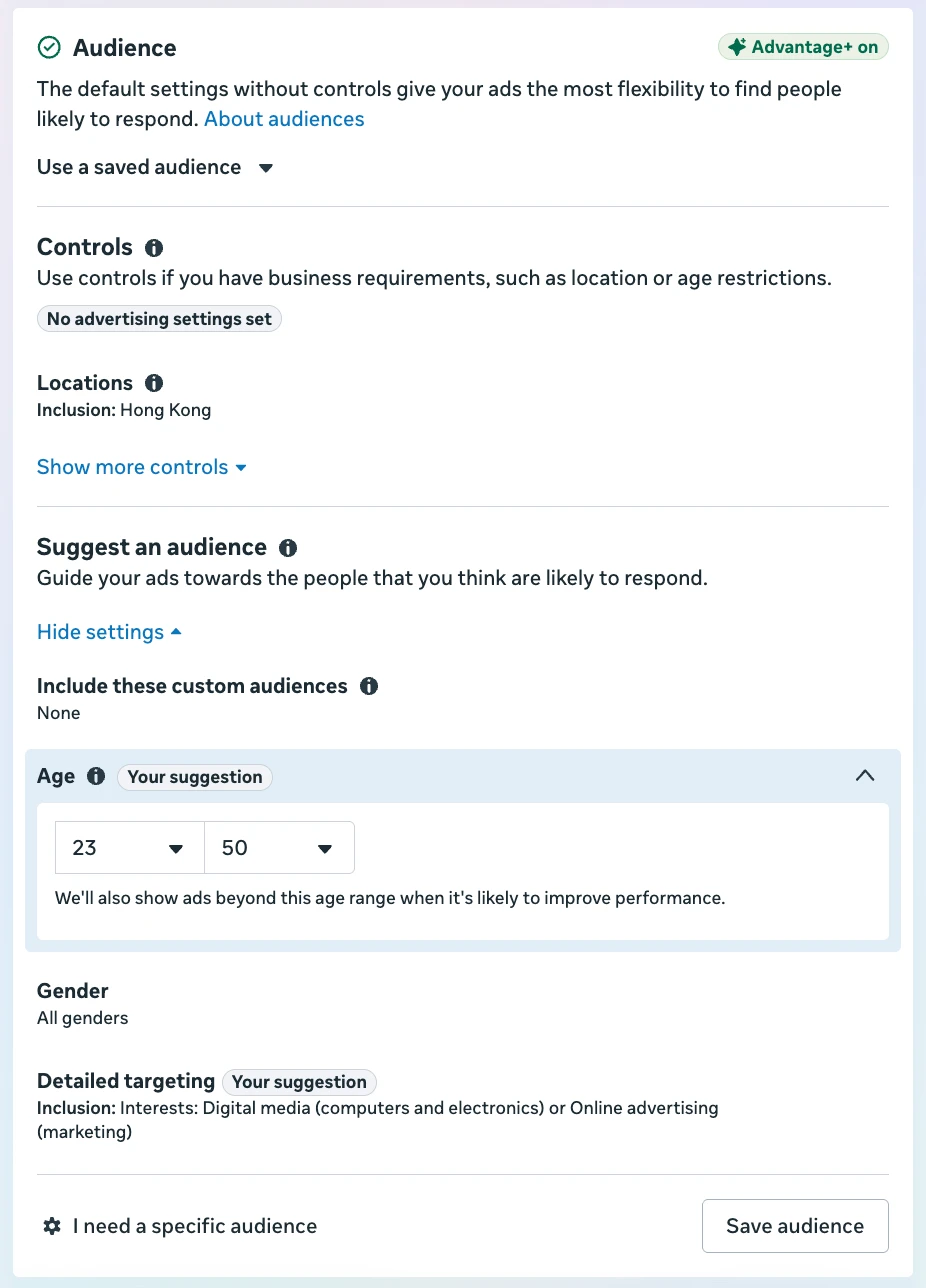
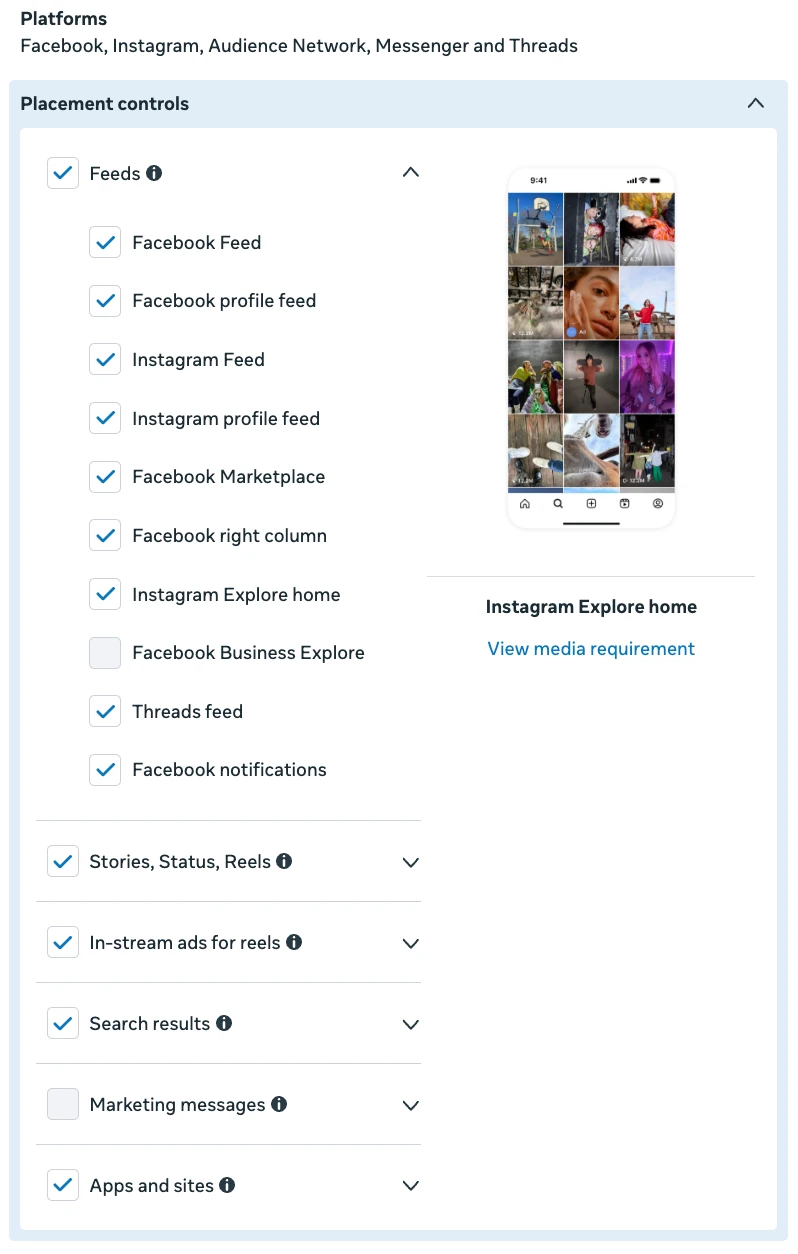
Ad set is the middle level, and it does most of the work. This is where you set your audience (locations, age, detailed targeting or Advantage+ audience), your placements (Advantage+ placements or manual), your budget and schedule if you are not using campaign budget, and your optimisation and delivery, meaning the specific event Meta aims for and the attribution setting used to report on it.
Ad is the bottom level, the creative people actually see. Here you pick which Facebook Page and Instagram account represent you, choose the format (single image, video, carousel or collection), upload the media, and write the primary text, headline and description. You also set the destination, a website, a WhatsApp chat or an instant form, and the call-to-action button.
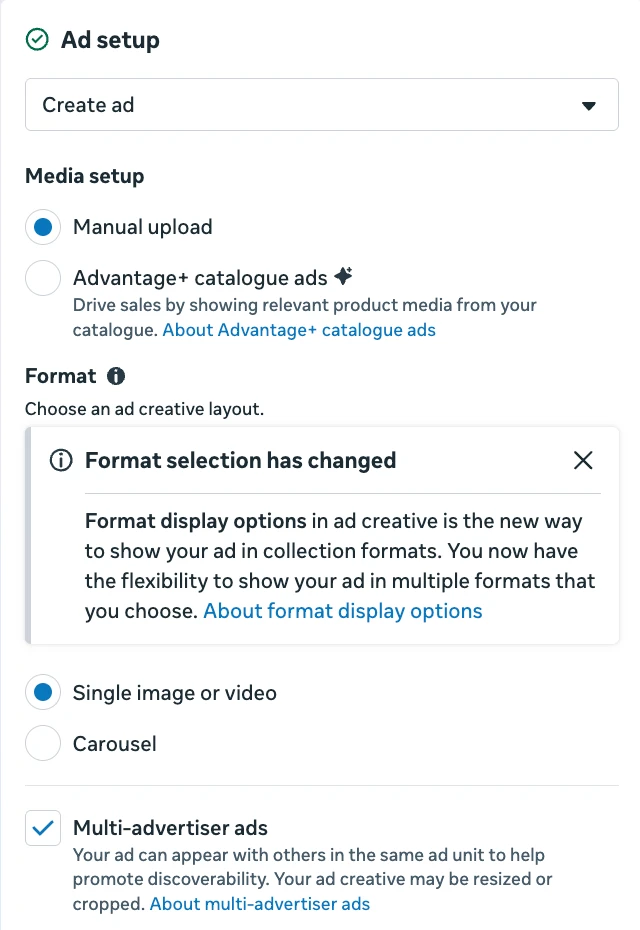
The relationship is one-to-many: one campaign holds several ad sets, and each ad set holds several ads. That is deliberate. You test different audiences at the ad-set level and different creatives at the ad level, all under a single objective.
Build your first campaign, step by step
Create and choose an objective. Click Create in Ads Manager and pick one of the six objectives: Awareness, Traffic, Engagement, Leads, App promotion or Sales. This is a strategic decision, so if you are unsure which fits your goal, work through our ads guide first.
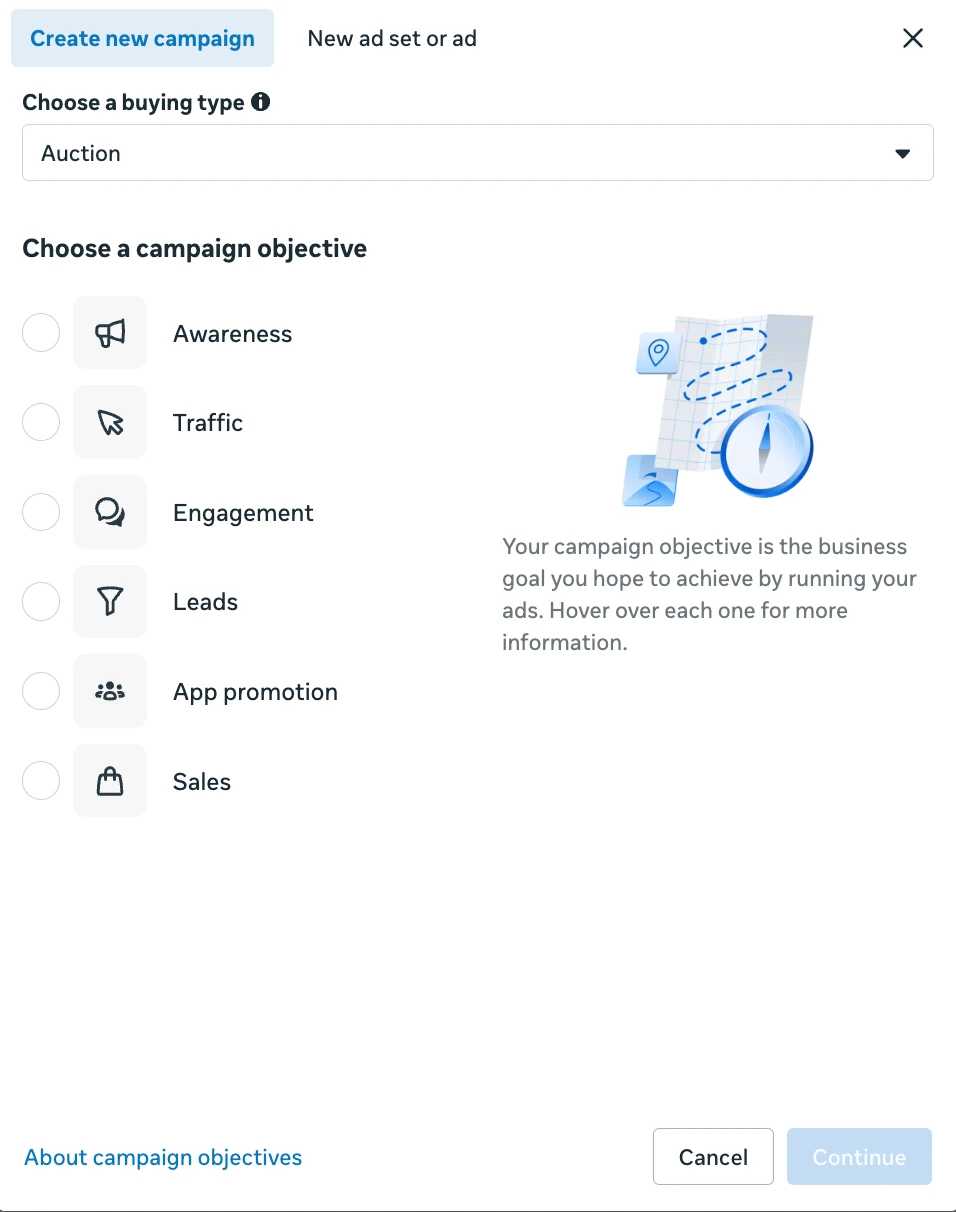
Name it clearly. Use a naming convention you can read at a glance later, for example objective, audience and date. Future-you, staring at a reporting table, will be grateful.
Set the campaign-level options. Choose whether the budget sits here (Advantage campaign budget) or at ad-set level, and decide whether to run this as an A/B test.
Build the ad set. Define the audience, choose placements (start with Advantage+ placements unless you have a reason not to), set the budget and schedule if it is not at campaign level, and confirm the optimisation event, the action you want Meta to chase.
Build the ad. Select your Page and Instagram identity, choose the format, upload your image or video, and write the primary text, headline and description. Set the destination and the call-to-action. Preview it across placements before moving on; a layout that looks right in the feed can break in Stories or Reels.
Review and publish. Publishing sends the campaign into Meta's review before it starts delivering, usually a short wait. If you are not ready, save it as a draft instead. A draft does not spend anything and does not deliver until you publish it.
Reading the reporting
The reporting table is where discipline pays off. A handful of columns tell you almost everything:
- Results and Cost per result: how many of your chosen outcome you got, and what each one cost. This pair is the headline.
- Amount spent: total spend for the row.
- Reach, Impressions and Frequency: how many people, how many times, and the average of the two. Rising frequency alongside falling performance is the classic fatigue signal.
- CTR, CPM and CPC: the engagement and cost efficiency of the delivery.
Two features make the table far more useful. Custom columns let you choose exactly which metrics show and save the layout as a preset, so you are not scrolling past numbers you never read. Breakdowns split any row by delivery, by age, gender, placement, platform, region or time of day, which is how you discover that Reels are carrying the account or that one age band is quietly wasting spend.
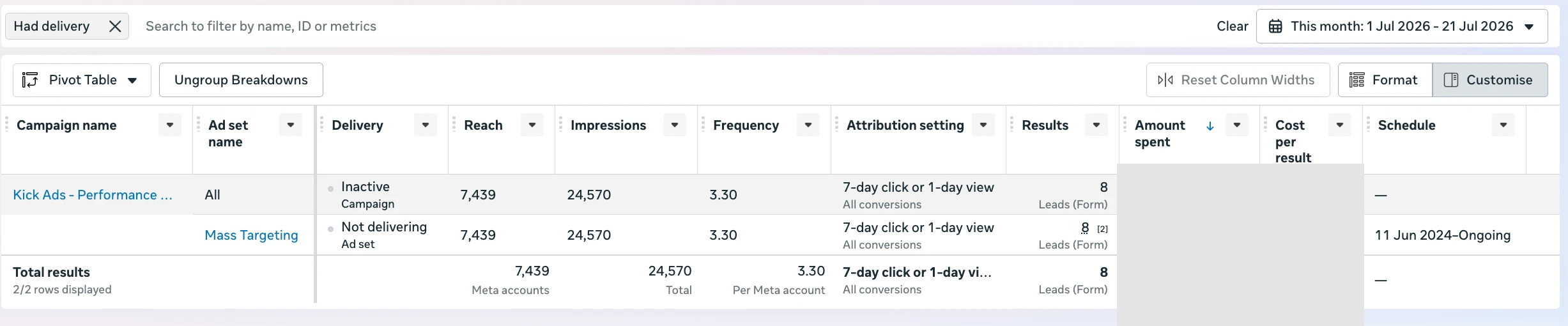
Reading the report to find what to improve
The columns above are not just a scoreboard; read together, they tell you which level to open next. Work down the three levels:
Campaign level, is the money going to the right place? Line up Cost per result and Results across your campaigns and ad sets. One is usually far more efficient than the others. Move budget away from the bleeders towards the performers, or let Advantage campaign budget do that shifting for you. This is the fastest win in most accounts, and it needs no new creative.
Ad set level, audience, targeting and delivery. A few numbers point straight at the ad set:
- Frequency. When frequency climbs while Results or CTR slide, the same people are seeing the ad too often and the audience is saturating. The fix is either fresh creative (an ad-level job) or a wider audience. Where the fresh creative can come from: our Seedance 2.5 AI video test. For the build steps, see two photos to a finished video ad.
- CPM and CPC. A high CPM usually means auction competition, audience overlap, targeting that is too narrow, or low ad quality. A high CPC most often just follows a low CTR. Check how broad the audience is and which placements are running.
- Optimisation event and learning phase. Confirm the ad set actually left learning; it needs roughly 50 optimisation events a week. Stuck in learning means too few conversions are coming through, so consolidate overlapping ad sets or optimise for a higher-funnel event.
- Breakdowns, the real diagnostic tool. Break a row down by placement, age, gender, platform or time, and the waste or the winner shows itself: Reels quietly carrying the account, or one age band burning budget for nothing. Then exclude what loses and shift towards what wins.
Ad level, the creative. CTR is the tell here. A low CTR means the hook or the creative is not landing, or the audience is wrong. A high CTR paired with weak conversions means the click is fine and the problem sits past Meta, on the landing page or in the offer. Compare CTR and Cost per result across your ads to see which creative wins, then pause the losers and put budget behind the winners.
These numbers tell you where to look; for how to actually fix the creative or the audience, see our strategy guide.
One setting quietly shapes every number: the attribution setting, which decides which conversions get credited to your ads and over what window. Ads Manager lets you compare attribution settings side by side. And expect the platform's figures to disagree with GA4 or your sales records; different tools count differently. Treat Meta's numbers as the platform's view and your CRM as the truth. We go deeper on this in our conversion tracking guide.
Where the Pixel, conversion events and custom audiences plug in
The build flow references these pieces; it does not create them. Two connection points matter:
- Conversion event. To optimise for conversions, the ad set needs an event to aim at. That event comes from your Pixel or dataset and is managed in Events Manager. You simply select it at the ad-set optimisation step; you do not build it inside the campaign flow.
- Custom or website audience. To retarget site visitors and engagers, or to prospect with a lookalike, you build the audience once in the Audiences tool, then pick it as a saved audience at the ad-set audience step.
In short, you set these up separately and the campaign only points at them. For how to install the Pixel, define events, and build retargeting audiences, see our strategy guide.
Business Manager, Ads Manager, Events Manager: who does what
Three tools sit next to each other, and mixing them up is common:
- Business Manager (Meta Business Suite) is the container. It holds your assets, Pages, Instagram accounts, ad accounts, datasets, and the people who can access them. Own it under the company, never an employee's personal profile.
- Ads Manager is where you build and report on campaigns. It is the subject of this tutorial.
- Events Manager is where you manage your Pixel and Conversions API datasets, verify that events are firing, and check match quality. When your reporting looks wrong, this is often where the problem actually lives.
Common Ads Manager settings to check
- The learning phase is real. After a significant change, an ad set re-enters learning while Meta gathers roughly 50 optimisation events. Performance is unstable during this window, so do not judge it, or panic-edit, on day one.
- Editing a live ad set resets learning. Changing the targeting, the optimisation event, the bid strategy, or the budget by a large margin restarts the learning phase. Batch your changes and make them on a schedule, not on anxiety.
- Duplicate versus edit. When you want to test or scale without disturbing a working ad set, duplicate it rather than editing it. Note that a duplicate starts its own learning phase from zero and inherits none of the original's history.
- The draft that never published. The most common answer to "why isn't my ad running" is that it is still a draft, still in review, or the ad set or campaign toggle is switched off. Check all three before assuming a bigger problem.
- Budget on the wrong level. If you set an Advantage campaign budget and then wonder why you cannot control each ad set's spend, that is the reason; the two budget models are mutually exclusive.
Hong Kong specifics
- Run bilingual creative. English and Traditional Chinese audiences respond differently. Build them as separate ads so you can read each one's numbers rather than blending them, then let the data decide the mix.
- WhatsApp and Messenger are first-class destinations here. In Hong Kong, click-to-WhatsApp and Messenger destinations are available and often outperform a form. You set them as the ad's destination at the ad level, and the conversation objective and messaging apps do the rest. The setup for this is in our ads guide.
- Get the account settings right once. Set your ad account currency to HKD and your timezone to Hong Kong before you spend. Both are effectively locked afterwards, and both affect how billing thresholds and daily budgets are calculated and reported.
FAQ
What is the difference between Meta Ads Manager and Boost Post? Boost is a simplified shortcut on a Page post that hides most targeting, placement and objective controls and optimises mainly for engagement. Ads Manager is the full tool, with every objective, audience, placement and reporting option. Growth budgets belong in Ads Manager.
What are the three levels in Meta Ads Manager? Campaign, ad set and ad. The campaign sets the objective; the ad set sets the audience, placements, budget and schedule; the ad holds the creative. One campaign can contain several ad sets, and each ad set several ads.
Why is my ad not spending or delivering? Usually one of a few tool issues: it is still saved as a draft, still in Meta's review, the ad set or campaign is toggled off, the budget or schedule has not started, or the ad was rejected. Check the delivery column and the toggles first.
Do I need Business Manager to use Ads Manager? In practice, yes. Business Manager holds your ad account, Page, Pixel and permissions under company ownership, which keeps you from being locked out later. Set it up first, then work inside Ads Manager.
Will editing my campaign reset the learning phase? Significant edits will: changes to targeting, the optimisation event, the bid strategy, or a large budget change. Minor edits such as renaming or a small schedule tweak generally will not. When in doubt, duplicate instead of editing a live ad set.

About the author
Frankie Chan · Co-Founder, Kick Ads
Frankie is an ex-Googler and paid media strategist. He has managed Google Ads and Meta Ads for ecommerce and lead generation businesses across Hong Kong and Malaysia since 2017, working closely on strategy, reporting and client growth planning.