
Naver Advertising: Complete Guide for HK Businesses
By Frankie Chan, Co-Founder · Updated 9 November 2026 · 11 min read
Jump to section
Naver sells two kinds of advertising. Search ads appear on its results pages and include Power Link (파워링크), Shopping Search ads and Place ads. Display ads appear on the Naver home page, news, Webtoon and other Naver services, and are usually called GFA. Most search ads are charged per click, with bids from 70 KRW to 100,000 KRW. A Hong Kong company can open its own account as an overseas advertiser and top it up in HKD or another foreign currency, or hand the work to one of the agencies on Naver's official partner list that support overseas advertisers.
Many Hong Kong businesses looking at Korea already run Google Ads and only find out later that Naver works differently. The products, billing, payment and account rules below come from Naver's own help centre and product pages as of November 2026, with a link beside each one so you can check the current version.
What search ads does Naver offer?
Naver currently lists eight search ad products (Naver product page). These five are the ones a Hong Kong business is most likely to consider:
| Product | Where it appears | Billing | Requirement |
|---|---|---|---|
| Power Link (파워링크) | Ad slots at the top of search results, plus partner sites such as Daum and Bing | Per click | Your own website |
| Shopping Search (쇼핑검색) | Naver Shopping and the shopping block in search results | Per click | Store listed on Naver Shopping |
| Power Content (파워컨텐츠) | The popular-posts block in search results | Per click | A Naver blog or Cafe post, on a set list of keywords |
| Brand Search (브랜드검색) | The top of results for your brand name | Fixed fee per contract period | Your own brand or product names only |
| Place Search (플레이스검색) | Map and place results | Per click, minimum bid 50 KRW | A Korean business listed on Smart Place |
Source: Naver product page and help centre, November 2026.
The other three are New Product Search (신제품검색), sold by weekly auction; Searching View (서칭뷰), which shows on desktop only; and local small-business ads (지역소상공인), charged per impression. Click Choice Plus and Click Choice Product, which older guides describe, no longer appear on Naver's product page.
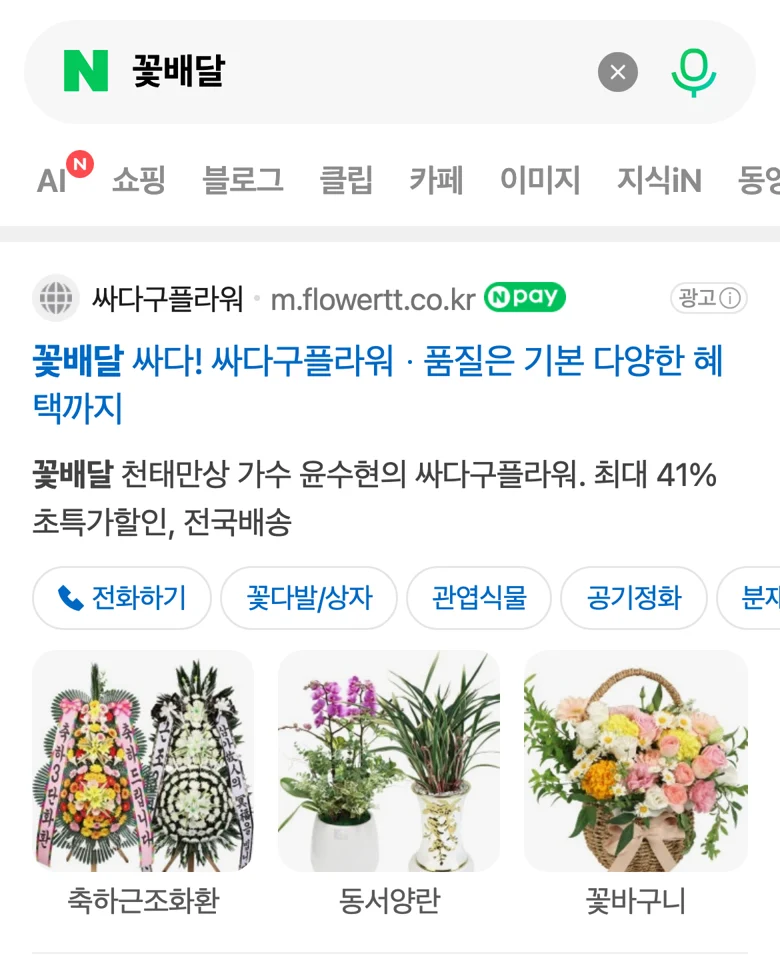
How Power Link works
Power Link is the closest thing to a Google Search campaign. You choose keywords, write the ad and set a bid, and you pay when someone clicks. Desktop results show up to 10 Power Link ads and mobile results up to 5, and low-volume keywords may show only 3 (Naver Help). Rank depends on your bid, how closely the keyword matches your site content and the quality of the ad (Naver Help), so the highest bid does not always take the top spot. If you know Google's Quality Score, the idea is similar. Biz Site still appears in Naver's description of placement order, below Power Link, but the product page no longer lists it separately.
Power Link also has an extended search option (확장검색). Naver's crawler reads the text on your site and matches your ads to related searches you have not added as keywords. Bids for these matches are set automatically, and you can cap the share of the ad group budget that extended search may use (Naver Help). Turning on its ADVoost Max feature lets Power Link appear in the AI briefing (AI 브리핑) section of results as well (Naver Help).
Shopping, Place and Brand Search each have a precondition
Shopping Search ads need your store to be listed on Naver Shopping's price-comparison service. There is a separate brand format for companies that join Naver's Brand Package (Naver Help). Place Search ads and local small-business ads both need the business registered on Naver Smart Place (Naver Help), so they only suit businesses with a physical location in Korea. Local small-business ads cost 0.5 KRW per valid impression, run to a maximum of 30,000 impressions a day and are open only to restaurants, everyday services, tutoring, and sports and leisure businesses, among a few others (Naver Help).
Brand Search only runs on company or product names directly tied to you. When someone searches one of them, your ad takes the top of the page on its own, with images and text. There is no auction. You pay a fixed fee for a contract period, priced by ad type and the keyword's search volume over the last 30 days, and desktop and mobile are contracted separately (Naver Help). If Korean customers do not know your brand yet, few people will search for it, so this format usually comes later.
Naver display ads (GFA)
You can buy Naver display in two ways. The first is performance display, bought by real-time auction. It is commonly called GFA, and the product page still sits at ads.naver.com/gfa. Ads run on the Naver home page and services, on Naver family apps such as Webtoon, SNOW and Band, and on Naver's external performance network, with targeting by age, location and interest (Naver product page).
GFA campaigns are organised by goal: awareness and traffic, website conversions, app installs, catalogue sales and video views, among others. Most are charged per click and video views per view (CPV). Website conversion campaigns need Naver's conversion tracking script installed first, do not allow manual bidding, and according to Naver need around 40 conversions in the past week to optimise well. A new account may not reach that at the start, so an awareness and traffic campaign can be the first step.
The second is guaranteed display (보장형), where you buy fixed placements for a set period: the top of the Naver home page, full-screen units, video slots and so on, priced from Naver's rate cards (Naver product page). Naver states on the same page that 54 million people use the platform each day. These placements suit brands running a large seasonal campaign.
Naver's display inventory is wider than older guides suggest. Whether you run display on Naver or on YouTube and the Google Display Network depends on where your customers spend their time and what creative you have. Our YouTube ads guide covers formats and costs on the Google side.
How much do Naver ads cost and how do you pay?
Naver search ads are prepaid. You load money into the account's Bizmoney (비즈머니) balance and each click is deducted from it. Power Link, Shopping Search and Power Content are auctions with a minimum bid of 70 KRW per click (50 KRW for Shopping Search) and a maximum of 100,000 KRW. You never pay more than your bid. Accounts paying in KRW add 10% VAT. Naver's own example is a bid of 320 KRW, an actual charge of 273 KRW and 300.3 KRW once VAT is added (Naver Help).
Naver does not publish a price per keyword. Once the account is open, the bid screen for each keyword in an ad group shows two reference figures. The minimum exposure bid is the highest bid that held the last position over the past four weeks, and the median bid is the middle of all bids over the same period (Naver Help). Both come from the keyword you actually plan to buy, which makes them more useful than any price quoted in an old article.
Each campaign takes a daily budget. When it runs out the system pauses the ads, though the pause takes a little time to apply and the day's spend can end slightly above the budget (Naver Help).
Overseas advertisers can top up with a Visa card enrolled in 3D Secure, a Mastercard with SecureCode or a JCB card with J/Secure. They can also pay by foreign-currency bank transfer, and HKD is one of the accepted currencies. Before a transfer you email Naver for an invoice, then send exactly the currency and amount shown on it. If your bank converts the payment to KRW first, the Bizmoney is not credited and a refund takes at least a month. Overseas accounts default to foreign currency. Top-ups made directly in foreign currency are billed without Korean VAT. If you switch to KRW, 10% VAT applies and is not refunded (Naver Help).
Can a Hong Kong company open a Naver ads account?
Yes. Naver has three advertiser types: Korean businesses, individuals and overseas advertisers. An overseas advertiser can open up to 10 ad accounts per company name (Naver Help). Naver's Global Growth Partner page for international brands also says that global companies can create and operate Naver ad accounts (Naver Global Growth Partner).
You need a Naver ID first. Naver Ads only accepts members who have completed real-name verification and are 19 or older. After signing up you create an ad account, choose the advertiser type and enter the company details (Naver Help). The help centre does not list which documents an overseas company has to submit, so we recommend confirming this with Naver's customer service or an official partner before you start.
An earlier version of this article suggested asking a Korean individual to open an account in their own name. We no longer recommend it. Naver's rules say a personal account may only advertise that individual when they have no business registration, and a business must advertise through an account in its own name. Naver also checks regularly that account details match the owner of the advertised website. Accounts that do not match get a grace period to fix it and are suspended after that (Naver Help). With the account in someone else's name, the ad history, the balance and the payments are all outside your control, and they are hard to recover if the arrangement ends.
For help with setup and day-to-day management, Naver publishes an official partner list. Agencies tagged Global Growth there specialise in overseas advertisers and offer support in English and other languages (Naver partner list).
Naver vs Google search market share in Korea
It depends which source you use. The two most quoted ones disagree widely for the same period:
| Source | Period | Naver | |
|---|---|---|---|
| InternetTrend (BizSpring) | 6 Oct to 4 Nov 2026 | 67.3% | 26.8% |
| StatCounter | October 2026 | 42.25% | 48.48% |
Sources: InternetTrend and StatCounter, checked 6 November 2026.
Both count visits that arrive at a website from a search engine. The difference is which websites. InternetTrend measures Korean domestic sites running BizSpring's Logger analytics. StatCounter measures more than a million sites worldwide that carry its tracking code and applies no country weighting (StatCounter FAQ). StatCounter's sample therefore includes many international sites, and Korean users who reach those sites tend to come through Google. That is probably the main reason Google scores higher there. If your website serves Korean customers locally, the InternetTrend figure is likely closer to what you will see.
Paid clicks look different. For the same period, InternetTrend reports that among visits from CPC ads, Google Ads accounted for 47.5% and Naver search ads (clickchoice) for 30.6%. So even in a sample of Korean sites where Naver has about two-thirds of organic search visits, Google Ads drives more paid clicks. That is why we recommend testing both in Korea.
Running Google Ads in Korea is much simpler than Naver for a Hong Kong business. Your existing Google Ads account can target South Korea with Korean keywords and keep the same billing. Our Google Ads guide covers the Search campaign basics.
What do you need before you launch?
Start with a Korean landing page. Korean customers search in Korean, so the keywords, ad copy and page all need to be in Korean, ideally written or at least checked by a native speaker. Naver requires the main page of a Power Link website to show the advertiser's business details (Naver Help), and those details must match the account holder.
Online stores have more to meet. Naver asks them to show the company name, business registration number and mail-order business report number (통신판매업 신고번호) on the main page, and to offer secure payment such as credit cards and escrow. Naver places test orders to check the payment works (Naver Help). The mail-order business report is a Korean registration, so ask Naver how an overseas store can meet this requirement before you build the store. Medical, financial and some other categories face extra review. Medical ad copy, for example, generally needs pre-approval from the relevant Korean medical association (Naver Help).
For payment, a company credit card enrolled in 3D Secure or an equivalent check is the easiest route. If you pay by transfer, allow time to request the invoice, and expect the Bizmoney to arrive one to two working days after Naver receives the money.
Then set up conversion tracking. Naver has its own tracking script that goes on your site, and GFA website conversion campaigns will not run without it. Google conversions are set up separately, as described in our conversion tracking guide. Use the same conversion definition on both, for example counting only submitted enquiry forms, so the comparison later is fair.
FAQ
What is the minimum budget for Naver ads? Naver has no fixed minimum. Search ads are charged per click from a minimum bid of 70 KRW, and you set each campaign's daily budget yourself.
Can a Hong Kong company open a Naver ads account directly? Yes. Naver offers an overseas advertiser type, so a foreign company can open an account in its own name and top it up in HKD or another foreign currency.
Can I pay with a Hong Kong credit card? Yes, with a Visa card on 3D Secure, a Mastercard on SecureCode or a JCB card on J/Secure. HKD bank transfer is also accepted.
Do overseas advertisers pay Korean VAT? Not when they top up directly in foreign currency. Top-ups in KRW include 10% VAT, which is not refunded.
Should I advertise on Naver or Google in Korea? We recommend testing both. In InternetTrend's data Naver leads organic search, while Google Ads brings more paid clicks, so let your own conversion data decide the split.
Planning ads for Korea?
If you are considering Korea and want to see keyword demand and budgets on both Naver and Google first, message us on WhatsApp or contact us. Kick Ads has managed Google Ads and Meta ads for Hong Kong and Malaysia businesses since 2017. See our search ads service page.

About the author
Frankie Chan · Co-Founder, Kick Ads
Frankie is an ex-Googler and paid media strategist. He has managed Google Ads and Meta Ads for ecommerce and lead generation businesses across Hong Kong and Malaysia since 2017, working closely on strategy, reporting and client growth planning.