
Click Fraud in Google Ads: Detection & Protection Guide (2026)
By Terrence Chung, Co-Founder · Updated 13 July 2026 · 5 min read
Jump to section
Click fraud means competitors or bots deliberately and repeatedly clicking your ads to burn your budget. The good news: Google already filters most invalid clicks automatically and doesn't charge you for them — the situations that genuinely need a third-party tool are rarer than the tool vendors suggest. This guide covers how click fraud works, how to detect it yourself, and when protection software is actually worth paying for.
What is click fraud?
Malicious or invalid clicks typically come from three sources:
- Competitors — manually or programmatically clicking your ads to drain your daily budget and knock your ads offline early;
- Bot traffic — automated programs clicking ads at scale, most common on Display placements and low-quality partner sites;
- Invalid but innocent clicks — for example, accidental double-clicks.
If you're running Google Ads, the only question that matters is: are these clicks actually eating your budget?
How big is the problem, honestly?
Let's be clear up front: Google runs an automatic invalid-click filtering system. Every click is examined; clicks judged invalid are removed from your reports and your bill, so you don't pay for them. When invalid clicks slip past automated detection, Google can refund the cost as an "invalid activity" credit.
That means most click fraud is filtered out before you ever see a bill. The scary "click fraud costs billions" statistics you see around the web mostly come from the marketing material of tool vendors — treat them with scepticism.
That said, Google's mechanism isn't transparent to advertisers — you can't see which IPs were filtered or what they did on your site. And in fiercely competitive, high-CPC industries (legal, repairs, aesthetics), the risk of clicks slipping past automated detection is genuinely higher.
How to detect click fraud yourself
Google Ads' own data gets you most of the way:
- Check the invalid clicks columns — add "Invalid clicks" and "Invalid click rate" to your campaign reports to see how much Google is already filtering for you;
- Watch for abnormal patterns — click spikes in short windows, CTR jumping with zero conversions, traffic clustering from one unexpected region;
- Cross-check GA4 data — heavy clicks with near-zero engagement (instant bounces, no interaction) is the classic bot signature;
- Review Search Partners and Display placements — bot traffic overwhelmingly lives there, not on core Google Search.
Google's built-in protection — and how to escalate
Beyond automatic filtering, you can act directly:
- Request an invalid-activity investigation — if you have evidence (e.g. server logs showing repeated clicks from one IP), submit an invalid-click review request through Google Ads support; confirmed cases are refunded as invalid activity adjustments;
- IP exclusions — campaign settings let you exclude specific IP addresses (up to 500 per campaign). Effective against fixed sources, less so against bots that rotate IPs;
- Tighten placements — if bot traffic concentrates on Display or Search Partners, switching those surfaces off is often more effective than blocking IPs one by one.
Third-party tools: ClickCease (now CHEQ Essentials)
If you're in a highly competitive industry with meaningful monthly spend, dedicated click-fraud protection may be worth evaluating. The best-known tool is ClickCease — acquired by CHEQ and now sold as CHEQ Essentials.
What it does:
- Automated IP blocking — suspicious click patterns trigger automatic additions to your Google Ads IP exclusion list, no manual work;
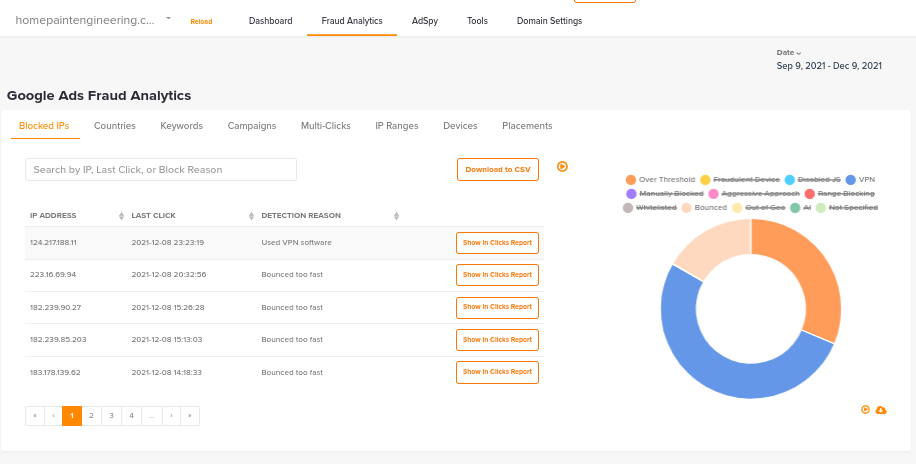
- Fraud Analysis reporting — shows which IPs were blocked and why, adding the transparency Google's own system lacks;
- Custom detection rules — set thresholds like "how many clicks within what window counts as suspicious" for your industry;
- Session recordings — watch what suspicious visitors actually did on your site.
Pricing changed after the acquisition — check the official pricing page for current plans. Other tools in this category work on the same principle: a tracking code observes click behaviour, then automatically maintains your IP exclusion list.
When a tool is NOT worth buying
Honest advice: most small and mid-sized accounts don't need a third-party click-fraud tool.
- Your budget runs mostly on Google Search (not Display), where bot risk is inherently lower;
- Your monthly spend is modest — the tool's subscription may cost more than your actual losses;
- Google's automatic filtering plus manual IP exclusions covers occasional incidents fine.
Getting the fundamentals right — Quality Score, conversion tracking, placement management — usually improves results more than another tool.
Bottom line
Click fraud is real, but Google's automatic filtering absorbs most of it. Start with the free layers: check your invalid-click data, exclude suspicious IPs, tighten placements. Only consider CHEQ Essentials-class tools if you're in a high-risk vertical with actual evidence of losses.
Want to know whether your account is leaking budget — not just to click fraud, but to the far more common placement, keyword and settings problems? Run a free Paid Media Health Check, or talk to us. Kick Ads is a Hong Kong Google Partner agency managing paid media for Hong Kong and Malaysia businesses since 2017.
FAQ
Will click fraud drain my Google Ads budget? Usually not. Google automatically detects and filters invalid clicks, and you aren't charged for filtered clicks; cases that slip through can be refunded as invalid activity adjustments. Meaningful losses concentrate in high-CPC, highly competitive industries.
How do I know if my ads are being maliciously clicked? Add the Invalid clicks column to your Google Ads reports to see what's being filtered, and watch for click spikes, CTR jumps with zero conversions, and GA4 traffic with near-zero engagement.
Can I block specific IP addresses in Google Ads? Yes. Campaign settings support IP exclusions, up to 500 per campaign. This works against fixed sources but is weaker against bots that rotate IP addresses.
Is ClickCease (CHEQ Essentials) worth it? It depends on scale and industry. Automated IP blocking and transparent reporting genuinely fill gaps in Google's own system, but smaller Search-focused accounts usually don't need an extra tool. Check official pricing before deciding.
Does Google refund invalid clicks? Yes. Filtered invalid clicks are never charged, and late-detected cases are credited back as invalid activity adjustments. You can also proactively request an investigation through Google Ads support with your evidence.

About the author
Terrence Chung · Co-Founder, Kick Ads
Terrence is an ex-Googler, paid media and SEM trainer. He has managed Google Ads for ecommerce and lead generation businesses across Hong Kong and Malaysia since 2017, working closely on account strategy and optimisation direction.