
Ecommerce Ads: 4 Always-On Campaigns Every Store Must Run
By Frankie Chan, Co-Founder · Updated 13 July 2026 · 7 min read
Jump to section
Most ecommerce stores spend on one-off boosted posts while the ads that actually compound — the always-on ones — never get built. Whether you run a two-person Shopify store or a large retail site, the same four campaigns do the heavy lifting for online sales. Here is what they are, why they work, and the real client data behind them.
Always-on Campaign vs Tactical Campaign
As far as any ad agency worth their salt is concerned, there are only 2 types of ad campaign. The first one is Always-On Campaign, meaning this ad will be online 24/7 365 days throughout the year without any end date; the second one is referred to as Tactical Campaign (also known as Event-Oriented), in which the ad campaign will only be viable for festive promotions during certain festive seasons, the inauguration of new products (otherwise known as Product Launch Ad/ Teaser Ad), store-wide sales of various E-commerce store, crossover of assorted brands, etc. In short, if the sole reason of the particular ad campaign is only to promote a specific event or entity, then it all falls under Tactical Campaign.
Why does the campaign type matter?
All four campaigns below are Always-On. As long as ROI stays positive they should keep running, because Always-On campaigns are what generate sales and online transactions day after day. Tactical campaigns are planned separately, weeks before the offer goes live: how we plan the Hong Kong sale calendar.
4 types of Always-on Ads
Paid Search (Search Ads + RLSA)
Paid Search is the paid half of search engine marketing — the other half being SEO. When a store has just launched, SEO takes months to compound, so Paid Search is usually the first channel worth switching on: it captures people who are already searching for what you sell.
How Paid Search helps elevate the effectiveness of online Sales?
No targeting method beats search intent: the person is already looking for what you sell. For Paid Search, there are three crucial keywords that we will purchase- BRAND, GENERIC/PRODUCTS, COMPETITORS. The examples are as shown below:
Brands – every combination associated with your brand name (adidas)
Generic/Product – every combination associated with your service, product or problem (NMD R1)
Competitors – every combination associated with your competitors (nike)
Paid Search puts your ad in front of the right person at the right moment and lands them directly on your product page. That is why, among all ad channels, it is the most reliable source of direct response.
The honest caveat: keyword advertising keeps getting more competitive, and cost per click keeps rising with it. Stores without strong brand recognition have to rely on generic keywords to reach customers, and generic clicks are exactly where CPA (cost per conversion) climbs fastest. Yes, that is a criticism of Paid Search — a decent ad agency presents you with the facts.
Pay-per-click is undeniably getting more expensive — but that is a reason to control each click harder, not to walk away. Set up RLSA (Remarketing Lists for Search Ads) to layer remarketing onto your Search campaigns and keep a tighter grip on CPC.
RLSA
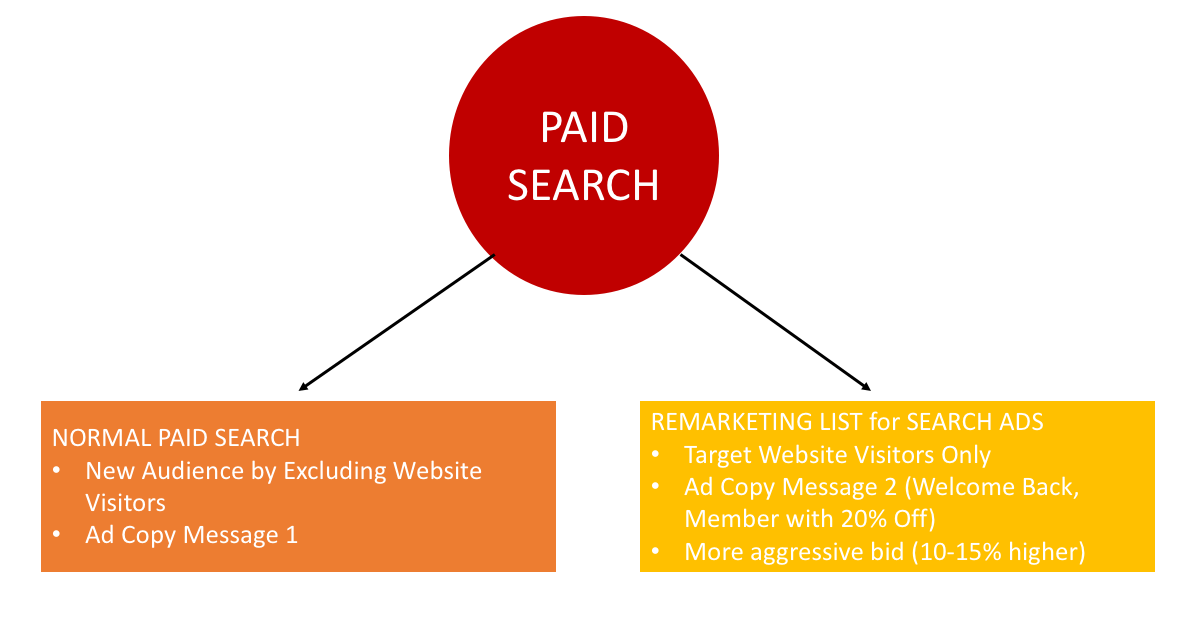
We run RLSA across our ecommerce clients to layer remarketing onto Paid Search. (In today’s Google Ads the lists live in Audience Manager as data segments — the RLSA name has stuck, but in practice you attach the segments to Search campaigns and Smart Bidding uses them as signals.) As shown by the image above, you will be guided to Normal Paid Search and Message 1 would be visible if you never visited that particular website before; If you did visit that particular website before, then it will guide you to Remarketing List for Search Ads, where we bid up for a higher ad position (assuming you already recognise our brand) and show a tailored Message 2.
Illustrative client data: RLSA vs generic Search
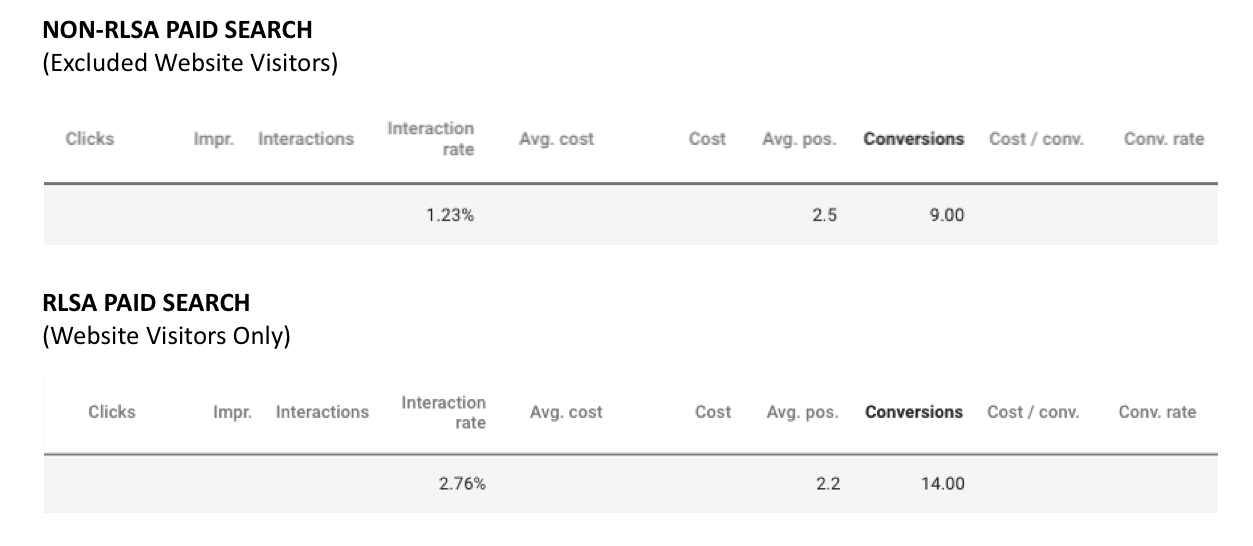
As expected, RLSA has a higher level of CTR (Click-through rate) and Conversions (As we need to protect our client’s privacy, please forgive us for hiding and concealing all sensitive information)
Dynamic Remarketing Banner on GDN
I am sure everyone here is familiar with the term Remarketing, but what exactly does Dynamic Remarketing mean? The concept of remarketing is extremely straightforward, and it is something everyone runs into daily. One of the most obvious examples: you have been on Booking.com checking out hotels but did not place any booking, and then you start to notice all those hotels you looked at following you and appearing everywhere, similar to the examples below:
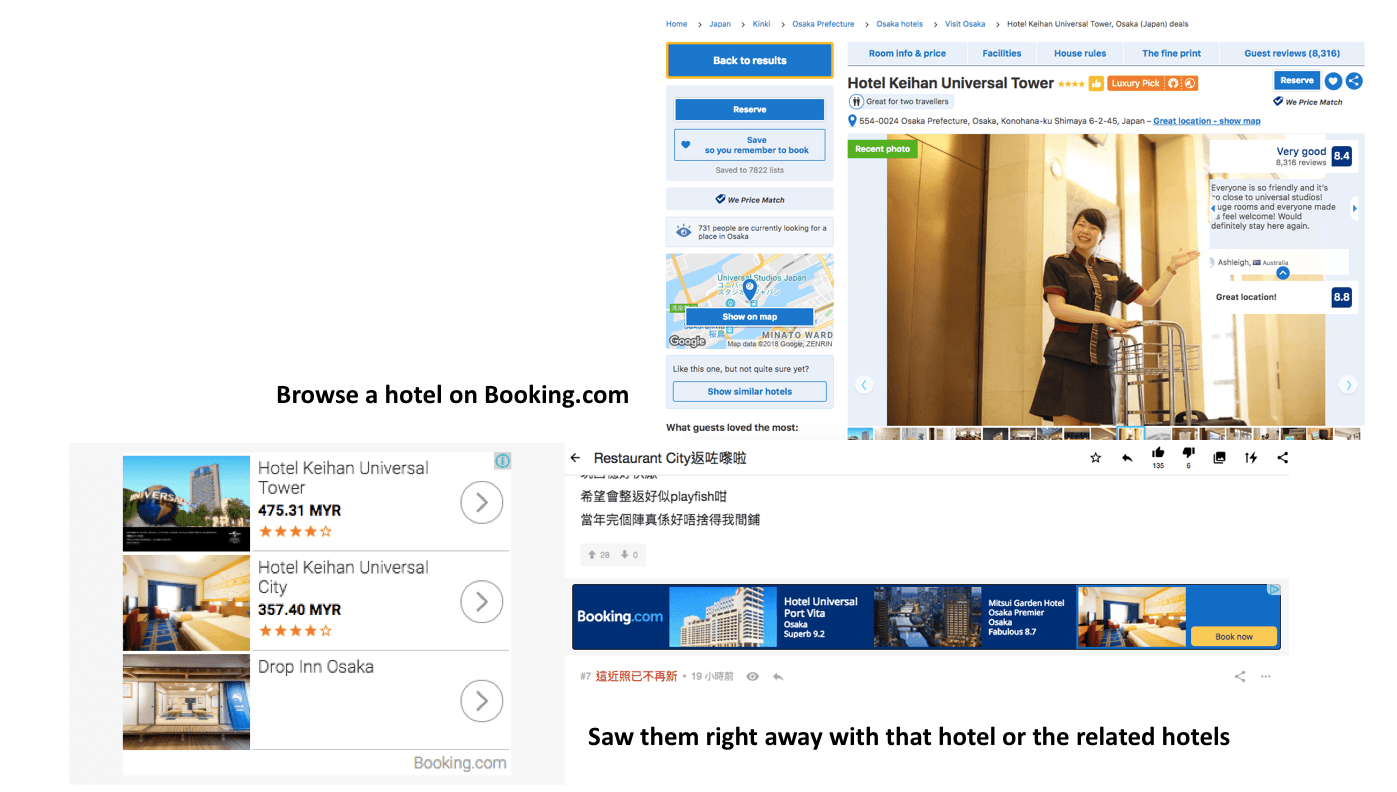
The obvious merit is that it lifts your CTR (Click-through rate) and Conversion Rate — and the reason is simple enough that everyone can see why those rates go up. The downside is that it might annoy your potential customers, so we need to exclude Converted Customers and set a Frequency Cap at the same time.
Dynamic Remarketing? Why does it seem like a back-breaking task?
A few years ago when we started using Google Ads, the dynamic ad settings were indeed troublesome, because we needed to insert a lot of custom code into the webpage. As website builders have advanced and Google has opened up more of its capability, dynamic remarketing has become a lot easier. In short, I will walk you through the simple steps of dynamic remarketing via the pictures below
Simple set-up Steps of Dynamic Remarketing
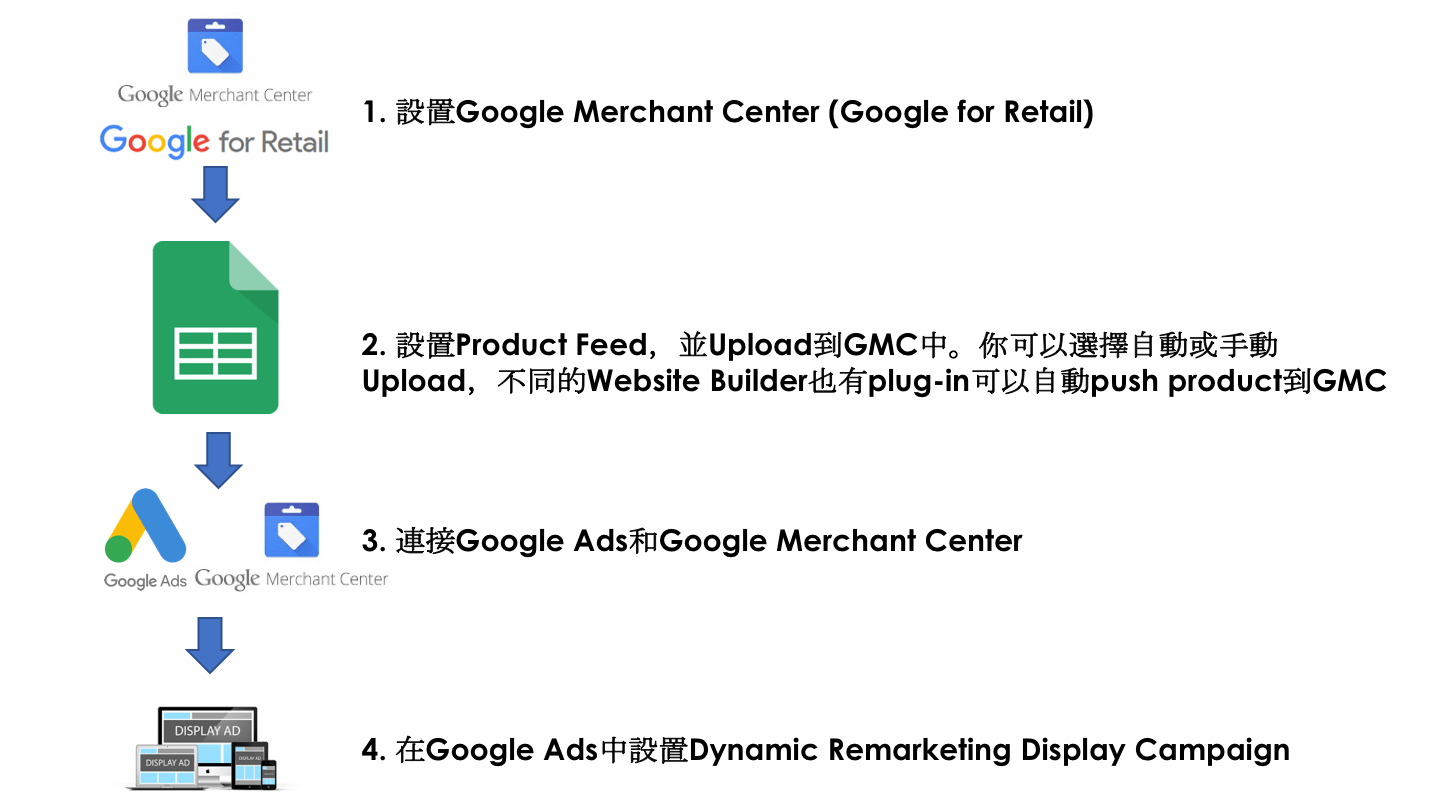
Since the main purpose of this article is not to introduce Dynamic Remarketing or the settings and optimization of Product Feed, we will not go into a lengthy explanation here. However do bear in mind that Dynamic Remarketing Ads assuredly helps a lot on E-Commerce.
Shopping Campaign
Once you set-up Product Feed on your Google Merchant Center, apart from Dynamic Remarketing, you might want to consider adding on something known as Shopping Campaign because this is another type of advertisement that E-Commerce stores need to consider. To be frank, we have been introducing Google Shopping for quite a few times, perhaps the reason everyone thinks that it’s not effective is because you feel that only sizeable E-commerce stores use Google Shopping? (As shown below)
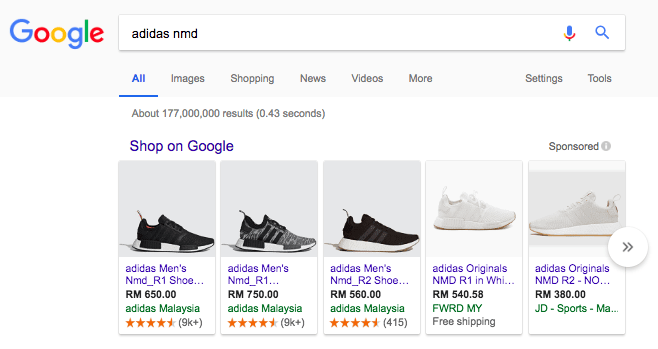
Yes it’s true that the websites of large E-commerce stores tend to dominate the shopping listing, however under the model of CPC even if your products did show up, you don’t have to pay for it if there is no click into it. Alternatively, if someone did click into it and ended up didn’t buy it, that’s when your Dynamic Remarketing comes in handy. Hence in many occasions, shopping and dynamic remarketing work the best when they are performed together. In addition, Shopping inventory tends to be cost-efficient when you manage it on a target-ROAS basis. In 2026 most ecommerce accounts serve Shopping inventory through Performance Max — it largely serves Shopping inventory, but a standard Shopping campaign remains the cleaner way to start, because you keep visibility over queries, products and bids before handing scale to PMax.
Meta Advantage+ Catalog Ads (formerly Facebook Dynamic Remarketing)
Apart from Dynamic Remarketing on the Google Display Network, Meta is the other platform you need to cover. What this post originally called Facebook Dynamic Remarketing is now Advantage+ catalog ads in Meta Ads Manager — same concept: a product feed powering personalised ads for people who viewed those products. Between Google and Meta you cover where almost every buyer spends their time, which is why remarketing is either all-in or not at all. However please don’t be terrified by the dynamic aspect of it because the settings are almost identical to Google’s remarketing, in which I will demonstrate the entire process flow.
Setup of Meta Advantage+ Catalog Ads
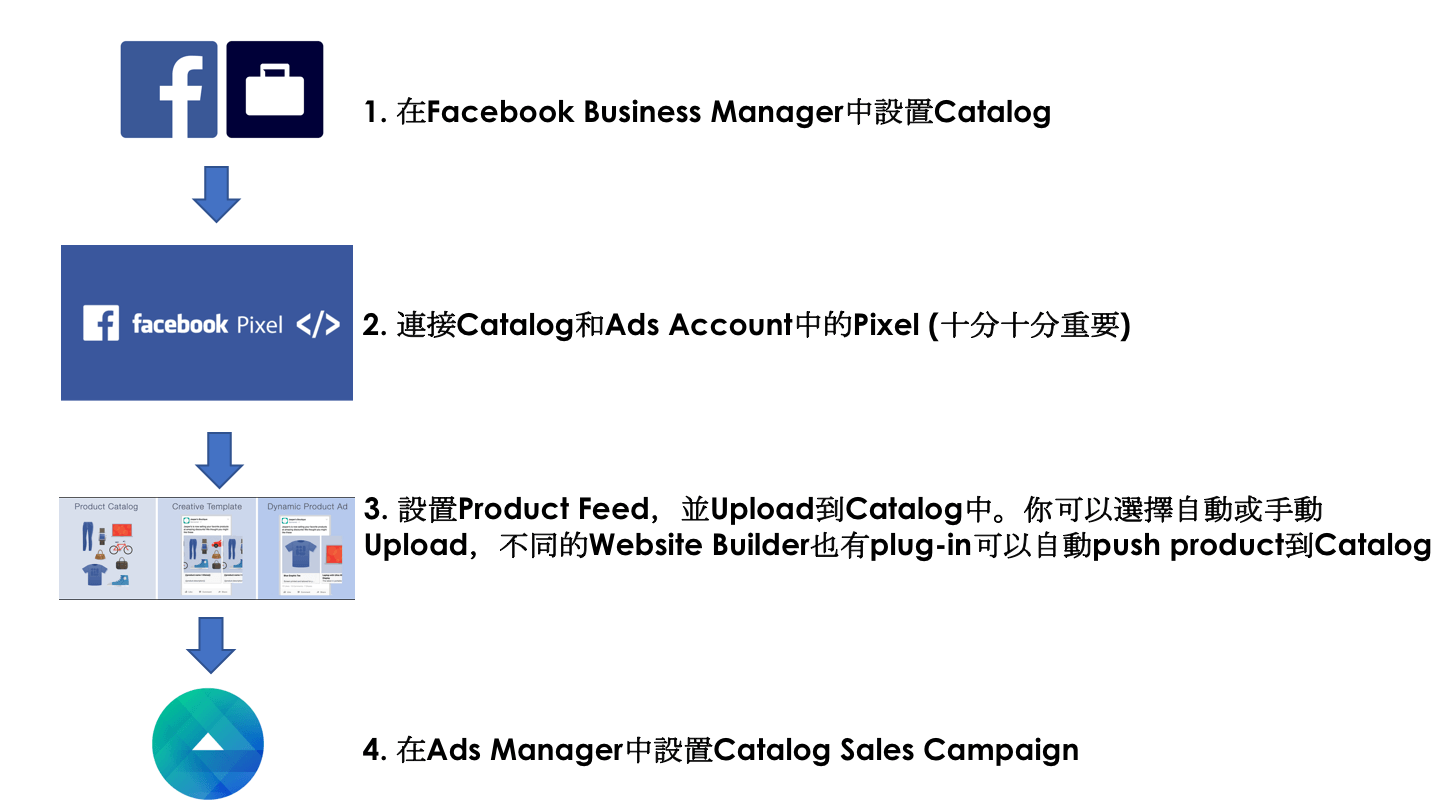
Advantage+ Catalog Ads greatly reduce CPA
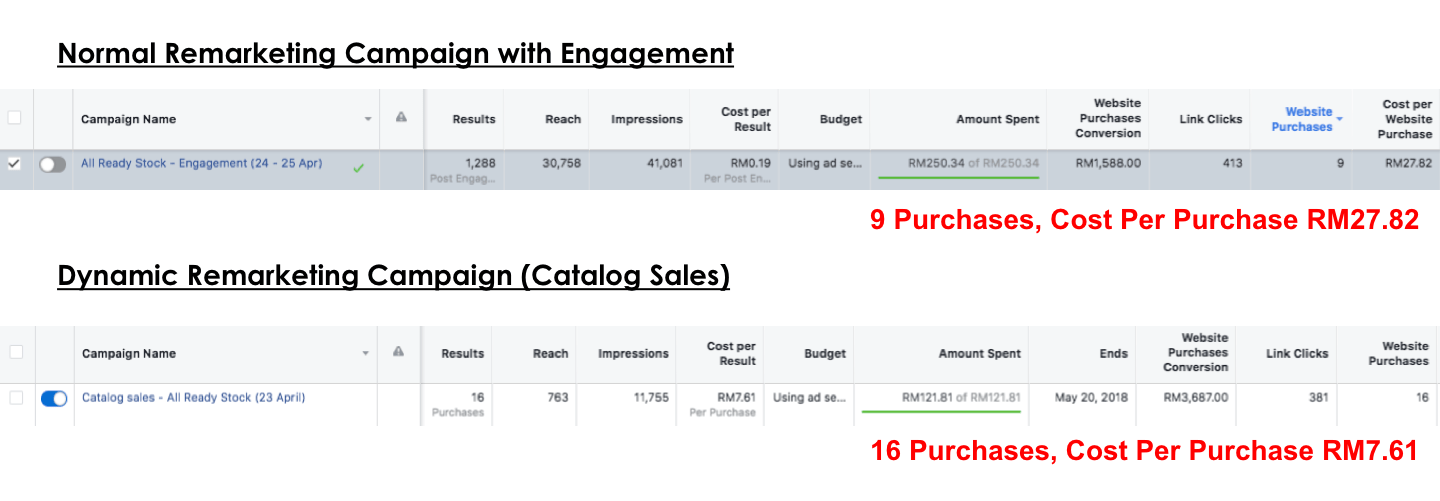
In an E-Commerce Store that we used to operate in Malaysia, we compared the data between an ordinary Remarketing Campaign and a Dynamic Remarketing Campaign in which evidently the advertisement fee for Dynamic Remarketing is lesser. Its CPA amounts to almost 3 times cheaper than the general remarketing advertisement fee!
The above four items are the kind of Always-On ads that an E-Commerce store should run. If you are not sure how to run them, feel free to ask us on Facebook at any time. If you want to know how Kick Ads can help grow your E-Commerce store, do not hesitate to leave your details and get in touch.
For the Meta side of the funnel, see our complete Facebook & Instagram Ads guide for Hong Kong.
FAQ
What is an Always-On campaign? An Always-On campaign runs 24/7, 365 days a year with no end date, and is primarily used to generate sales and online transactions. A Tactical campaign, by contrast, runs only for a specific period such as a festive promotion or a product launch.
Which four ads should every ecommerce store run? Paid Search (Search Ads with RLSA), Dynamic Remarketing banners on the Google Display Network, Google Shopping campaigns, and Meta Advantage+ catalog ads.
What is RLSA in Google Ads? RLSA (Remarketing Lists for Search Ads) applies remarketing to Paid Search, so people who have visited your website see a different message and a higher ad position. In our client data, RLSA delivered a higher CTR and more conversions than normal Paid Search.
What do I need before running Dynamic Remarketing or Shopping campaigns? A product feed set up in Google Merchant Center. Once the feed is live, it powers both Dynamic Remarketing banners and Google Shopping campaigns.
Do Meta Advantage+ catalog ads lower CPA? In an ecommerce store we operated in Malaysia, Dynamic Remarketing spent less than an ordinary remarketing campaign while its CPA came out almost 3 times cheaper.

About the author
Frankie Chan · Co-Founder, Kick Ads
Frankie is an ex-Googler and paid media strategist. He has managed Google Ads and Meta Ads for ecommerce and lead generation businesses across Hong Kong and Malaysia since 2017, working closely on strategy, reporting and client growth planning.